Foreign-currency operations
Many Moldovan companies work with foreign currency — imports paid in EUR, exports invoiced in USD, loans in currency. POSfix supports multi-currency operations: BNM rates sync automatically, exchange differences are calculated on every payment and collection, and the monthly revaluation is part of the month-end closing wizard.
Where to find it: Sidebar → Accounting → Classifiers → the Currencies tab
Where you see the rates: Sidebar → Accounting → Classifiers → the Exchange Rates tab
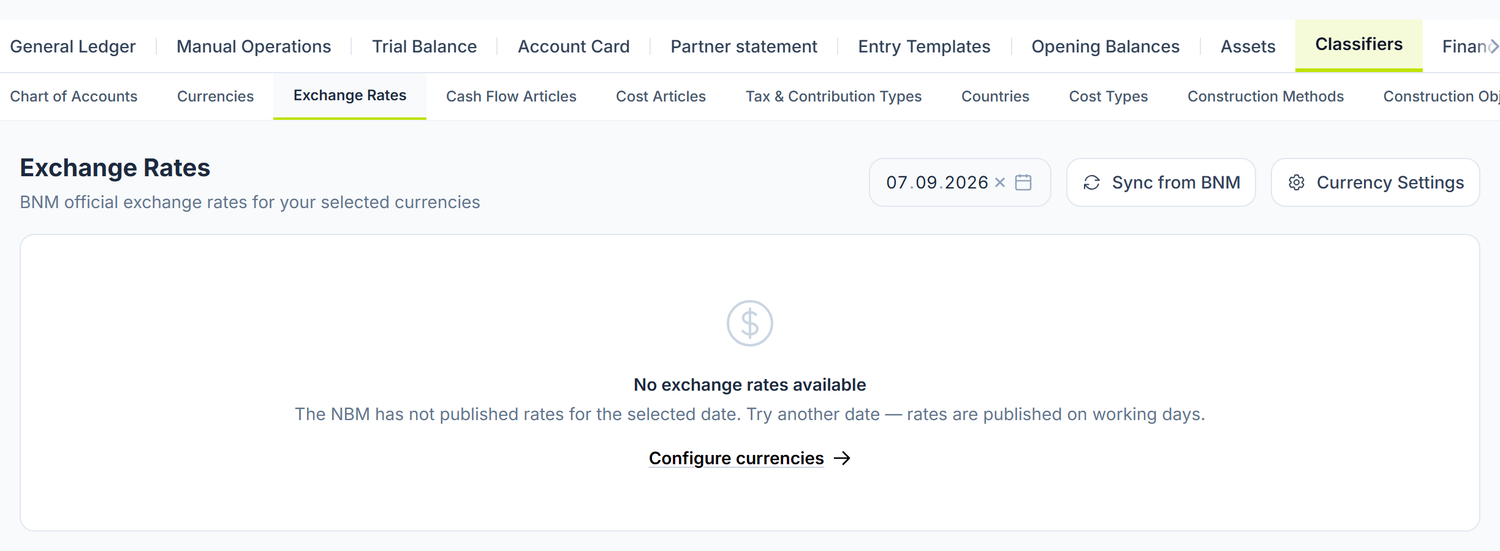
This is what the Exchange Rates screen looks like on a new organization: empty, with the message "No exchange rates available" and the Configure currencies link. Rates appear only after you tick the currencies in Currency Settings.
The header has three controls: the date picker, the Sync from BNM button and the Currency Settings link. Once you have currencies ticked, the table below has five columns — Currency, Name, Units, Official Rate and Rate / Unit — and underneath it the source is stated: the National Bank of Moldova.
The Units column explains the difference from the BNM site. Some currencies are published for 100 units, not for one. Official Rate is the figure as published, and Rate / Unit is the same value brought down to a single unit — the one the platform calculates with.
The basics
The BNM rates
POSfix pulls the official rates from the National Bank of Moldova daily, automatically. When you create a document in foreign currency:
- You select the Currency (EUR, USD, RON and so on)
- POSfix fills in the Exchange rate at the document's date automatically — the
BNM ✓marker appears next to the field - The lei amounts are calculated:
Currency amount × Rate
| Field | Value | Explanation |
|---|---|---|
| Currency amount | 1 000,00 EUR | The amount in the transaction's currency |
| Exchange rate | 19,4250 | The official rate at the document's date |
| Amount in lei | 19 425,00 MDL | The equivalent in Moldovan lei |
The rate is pulled automatically, but can be overridden. If the transaction was done at the commercial bank's rate, you type the value yourself — the field is marked "Rate manually changed (differs from the BNM rate)". When you change the document's date, POSfix asks you before updating the rate: the update recalculates the lei amounts of all the lines.
Accounts with currency records
Not every account keeps records in currency. The attribute is called Multi-currency and is ticked on the account form, under Account Features. On a multi-currency account, each entry line additionally carries the currency amount, the currency code and the rate at the transaction date.
242 — Current accounts in national currency — has no currency records in the delivered chart. The current account in foreign currency is 243, with its analytics. If currency operations land on 242, no currency balance forms at all and the revaluation has nothing to revalue.
The difference accounts
The pair of accounts the revaluation uses is visible and changeable in Accounting → Entry Templates → the Default Accounts tab, group Accounting — Close, on the keys FX_REVAL_GAIN (gain) and FX_REVAL_LOSS (loss). As delivered, they show 622.6 and 722.4. Change them only if your organization keeps the differences on other analytics.
For contracts in conventional units, settled in lei, POSfix routes to the amount-difference accounts on its own: it recognizes the accounts marked "(u.c.)" in the chart and asks you nothing.
The monthly revaluation
At the end of each month, the balances of the monetary currency accounts are revalued at the BNM rate of the month's last day.
The monthly cadence is POSfix's choice. The revaluation runs at every month-end close, so that the month's result is right from the start.
The revaluation has no button of its own: it is the first step of the month-end closing wizard (Sidebar → Accounting → the Accounting Periods tab → Start Closing). The wizard first shows you the entries it would generate, with the total to be recorded, and at the Confirmation step it posts them.
What enters the revaluation
An account enters only if it has both the Multi-currency tick and the nature of a monetary item — money, or the right to receive or the obligation to pay a fixed amount in currency. Inventories, non-current assets and advances stay put, whatever rate comes. Advance accounts are excluded by design, not by configuration, so there is nothing to tick there.
Check the tick before the first close. Loans from affiliated and non-affiliated parties (512.1, 512.2) come from the delivered chart without the Multi-currency attribute, so they are not revalued. If you have currency loans on them, open the account from the chart of accounts and turn Multi-currency on.
How the calculation works
- POSfix identifies the multi-currency accounts and keeps only the monetary ones
- For each (account, currency) pair, it calculates the currency balance and the current lei balance, at the month's last day
- It multiplies the currency balance by the BNM rate of the last day of the month
- The difference between the recalculated value and the current lei balance becomes an entry line
- Differences smaller than 1 ban are ignored
- The entry is emitted posted, dated the last day of the month
To activate a currency
- Open Accounting → Classifiers → Currencies. The screen is called Currency Settings.
- At the top you see the MDL — Moldovan leu card, marked Base Currency. It has no tick and cannot be removed.
- Under it, in Available Currencies, you get one row per currency, with a checkbox, the code and the name. You click the row to activate or deactivate it — it saves on the spot, with no separate button.
- Under the list a counter appears: "N foreign currencies selected".
- From the header, the Exchange Rates link takes you to the rates screen.
The "Sync from BNM" button is on the Exchange Rates screen, not in Currency Settings. In Currency Settings you only have the link to the rates.
To pull the rates
On the Exchange Rates screen, the date picker in the header decides both what you see and what gets synced: Sync from BNM pulls the rates for the selected date, not for today. If you want the rate from three days ago, you set the date first, then press the button.
If you see no rate at all, the message "No exchange rates available" almost always means you have not ticked the currencies yet. The Configure currencies link under the message takes you straight into Currency Settings.
Days with no published rate. At weekends and on public holidays the BNM publishes no rates. Both at posting and at revaluation, POSfix uses the last rate published before that date. If 31 March falls on a Sunday, Friday's rate is used.
Troubleshooting
| Problem | Likely cause | Solution |
|---|---|---|
| The rate doesn't appear automatically on the document | The currency is not ticked in Currency Settings, or no rate has been pulled | Tick the currency, then press Sync from BNM |
| The exchange difference isn't calculated on payment | The invoice and the payment have the same rate | Normal — with no change of rate there is no difference |
| The revaluation doesn't include the advances | They are excluded by design, not by configuration | Intended behaviour, not a fault |
| The revaluation finds nothing to revalue | The currency balances sit on accounts without the Multi-currency attribute, or on 242.x instead of 243.x | Check which accounts the currency operations landed on |
| The revalued amount looks wrong | A wrong currency balance from earlier transactions | Check the account card per currency |
| I can't change the rate on the document | The document is already posted | Unpost it, correct the rate, post it again |
How this connects to other documents
Foreign-currency operations interact with several features:
- Chart of accounts — the Multi-currency attribute on the account
- Posting rules — how exchange differences are generated automatically
- Accounting periods — the revaluation is the first step of the closing wizard
- Posting templates — the gain and loss accounts of the revaluation
- General journal — currency lines carry the currency amount and the rate
Frequently asked questions
Can I enter a rate different from the BNM one by hand?
Yes. On the document you can override the rate, which is useful for transactions at the commercial bank's rate. The field is visibly marked as manually changed. The monthly revaluation, however, always uses the official BNM rate, whatever you put on the documents.
What happens if the BNM publishes no rate for a given day?
POSfix uses the last rate published before that date. The behaviour follows accounting practice: the BNM rate stays valid until a new one is published.
Can I have invoices in several currencies from the same supplier?
Yes. Each invoice has its own currency, and the balances are calculated separately for each account–currency pair. The revaluation is likewise done per currency.
How do exchange differences affect profit?
Favourable differences (622.6) increase the result, unfavourable ones (722.4) reduce it. Both are a financial result, not an operating one. Being accounts of classes 6 and 7, they are closed once a year, in December, through the balance reform.
Do I have to run the revaluation every month?
Yes. But you don't have to start it separately: it is the first step of the month-end closing wizard. If you close the month through the wizard, the revaluation is done.
What do I do about exchange differences on advances?
At the monthly revaluation nothing appears: the advance is a non-monetary item and stays at the rate of the payment date.
At the settlement of the advance against the final invoice, POSfix takes the advance out of the account at its lei value — the one from the payment date — and covers the rest of the partner balance with an exchange-difference line, on 622.6 or 722.4. The entry closes exactly, with no residue on the partner account.
The part of the invoice not covered by the advance stays a monetary receivable or payable: it is revalued monthly and produces a difference at settlement, like any currency balance.
What is the difference between the exchange difference at payment and the one at revaluation?
At payment or collection, the difference comes from a real operation: you paid or received a different amount in lei than the one recorded. At revaluation, the difference is an accounting one — you adjust existing balances to the closing rate, with no movement of money. Both go on the same accounts.
What is the "amount difference" and how does it differ from the exchange one?
The amount difference appears on contracts expressed in conventional units but settled in lei — no currency moves, only the lei amount is recalculated. It has its own pair of accounts, and POSfix picks them on its own: it recognizes the accounts marked "(u.c.)" in the chart and routes the difference there, without asking you.
How do I handle a partial payment of a currency invoice?
The exchange difference is calculated on the part actually settled. The rest stays a payable or receivable in currency and is revalued at the end of the month.
Can I have several bank accounts in the same currency?
Yes. The specific bank account ends up as a dimension on the 243.x line, so you don't need a separate analytical account for each bank. The revaluation is calculated per account–currency pair.
What do I do if I got the rate wrong on an invoice that is already posted?
Unpost it, correct the rate and post it again. If the period is closed, record the correction in the current month through a document with negative values.