The chart of accounts
Every leu your company earns, spends or owes passes through an accounting account. The chart of accounts is the map that organises all of them into one logical structure — from the money in the bank and the goods in the warehouse, to the wages due and the owner's equity.
Where to find it: Sidebar → Accounting → Classifiers → the Chart of Accounts tab
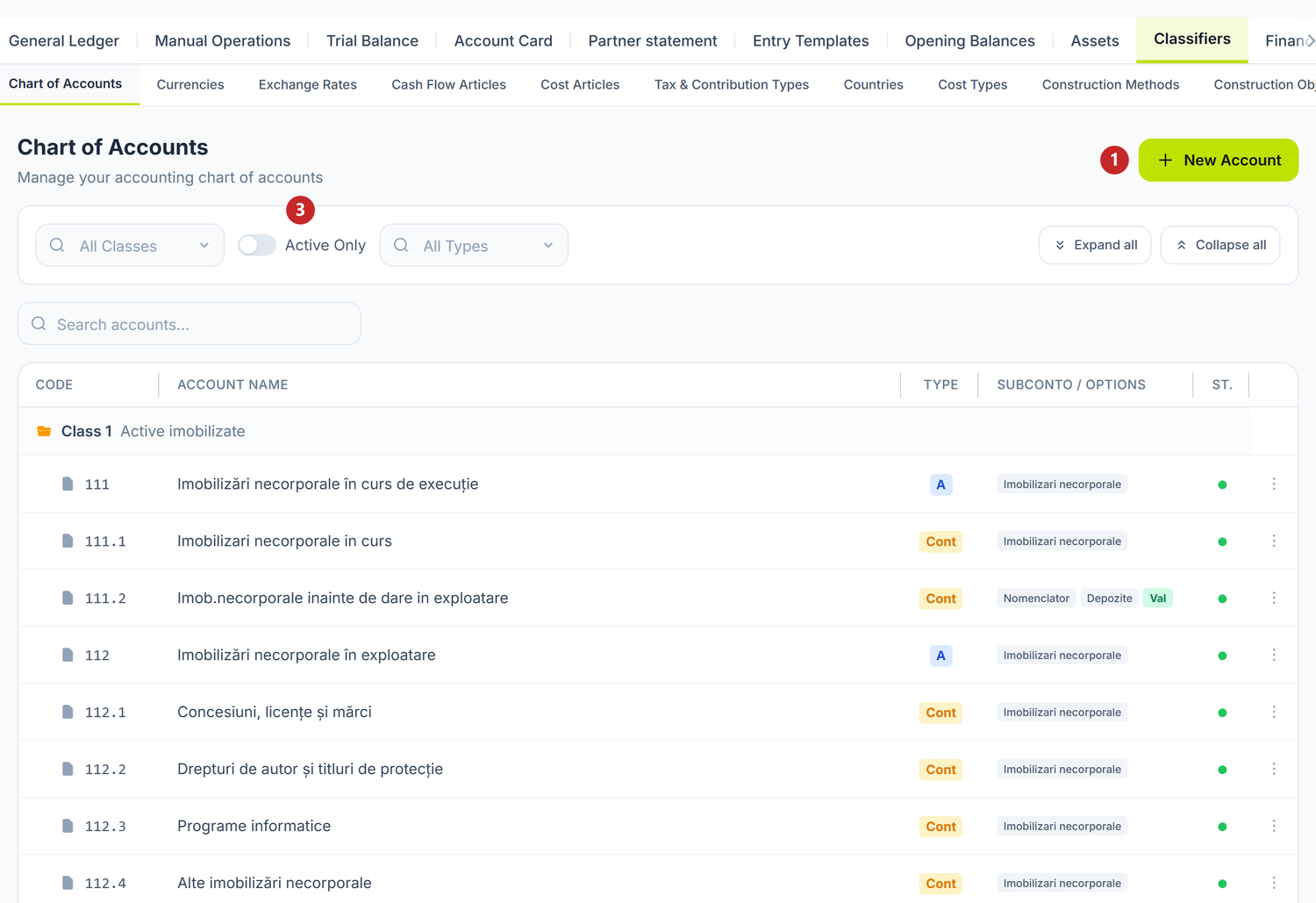
1 add your own account · 2 filter by class · 3 hide locked accounts
The list is grouped by the nine classes of the plan, not by the account hierarchy: the arrow next to Class 1 opens every account in that class, in code order. The analytical 217.1 sits next to 217, not under it. Expand all and Collapse all do this for every class at once.
Classes 6 and 7 are not closed monthly. POSfix accumulates them across the whole year and closes them once, in December, through the balance-sheet reform step of the closing wizard. If you look at an income account in November and see turnover running from 1 January, that is exactly right. See Accounting periods.
The badges in the Subconto / Options column show the account's analytical slots, while Val and Cant tell you it also keeps currency and quantities respectively. The dot in the St. column is green on active accounts and grey on locked ones.
Right-click a row for six actions: Edit, Copy, Pin to Dashboard / Unpin from Dashboard, Lock / Unlock. Copy opens a new account with every field prefilled from the selected one — the shortest route to a new analytical account.
To add an account
Press New Account in the page header. A document tab opens with the form:
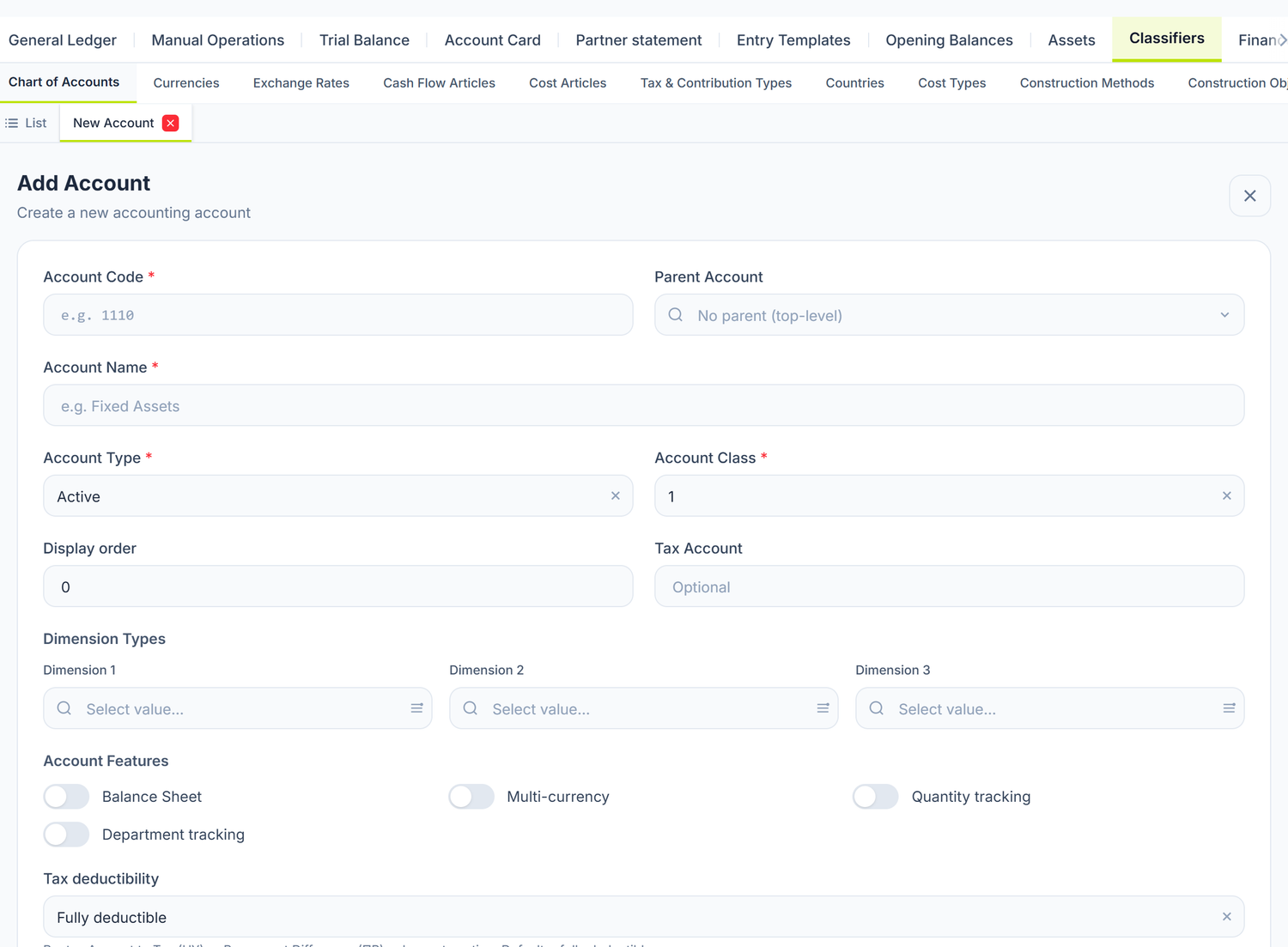
Four fields are mandatory: Account Code, Account Name, Account Type and Account Class. The rest — Parent Account, Tax Account, the display order, the three slots under Dimension Types, the switches under Account Features and Tax deductibility — are optional.
The code is not proposed automatically: you write it. The accepted format is NNN, NNN.N or NNN.NN — so 242.3 can be created. Three-level codes from the shipped plan, like 221.1.1, cannot be created from this form. A code that already exists is rejected.
Two fields exist only at creation. The Balance Sheet switch appears on a new account only, and Account Class becomes read-only after the first save. Get them wrong and the account has to be rebuilt, not corrected.
Tax deductibility
The field decides where the amount lands at posting: on the tax plan or on permanent differences. It has four values.
| Value | What happens to the amount at posting |
|---|---|
| Fully deductible (default) | Goes to the tax plan in full |
| Never deductible (expense) | Goes to permanent differences, not to the tax plan |
| Never taxable (income) | The same, on the income side |
| Limited deductible (close-of-period) | Settled at period close, not on the document |
Group accounts vs analytical accounts
This is the most important distinction in the chart of accounts, and the source of the most frequent mistakes made by accountants moving to POSfix. Of the 654 accounts, 160 are group codes (no dot) and 494 are analytical (with a dot).
Group accounts (no dot)
Codes without a dot are group accounts. Their job is aggregation and reporting — in the trial balance they show the sum of every sub-account underneath.
| Account | Name |
|---|---|
217 | Mărfuri (goods) |
521 | Datorii comerciale curente (current trade payables) |
242 | Conturi curente în monedă națională (current accounts in national currency) |
Analytical accounts (with a dot)
Codes with a dot are analytical accounts — these are the ones you post real operations to.
| Account | Name | Parent group account |
|---|---|---|
217.1 | Bunuri procurate în vederea revînzării (goods bought for resale) | 217 |
217.2 | Produse transmise spre vînzare magazinelor proprii (goods handed over to own shops) | 217 |
521.1 | Datorii comerciale în țară (domestic trade payables) | 521 |
242.1 | Numerar la conturi nelegat (unrestricted cash in accounts) | 242 |
When you view the trial balance at group level 217, you see the sum of all the analytical accounts 217.1, 217.2 and so on.
The practical rule: always pick the analytical account (the one with a dot). A balance left directly on a group code cannot be broken down by analytics and ruins both the account card and the analytical balance. The system leaves the choice to you — it does not block posting to a group code — so the discipline is yours.
Check this on the shipped default accounts too. A few keys come with a group code instead of an analytical one. Open Accounting → Entry Templates → Default Accounts and replace every dot-less code with the right analytical account, before you post your first documents.
The account type
The Account Type field in the form has three values — Active, Passive and Active-Passive. It matters in two places on the platform: in the opening balances, where the Type column tells you which side the line's balance goes on, and in reports, where it decides the sign of the balance.
Account attributes
Beyond the type, every account has features that switch on extra behaviour. You find them in the account form, under Account Features:
| Attribute | Screen label | What it does |
|---|---|---|
| Currency records | Multi-currency | The account keeps a balance in foreign currency as well as MDL |
| Quantity records | Quantity tracking | The account keeps quantities too, not just value |
| Department records | Department tracking | Allows allocation to cost centres |
Multi-currency does not mean “it gets revalued”. The attribute is a necessary condition, not a sufficient one. Monthly revaluation touches monetary items only: cash, bank accounts, settlement receivables and payables, loans. Inventory stays at historical cost, even though 217.1 has the attribute switched on. See Foreign-currency operations.
Quantity tracking is not switched on for inventory accounts. In the shipped plan, stock quantities live in the inventory module, not on the accounting account: 217.1 has Multi-currency on, but not quantity tracking. The quantity attribute sits mainly on off-balance accounts — 914 Bunuri primite în custodie (goods held in custody), 918 Formulare cu regim special (controlled forms) — and on two special record-keeping accounts: 246.2 Documente bănești (valută) (monetary documents in foreign currency) and GTD Evidența mărfurilor importate (imported goods records).
Subconto (analytical dimensions)
Subconto are extra dimensions of analysis attached to the account. Every account has three independent slots: Dimension 1, Dimension 2 and Dimension 3. The shipped plan comes with 36 subconto types already defined and wired to the right accounts.
The most frequent ones:
| Subconto type | What you track | Example account |
|---|---|---|
| Contraparti (counterparties) | The supplier or the customer | 521.1, 221.1 — balance per partner |
| Contracte (contracts) | The commercial agreement | 221.1, 521.1 — receivables per contract |
| Documente de decontari (settlement documents) | The exact invoice that created the balance | 221.1, 521.1 |
| Nomenclator (nomenclature) | The catalogue item | 217.1 — stock per item |
| Depozite (warehouses) | The warehouse | 217.1 — stock per warehouse |
| Angajati (employees) | The individual | 531.1 — wages per employee |
| Subdiviziuni (departments) | The cost centre | the expense accounts |
| Conturi bancare (bank accounts) | The specific bank account | 242.1, 243.1 |
| Impozite si taxe (taxes) | The kind of tax | 534.x |
Why do subconto matter? Without them, account 521.1 would show one total for all payables. With the Contraparti subconto, you see exactly how much you owe each supplier — straight from the trial balance or the account card.
Subconto are filled in automatically. When you post a document, POSfix reads the slots declared on the account and fills them from the document's data. On a supplier invoice, the Contraparti subconto on 521.1 is filled with the selected supplier. You never type them by hand. On manual operations you pick them yourself, and the form shows you exactly which types the selected account requires.
An example from practice
Situation: SRL „Florăria Verde" in Chișinău sells flowers and floral arrangements. The accountant wants to track the goods in the central warehouse separately from the goods in the company's own shop.
Solution in POSfix:
-
Under the group account
217(Mărfuri), the company uses the existing accounts:217.1— Bunuri procurate în vederea revînzării (the flowers in the warehouse fridge)217.2— Produse transmise spre vînzare magazinelor proprii (the flowers in the shop)
-
Both accounts already have the Nomenclator and Depozite slots declared — so the balance splits by item and by warehouse with no extra setup.
-
On
521.1(Datorii comerciale în țară) the Contraparti slot is already active — the debt is visible per supplier.
Result: from the trial balance, the accountant sees 45.000 MDL of flowers in the warehouse, 12.000 MDL of flowers in the shop, and debts of 18.000 MDL to „HollandFlowers BV" and 7.500 MDL to „Grădina Moldovei SRL".
Locking accounts
You can lock an account to prevent accidental posting. The action is in the row's context menu (right-click the account): Lock / Unlock.
A locked account:
- stays visible in the chart of accounts and in reports;
- accepts no new entries;
- can be unlocked at any time.
System accounts cannot be locked. Locking and unlocking are available only for accounts you created yourself. Some shipped accounts are flagged System Account — those you can neither edit nor lock, and the form shows them read-only. Every other account in the plan behaves as if it were yours.
What can trip you up
| What you see | Why | What to do |
|---|---|---|
| An account you opened is read-only | It is flagged System Account | Create your own analytical account under it |
| You cannot change the class of a saved account | The field becomes read-only after the first save | Create the account again, with the right class |
| The code is rejected on save | The code is taken, or it does not match NNN / NNN.N / NNN.NN | Look the code up in the list and pick the first free one |
Frequently asked questions
Can I change the name of a preloaded account?
Yes, unless it is flagged System Account. The practical advice: leave the synthetic names as they come and customise only your own analytical accounts (e.g. 242.3 — „Cont curent Victoriabank MDL"). It makes life easier when you compare with someone else's reports.
Can I add a new group account?
Technically yes, the form accepts a three-digit code with no parent. In practice you should not: an invented synthetic account does not appear in the financial statements, which are built on the shipped plan. Add analytical accounts under the existing ones.
What happens if I lock an account that has a balance?
The balance stays visible in reports (trial balance, account card). You simply cannot record new transactions on that account. If you want it clean, move the balance to another account before locking.
How many analytical accounts can I create under a group account?
There is no limit. The only constraint is the code format: NNN, NNN.N or NNN.NN.
Watch out for codes that are already taken. Under 242, the codes 242.1 (Numerar la conturi nelegat) and 242.2 (Numerar la conturi legat) exist in the shipped plan with a different meaning: unrestricted cash versus restricted cash. If you want an analytical account for a specific bank, use the first free code — 242.3 or further on.
Why do I need subconto if I have analytical accounts?
Analytical accounts separate by nature (goods in the warehouse vs goods in the company's own shop). Subconto separate by entity (supplier A vs supplier B, on the same account). Combining the two gives you maximum granularity without inflating the chart of accounts with hundreds of codes.
Do I need a separate analytical account for each bank account?
Not necessarily. Account 242.1 already has the Conturi bancare subconto slot, so balances split automatically per registered bank account, with no new codes. A separate analytical account stays useful when you want to see the bank directly in the synthetic balance.
Is the POSfix chart of accounts complete?
Yes, the 654 accounts cover the general plan. If a specific analytical account is missing, create it under the right group account.
Links to other documents
The chart of accounts is the foundation everything else in POSfix is built on:
- Double entry — how debit and credit work
- The document lifecycle — statuses and posting
- Posting templates — the default accounts used at posting
- The general journal — where the generated entries land
- Opening balances — how you enter opening balances per account
- Posting rules — how entries are generated automatically from the accounts