State changes
You put a machine into conservation over the winter. You took a car out of use until it is repaired. The question that follows is always the same: does the asset still accrue depreciation?
There is no single answer. Accounting and tax are two different planes, and they do not answer alike. That is why this document exists: you tell it from when the rule changes, and on which of the two planes.
Where to find it: Sidebar → Accounting → Assets → the State changes tab
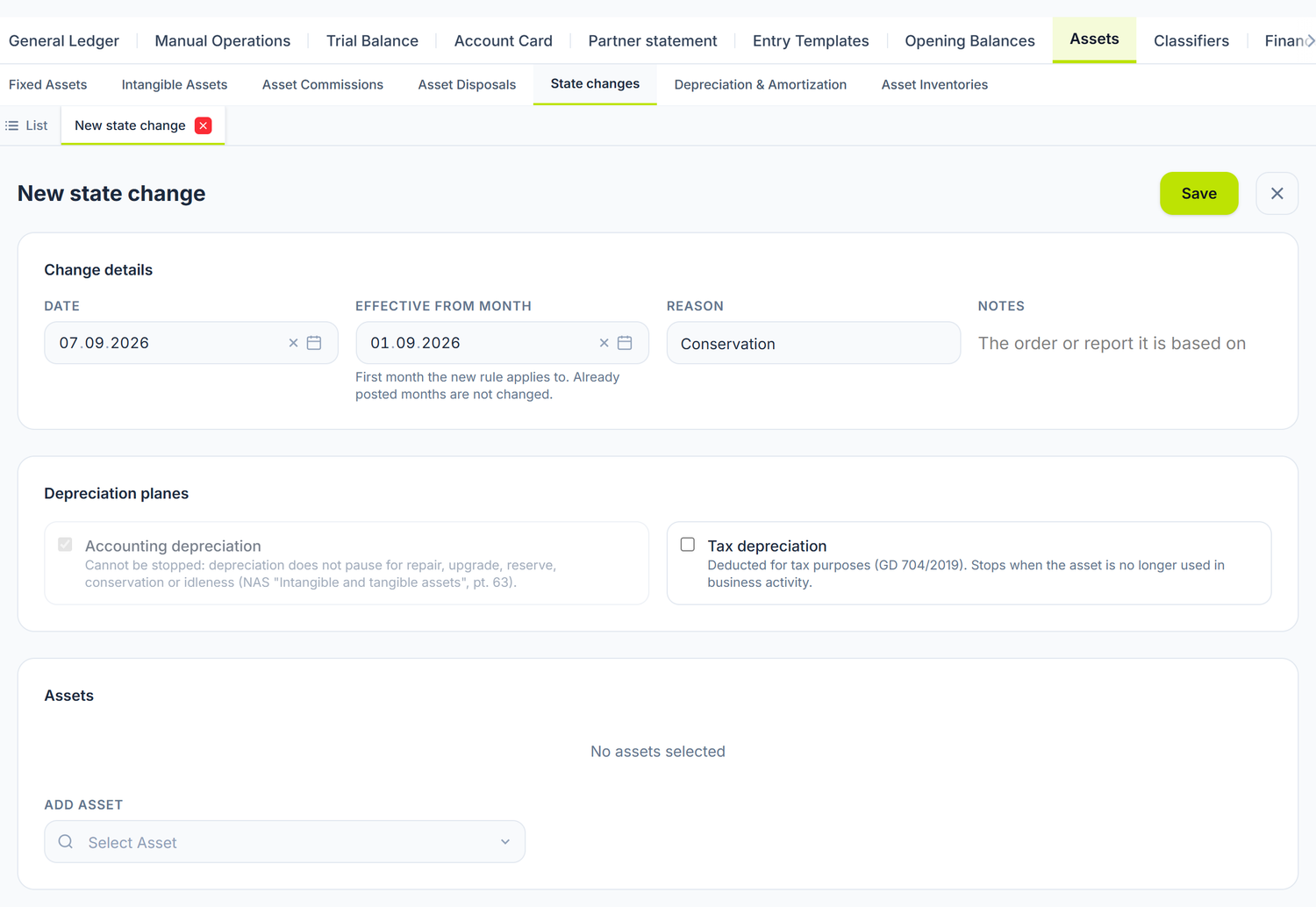
The two dates are not the same thing
Date is the day you draw up the document. Effective from month is the first month in which the new rule takes effect — and they are rarely the same month, because conservation orders are often recorded after the fact.
It says so under the field too: the months already posted are not changed. If August's depreciation is already in the register, a change applied from August does not undo it. Choose the first month that is not closed.
Reason is free text — "Conservation", "Major repair", "Taken out of use". It ends up in the asset's history, so write it so that whoever opens the card a year from now understands it. In Notes you put the order or the report the change is based on.
The two planes
The Depreciation planes block in the screenshot above has two checkboxes, and the difference between them is the heart of the document.
Accounting depreciation cannot be stopped. The checkbox is locked, and the text underneath says why: accounting depreciation is not interrupted for repair, upgrade, reserve, conservation or non-use. A machine put into conservation keeps depreciating in the accounts — it also wears out morally while standing still.
Tax depreciation can be stopped. It is deducted only for as long as the item is intended for use in business activity. A machine in long-term conservation no longer meets the condition, so the checkbox goes off.
When you stop the tax plane, that month does not disappear from the schedule — it shifts. The total depreciable value of the asset stays the same, it just spreads over more months. The accounting schedule behaves the same way when you correct a month.
How you list the assets
Under the two checkboxes you choose the assets the change applies to. You can put several in a single document — a winter conservation usually catches a whole group of machines, not just one.
Posting is what puts it into force
While the document is a Draft, it changes nothing: depreciation runs on exactly as before. The new rule starts to count only when you press Post.
The document issues no journal entry — it only records what will be accrued from now on. That is why you can post it without looking at the period: nothing goes into the journal register.
Unpost takes it back to Draft and withdraws the rule, and depreciation returns to what it was before it.
Two refusals at posting, both with a clear message. The server sends them in Romanian, in every language:
- "Uzura pentru … este deja contabilizată" (the depreciation for … is already posted) — the month of application already has its depreciation in the register, and the document cannot rewrite it. Either you unpost those months, or you choose a later month of application.
- "Există deja o modificare aplicată pentru aceeași lună pe: …" (a change is already applied for the same month on: …) — the register accepts one single decision per asset per month. The panel tells you which inventory numbers it tripped over.
What it does to the label in the list
On posting, assets in conservation, in reserve, seasonal or not used in the business move to Suspended in the list; the Resumed document brings them back to In Operation. On repair, upgrade or a non-depreciable class the label is untouched — the asset is in normal use.
The label is only the label: nothing in the calculation depends on it. A suspended asset still exists physically, so it is inventoried, it can be written off and it can be sold.
It does not apply retroactively over posted months. See above.
What can trip you up
"doar activele aflate în serviciu pot fi conservate sau reluate (stare curentă: Ciornă)" (only assets in service can be put into conservation or resumed; current state: Draft) — the asset has not been commissioned yet. First go through commissioning, then you can put it into conservation.
"Uzura pentru … este deja contabilizată" (the depreciation for … is already posted) — the month you asked the change to apply from already has its depreciation in the register. Choose a later month, or unpost the months affected.
"Există deja o modificare aplicată pentru aceeași lună pe …" (a change is already applied for the same month on …) — an asset cannot have two decisions in the same month. Unpost the previous document or move it to another month.
Frequently asked questions
I put the asset into conservation in March and it is now August. Which date do I use?
In Date you put today, in Effective from month you put the first month that is not closed. March to July, if they are already posted, stay as they are. Correcting them, if you want to, is done from the documents of those months.
Why can I not untick the accounting depreciation?
Because the accounting standard does not allow it to be interrupted for conservation, repair or non-use. The only class of assets that does not depreciate at all — library collections, museum and art objects, listed buildings — is declared on the asset card, not from here.
How do I restart the tax depreciation?
With a new document, in which you tick the tax plane back on, applied from the month the asset comes back into use.
Is the history visible anywhere?
Yes, on the asset card. Every change stays there, with the date, the month it applies from and the reason you wrote.
Related pages
- Fixed asset records — the asset card and its lifecycle
- Depreciation — how it is calculated monthly
- Month close — the step where the depreciation is accrued