Intangible assets
Not every long-term asset a company owns is a physical object. Some are rights, licences or computer programs — you cannot touch them, but they have real economic value and serve the business over several years. These are the intangible assets. POSfix manages them much like fixed assets, but on separate accounts from class 11x.
Where to find it: Sidebar → Accounting → Assets → the Intangible Assets tab
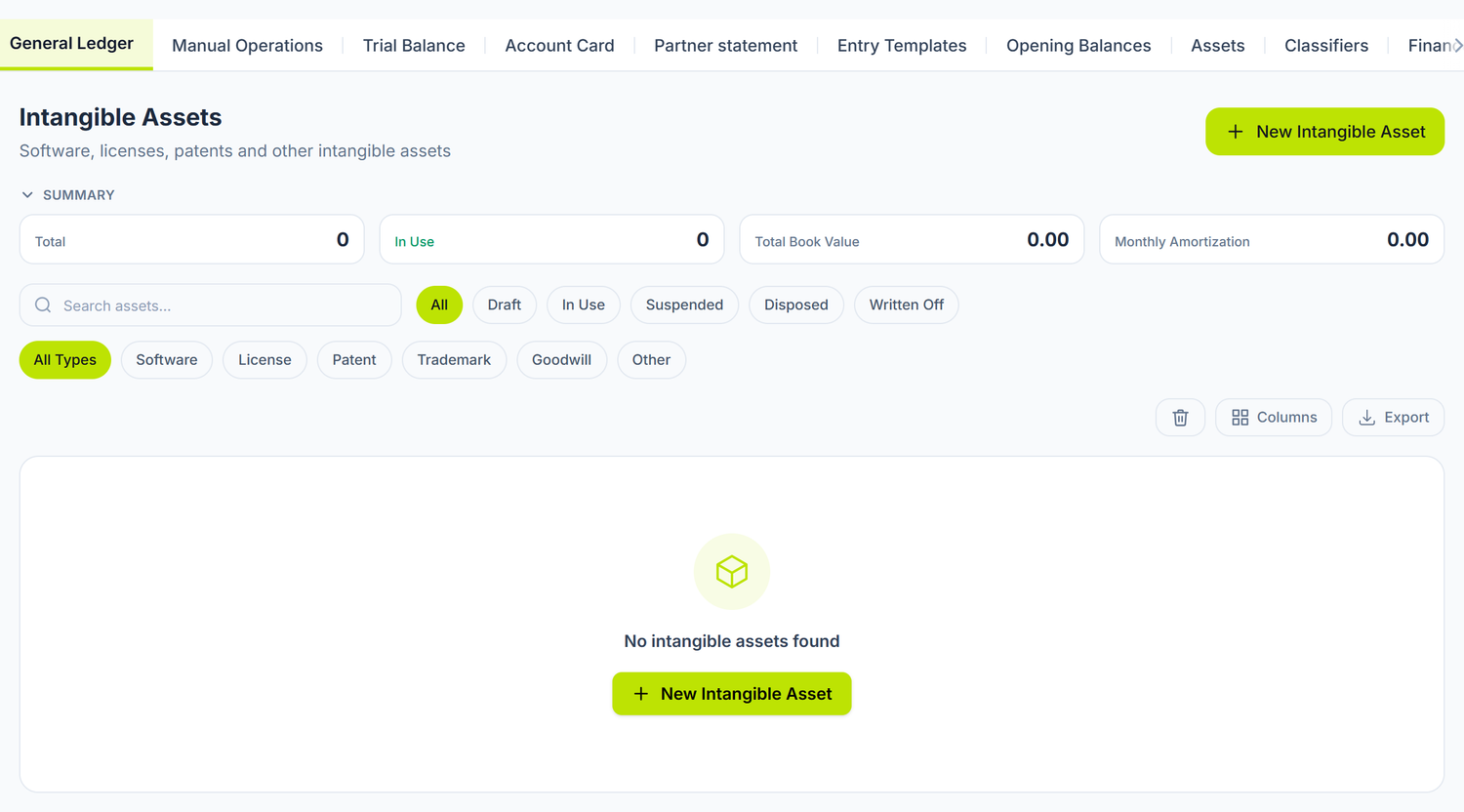
What you filter in the list
The top bar has six state buttons — All, Draft, In Use, Suspended, Disposed, Written Off — and, separately, a filter by kind of asset: All Types, Software, License, Patent, Trademark, Goodwill, Other. The two combine.
The bin toggle shows the deleted cards, from where you can Restore them. In the footer you have the total row, calculated over the whole filtered set, not just the page on display.
The asset type
The Asset Type field has six values: Software, License, Patent, Trademark, Goodwill and Other. It does not decide the account — it serves for filtering and for the coloured badge in the list. You choose the asset account separately, in the GL Accounts section.
The fields of the card
Asset details
| Field | Description | Mandatory |
|---|---|---|
| Registration Number | The unique code of the asset. Unlike fixed assets, here it is not assigned automatically | Yes |
| Name | The name of the asset (e.g. "ERP licence — 10 users") | Yes |
| Asset Type | Software · License · Patent · Trademark · Goodwill · Other | Yes |
| Department | The department that uses the asset | No |
| Responsible Person | Chosen from the employee list | No |
Values
| Field | Description | Mandatory |
|---|---|---|
| Initial Cost | The entry value. It must be positive | Yes |
| Salvage Value | Subtracted from the amortisable base. It must stay below the initial cost | No |
| Useful Life (months) | The number of months over which it is amortised. It must be positive | Yes |
| Date Acquired | The date of purchase or of obtaining the right | No |
GL Accounts
| Field | Typical value |
|---|---|
| Asset Account | 112.x |
| Depreciation Account | 113.x |
| Expense GL Account | The account on which the amortisation expense is recognised, chosen by where the asset is used: 713.2 administrative, 712.2 commercial, 821 production |
All three accounts are mandatory, but the form does not mark them with an asterisk. The refusal comes only from the server, on save, with the message of the missing field. The name, the type, the cost and the life behave the same way.
The Summary side panel is what you open an existing asset's card for: on a saved asset it shows you Accumulated Depreciation, Book Value, Monthly Depreciation and the remaining life in months. Under the form, Movements History lists the asset's operations.
Intangible asset amortisation is always straight-line. Unlike fixed assets, where you can choose between three methods, the intangible asset card has no method field — the calculation is straight-line, fixed.
The lifecycle
Draft → Commissioning → In Operation
A new asset is created in the Draft state and produces no amortisation. From the intangible asset list, the context menu of a row in the Draft state contains the Asset Commissioning action: the asset moves to the In Operation state, with today's date, and its amortisation schedule is generated.
Taking an intangible asset off the books is recorded by hand, through an operation that writes off the remaining value — see the question below.
Fixed assets have a dedicated commissioning document, which issues the entry too. Here the action is a plain state transition: it starts the amortisation schedule, but it moves no value between accounts. If you have accumulated costs on the assets-under-construction account, you record the transfer to the asset account separately, from Sidebar → Accounting → the Manual Operations tab.
Amortisation
The first month of amortisation is the month after commissioning. The amount is spread equally over the declared life, and the entry is issued on the pair of accounts from the card, with the asset as the analytical dimension on both sides.
The amortisation period does not go beyond the life of the right. A 3-year licence is amortised over at most 36 months, even if the program will keep working after it expires.
The monthly document and posting
Intangible asset amortisation has a monthly document of its own, separate from the fixed asset one.
- The preview you see in Sidebar → Accounting → Assets → the Depreciation & Amortization tab → the Intangible Assets tab, with the columns Registration Number, Name, Book Value, Depreciation, Closing Value, Debit Account, Credit Account
- The posting runs at the Confirmation step of the month-close wizard, under the name Intangible Assets Amortization. If you want to launch it separately, you find it in Accounting Periods → the month's Closing Documents button → Create document → Amortization
See Depreciation for the full flow.
Differences from fixed assets
| Aspect | Fixed assets | Intangible assets |
|---|---|---|
| Physical substance | Yes | No |
| Asset account | 123.x | 112.x |
| Accumulated depreciation | 124.x | 113.x |
| "Under construction" account | 121.x | 111.x |
| Depreciation method | Straight-line, reducing balance or units of production | Straight-line, fixed |
| Separate fiscal column | Yes | No |
| Commissioning | A dedicated document, with a journal entry | A direct action from the list, with no entry |
| Exit document | Yes — the Asset Disposals tab | No. The menu has a Write-off action, but it fails |
| Inventory | Lines generated automatically | Added by hand on the inventory document |
How it connects to other documents
| Document / Module | The connection |
|---|---|
| Fixed asset records | The register of tangible assets — a similar structure |
| Depreciation | The monthly document and the close step for intangible assets |
| Supplier invoices | The purchase invoice for the licence or the program |
| Chart of accounts | Accounts 111, 112, 113 |
| Journal register | The amortisation entries generated |
Frequently asked questions
Can I have intangible assets with an indefinite life?
Not in the form: the life in months is mandatory, and validation refuses zero. You set a conventional life and come back to the card when you reassess the asset.
What do I do about an expired licence that I renew?
If the renewal is an extension of the same right, you increase the initial cost and the life on the existing card — as long as the asset has no amortisation recorded, the fields are editable; otherwise you correct it with an accounting entry. If it is a new contract, you create a new card.
How do I take an intangible asset off the books?
There is no exit document for intangible assets, the way the Asset Disposals tab exists for fixed assets, and the Write-off action in the list menu fails. You record the write-off by hand, from Sidebar → Accounting → the Manual Operations tab: one entry for the accumulated amortisation and one for the remaining value.
Deleting the card is not a substitute for a write-off. It only moves the card to the bin; the account balances stay untouched.
How do I check the total of intangible assets?
Consult the Trial balance, filtered on accounts 112 (gross value) and 113 (accumulated amortisation). The difference between the balances is the net book value. The intangible asset list also has a total row in the footer, calculated over the whole filtered set.
Are intangible assets inventoried?
They are not counted physically, but their validity is checked: is the licence active? Has the patent not expired? Is the right of use still in force? You can add them by hand on the asset inventory document, where they appear marked with the NMA badge. See Asset inventory.
Related pages
- Fixed asset records — the register of tangible assets
- Depreciation — the monthly document and posting
- Asset inventory — verifying that the assets exist
- Chart of accounts — accounts
111,112,113 - Journal register — viewing the journal entries