Fixed asset records
Every company accumulates goods that serve the business over several years — equipment, furniture, vehicles, machinery. Those goods make up the organization's fixed assets. POSfix keeps a complete register of each asset, from the moment the card is created to the moment it leaves the books, so that the accounting records always match physical reality.
Where to find it: Sidebar → Accounting → Assets → the Fixed Assets tab
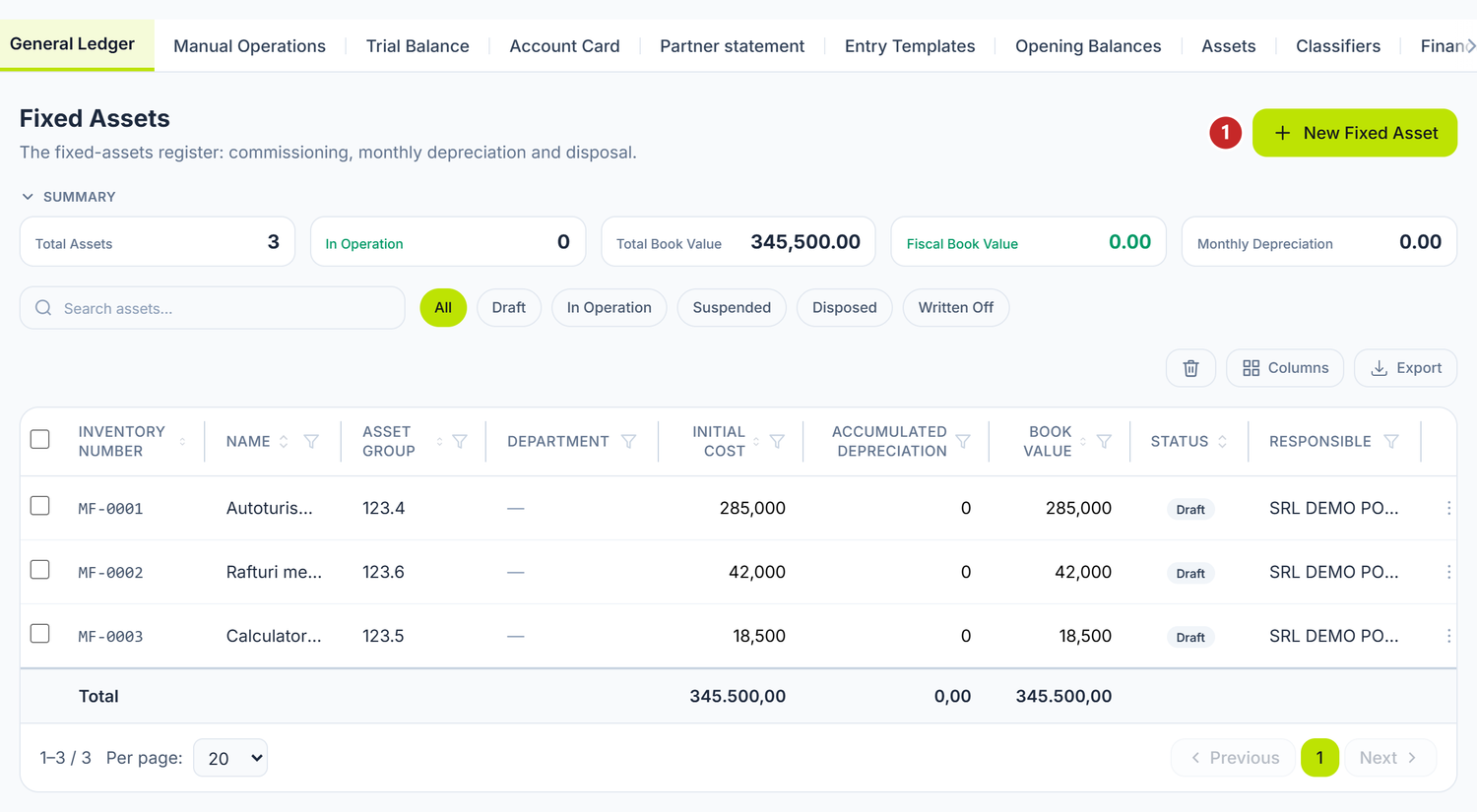
1 adds a fixed asset
The Assets tab groups every screen related to long-term assets: Fixed Assets, Intangible Assets, Asset Commissions, Asset Disposals, State changes, Depreciation & Amortization and Asset Inventories.
Above the list you have five cards with the figures of the filtered set: Total Assets, In Operation, Total Book Value, Fiscal Book Value and Monthly Depreciation.
To register a fixed asset
- Press New Fixed Asset.
- Leave the Inventory Number empty if you want the platform to generate it, or type your own.
- Choose the Asset group — the accounts hang on it.
- Enter the Initial Cost and the Useful Life.
- Check the Depreciation Method.
- Save.
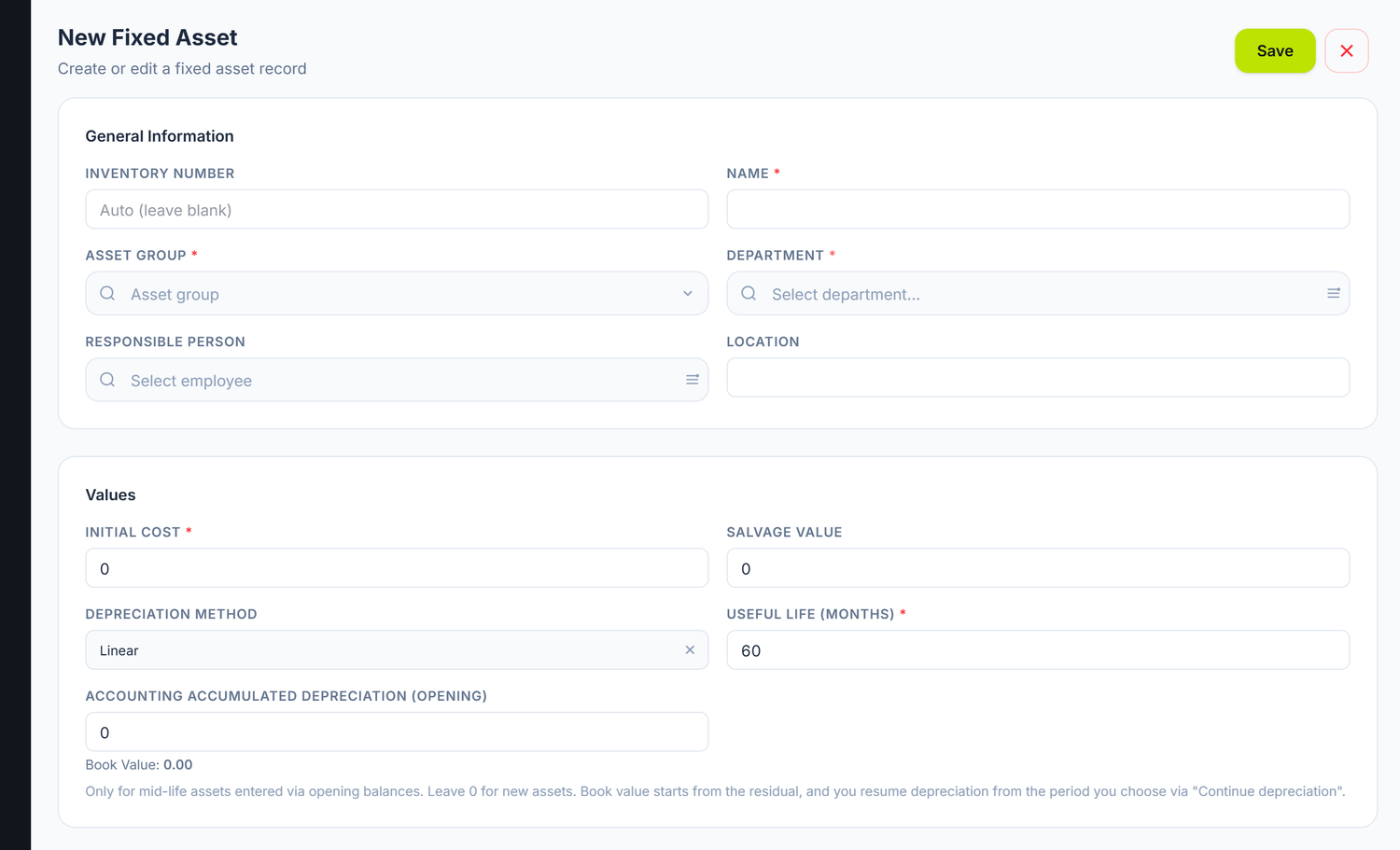
1 the inventory number · 2 the group, which brings the accounts · 3 the depreciation method
Asset group is the field that matters most: the asset account and the depreciation account are derived from it, and the platform shows you the chosen pair under the picker. You do not pick it "just to have something" — change it after the asset has started depreciating and the figures move onto another account.
Depreciation Method has three values. Straight-line spreads the value equally over the whole life; it is the one proposed and the one almost everybody uses. Reducing balance depreciates more at the start, less towards the end. Units of production ties depreciation to how much the machine actually worked, not to the passing of time — in that case you correct the month's amount on the monthly document, while it is still a Draft.
Salvage Value is what stays undepreciated at the end of the life. Zero is the usual choice.
Accumulated depreciation is filled in only for assets taken over halfway through their life, through opening balances. On a new asset you leave it at zero. Under the field you see the resulting book value, so you can tell straight away whether the figure is the one you expected.
Tax records are kept separately

1 the tax category · 2 the expense account, if you want one other than the default
The platform keeps two lives for the same asset: an accounting one, which you set according to the company's policy, and a tax one, which comes from the category chosen here. Tax depreciation is calculated straight-line only and without a salvage value, whatever method you chose for the accounts. The two schedules run in parallel and do not have to coincide.
The fields of the card
General information
| Field | Description | Mandatory |
|---|---|---|
| Inventory Number | Unique code per organization. Left empty → a 10-digit number is assigned automatically | No |
| Name | The name of the asset (e.g. "Dell Latitude 5540 laptop") | Yes |
| Asset group | The 123.x sub-account; the 124.x depreciation account is derived from it | Yes |
| Department | The department the asset is in | Yes |
| Responsible Person | Chosen from the employee list | No |
| Location | Free text (e.g. "Office 205, 2nd floor") | No |
Values
| Field | Description | Mandatory |
|---|---|---|
| Initial Cost | The entry value of the asset | Yes |
| Salvage Value | The value left at the end of the life; it is subtracted from the depreciable base | No |
| Depreciation Method | Straight-line / Reducing balance / Units of production | No (straight-line by default) |
| Useful Life (months) | The accounting life | Yes |
| Accounting accumulated depreciation (opening) | Only for assets taken over halfway through their life through opening balances. Appears only when the card is created | No |
The panel warns you when the item is too cheap to be a fixed asset. If you type an amount below the year's capitalisation threshold in Initial Cost, a yellow line appears under the field straight away: it tells you the threshold and suggests account 213 (low-value items) or 713 (direct expenses). The warning does not block the save — the decision stays yours.
Tax records
| Field | Description |
|---|---|
| Fiscal depreciation category | I–V; pre-fills the fiscal useful life |
| Fiscal useful life (months) | May differ from the accounting life |
| Max. annual depreciation rate | The annual rate equivalent to the chosen life (100 % ÷ life), informative only |
| Fiscal accumulated depreciation (opening) | For assets taken over halfway through their life. Appears only when the card is created |
| Government reg. number | Appears only for group 123.4 (vehicles) |
The two "opening" fields disappear after the first save. You only see them while you are creating the card. If you got the carried-over balance wrong and the asset is already saved, you correct it from the commissioning document, not from the card.
Expense account, lifecycle and history
The section is called Expense account (override), but the field inside it is mandatory — without it the save is refused. You set the account on which the depreciation expense is recognised: 713.2, 712.2, 821 or 811.1, depending on where the asset is used.
The Lifecycle section shows the Commissioned date (editable as long as no depreciation has been recorded) and the Disposal date. At the end, Movements History lists the asset's operations.
There are no "Acquisition date" and "Supplier" fields on the card. The fixed asset card does not ask for the acquisition date or for the partner. The link to the supplier is made on the supplier invoice, and the depreciation start date comes from the commissioning document.
The states of a fixed asset
The fixed asset list has state filter buttons, and each row carries a coloured badge:
| State | What it means |
|---|---|
| Draft | The card exists, but the asset is not commissioned. No depreciation is calculated |
| In Operation | The asset is commissioned and enters the monthly depreciation calculation |
| Suspended | The label for an asset in conservation or temporarily unused. Depreciation continues — you stop it from the Asset state change document, see Depreciation |
| Disposed | Out of the books. The state reached by assets from any exit document — write-off, sale, donation or exchange |
| Written Off | A reserved terminal state. Exit documents do not produce it; you only see it on data carried over from other records |
Besides these, a deleted document or card gets the Deleted state and shows through the bin toggle in the respective list, from where it can be Restored.
A "No schedule" badge means the asset does not depreciate. If an asset is In Operation, has a positive book value, but has no depreciation schedule, the list marks it with an orange No schedule badge and shows a warning at the top of the list. This is the typical case of imported assets: with no schedule, they never appear in the monthly calculation.
To fix it: open the asset, set its remaining life and depreciation method, then save. On save the schedule is generated on the residual value.
The row menu
A right-click on a row in the list gives you shortcuts that depend on the asset's state:
| Action | When it appears | What it does |
|---|---|---|
| View | always | Opens the card |
| Asset Commissioning | on Draft | Opens the commissioning document with the asset already on a line |
| Depreciation history | on In Operation | A window with the asset's monthly schedule: period, opening value, amount, closing value and the fiscal amount. The green dot marks the months already posted |
| Write-off | on In Operation | Opens the disposal document with the asset on a line |
| Delete | always | Moves the card to the bin; you see it through the bin toggle and you can Restore it |
The lifecycle of a fixed asset
Draft → Commissioning → In Operation → Write-off / exit
1. Draft
You create the asset card with the technical and financial data. The asset generates no depreciation and takes part in no calculation.
2. How the value reaches the card
The acquisition is recorded on the supplier invoice. On the invoice lines whose account carries the [Fixed assets] analytical dimension (121.3.1 or 123.x) a Fixed Asset column appears: there you choose an existing card or create a new one straight from the line, without leaving the invoice. That way the value accumulates on the assets-under-construction account (121.3 / 121.3.1) until commissioning.
3. Commissioning
The moment from which the asset is considered actually in use is marked with a dedicated document.
Where to find it: Sidebar → Accounting → Assets → the Asset Commissions tab
The document is a header with lines — you can commission several assets at once.
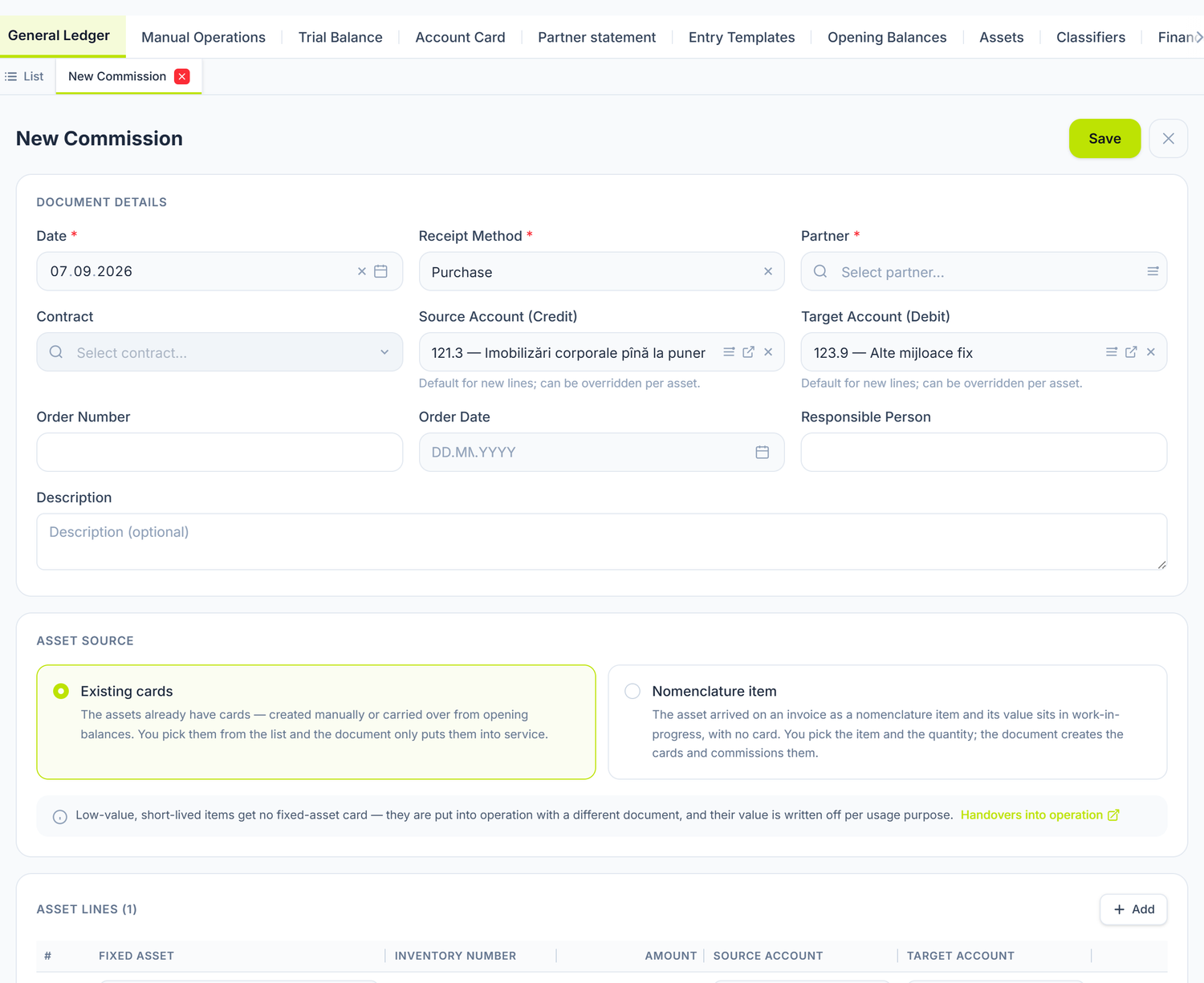
Between the header and the lines sits the choice that reshapes the rest of the document: Asset source. It appears only on a new document — on re-editing the block disappears, because the choice has already been consumed.
- Existing cards — the assets already have a card on record. You pick them from the list, and the document only commissions them.
- Nomenclature item — the asset came in on an invoice as a nomenclature item, and its value sits in assets under construction, with no card. Here you fill in three fields: the item, the warehouse it leaves from and how many pieces. The document creates the cards itself and commissions them.
The second option saves you from opening a card by hand for each piece — with ten identical chairs, the difference is between one document and ten hand-written cards.
The two accounts in the header are only defaults for new lines, as it says right underneath them: you can change them on each line. And the box at the bottom reminds you that low-value items do not get a fixed asset card — they are put into use with the Handovers into operation document, which the box links to directly.
| Header field | Description |
|---|---|
| Date | The commissioning date; depreciation starts the following month |
| Receipt Method | Purchase · Construction · Donation · Surplus · Lease · Opening Balance |
| Source Account (Credit) | Default for new lines; can be overridden per asset |
| Target Account (Debit) | Default for new lines; can be overridden per asset |
| Order Number / Order Date / Responsible Person | Internal references |
| Description | Free text, under the rows above |
The receipt method decides which other fields appear in the header. Do not look for them all at once — the panel shows them only when they make sense:
| Receipt method | What opens in addition |
|---|---|
| Purchase | Partner (mandatory) and Contract |
| Lease | Partner and Contract, both optional |
| Donation | Partner, optional. The contract does not appear |
| Surplus | Income Article |
| Construction, Opening Balance | None |
Under the lines you have the Commission Members section: you add employees with Add member and tick President on the one who signs first. At the foot of the document, Responsible shows who is answerable for it — the name is read-only, and reassignment can be done by the account owner.
The form shows you the journal entry before posting, with the total of the lines. After posting, the J button in the action bar opens the generated entry.
For assets carried over from other records, whose value already sits on 123/124, use the Opening Balance method: the document is for 0 lei, generates no journal entry and merely starts the depreciation. If you try to post an ordinary commissioning on an asset that already has value on account 123, the panel refuses the operation and tells you exactly which balance it found.
For a single asset there is a shortcut: in the fixed asset list, on a row in the Draft state, the context menu contains the Asset Commissioning action.
4. Write-off and exit from the books
Where to find it: Sidebar → Accounting → Assets → the Asset Disposals tab
This document is a header with lines too, plus a separate table of salvaged materials.
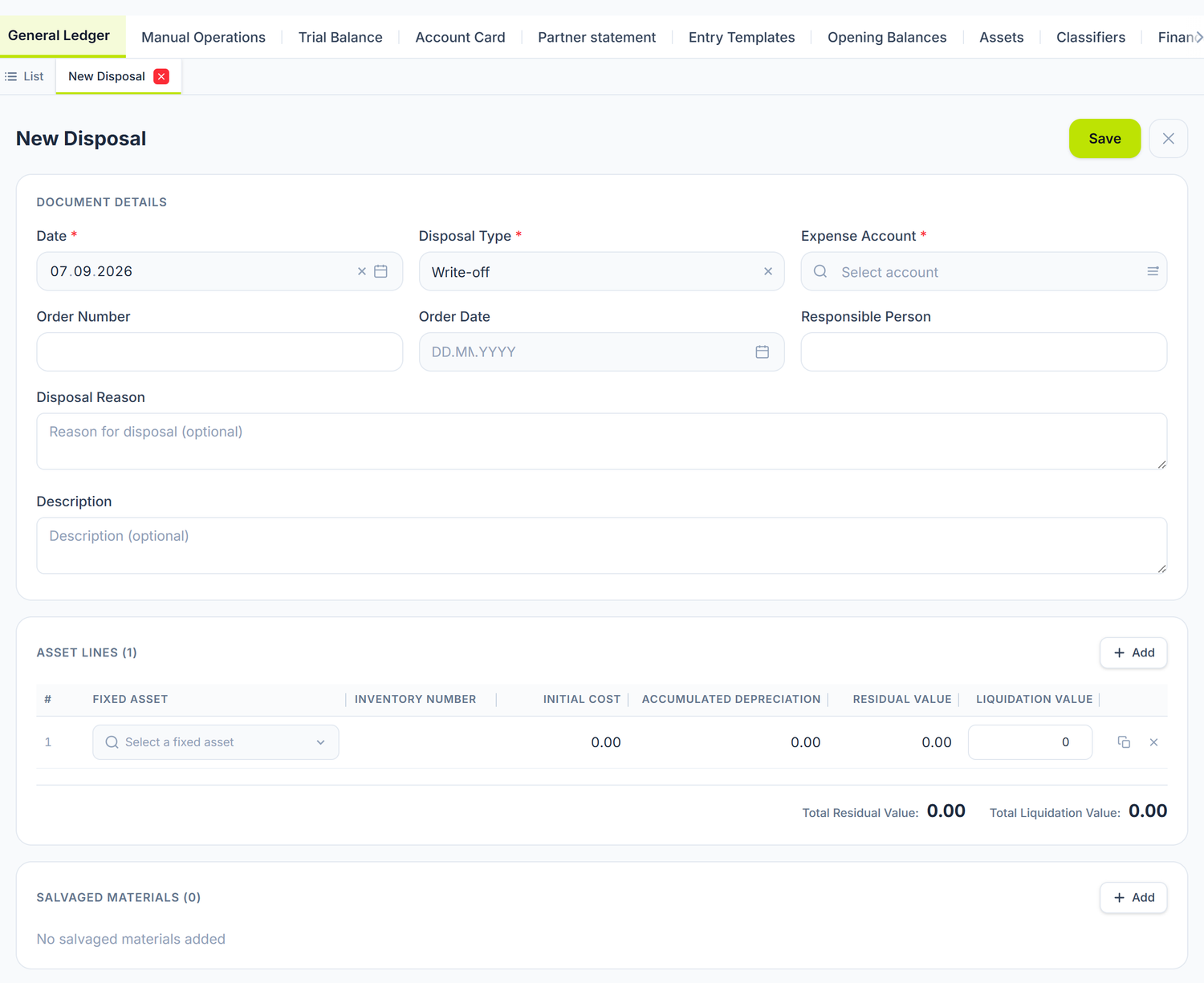
Disposal Type is the field everything starts from — pick it first, because it decides which other fields appear in the header. And the Salvaged Materials block at the bottom stays empty if you dismantle nothing: you use it when the written-off asset leaves parts that go back into stock.
| Header field | Description |
|---|---|
| Date | The exit date |
| Disposal Type | Write-off · Sale · Donation · Exchange |
| Expense GL Account | The account the residual value is written off to. Mandatory, and it starts empty — it is not pre-filled from a template |
| Write-off reason, Order Number, Order Date, Responsible Person, Description | Documentation |
The sale fields appear only at Disposal Type = Sale. Only then do Sale Amount, Revenue Account and Settlement Account open. On an ordinary write-off do not look for them — they are not there.
On the lines you fill in one single thing. You choose the asset, and the rest of the columns come on their own from the card: Inv. Number, Initial Cost, Accumulated Depreciation and Salvage Value. The only column you fill in yourself is Liquidation Value — what the asset is actually still worth at exit. Under the table, the panel totals the Total Liquidation Value alongside the total of the residual values.
The asset combobox offers only fixed assets In Operation and takes out the one already placed on another line.
In the Salvaged Materials section you add the parts left from dismantling, with product, quantity, amount, warehouse and accounts. On posting, one row is issued for writing off the depreciation, one for the residual value, one for the sale revenue and one for the materials; rows with a zero amount are not issued, and every row carries the asset as its analytical dimension.
Salvaged materials are subtracted from the written-off value first. The revenue account is editable on every material line, precisely so you can send the part that offsets the expense to a different account from the surplus that stays current revenue.
The disposal document writes no VAT and does not enter the supply in the VAT ledger, whatever exit type you choose. If you are VAT-registered, you issue the tax invoice and record the tax separately, from Accounting → Manual Operations.
Calculate the depreciation up to the month of exit. The disposal document picks up the accumulated depreciation as it stands at the moment the lines are created. If the current month's depreciation has not yet been recorded at the month close, the residual value written off will be higher than the real one. Close the month first, then write off.
A posted disposal document can be taken back to draft with Unpost — the journal entry is deleted and the values are restored.
How it connects to other documents
| Document / Module | The connection |
|---|---|
| Depreciation | The monthly depreciation calculation based on the data in the card |
| Supplier invoices | The invoice line where you choose or create the asset card |
| Journal register | The entries generated at commissioning, depreciation and write-off |
| Posting templates | The default accounts for depreciation, commissioning and write-off |
| Chart of accounts | The 121–124 accounts used on the asset card |
| Trial balance | Checking the balances on the fixed asset accounts |
| Asset inventory | Matching the accounting records against physical existence |
Frequently asked questions
How is the inventory number generated?
If you leave the field empty, POSfix assigns a unique 10-digit number, zero-padded. You can also enter your own code — then the code is kept exactly as you typed it. The number stays with the asset for as long as it exists.
What is the difference between a low-value item and a fixed asset?
Goods below the capitalisation threshold are recorded on 213, those above it get a card and are depreciated over their useful life. You do not have to remember the threshold: the panel shows it on its own, in the yellow warning under Initial Cost, when the amount you type falls below it.
Can I change the group or the accounts after commissioning?
As long as the asset has no month of depreciation recorded, you can freely edit the inventory number, the name, the group, the initial cost and the depreciation method. From the moment the first depreciation appears — and permanently after the asset leaves the books — these fields lock. The expense account stays editable. For a substantive correction, unpost the commissioning document, correct the card and commission the asset again.
What happens to a fully depreciated asset that is still in use?
It stays in the register with a zero net book value. No more depreciation lines are generated, but the asset keeps appearing in the inventory and in the reports. Writing it off is a management decision, not an automatic one.
Which tax category do I choose for a combined asset?
If an asset has components from several categories (a specialised vehicle with technical equipment, for instance), you classify it by the main component — the one that determines the essential function of the item. In any case, the category only pre-fills the life; you can type the correct fiscal life directly.
How do I treat an asset received free of charge?
You create the card at fair market value and use, on the commissioning document, the receipt method Donation, with the partner it came from.
What do I do with an asset found in surplus at the inventory?
From the confirmed inventory document you launch the Create Commissioning (Surplus) action — a commissioning document opens with the Surplus method and with the assets already on the lines. See Asset inventory.
What do I do about VAT when selling a fixed asset?
You issue the tax invoice and record the tax by hand, from Accounting → Manual Operations: the disposal document does not produce the VAT line, whatever exit type is chosen.
How do I check the total of long-term assets at a given date?
Consult the Trial balance, filtered on accounts 121–124. The debit balance on 122–123 shows the gross value, and the credit balance on 124 the accumulated depreciation. The difference is the net book value. The fixed asset list also has a total row in the footer, calculated over the whole filtered set.
How do I delete a card created by mistake?
From the row's context menu you choose Delete. The card moves to the bin and shows through the bin toggle in the list, from where you can Restore it. Commissioning, disposal and inventory documents work the same way.
Related pages
- Depreciation — the monthly depreciation calculation
- Intangible assets — intangible assets (software, licences)
- Asset inventory — the physical verification of the assets
- Chart of accounts — the long-term asset accounts (
12x) - Journal register — viewing the generated journal entries