Depreciation
Every month it is used, a fixed asset loses value — it is the natural wear of equipment, vehicles, buildings. Depreciation gradually transfers the cost of the asset onto expenses, reflecting that wear in the accounting records. POSfix keeps two columns in parallel: accounting depreciation and fiscal depreciation, from the same monthly schedule.
Where to find it: Sidebar → Accounting → Assets → the Depreciation & Amortization tab
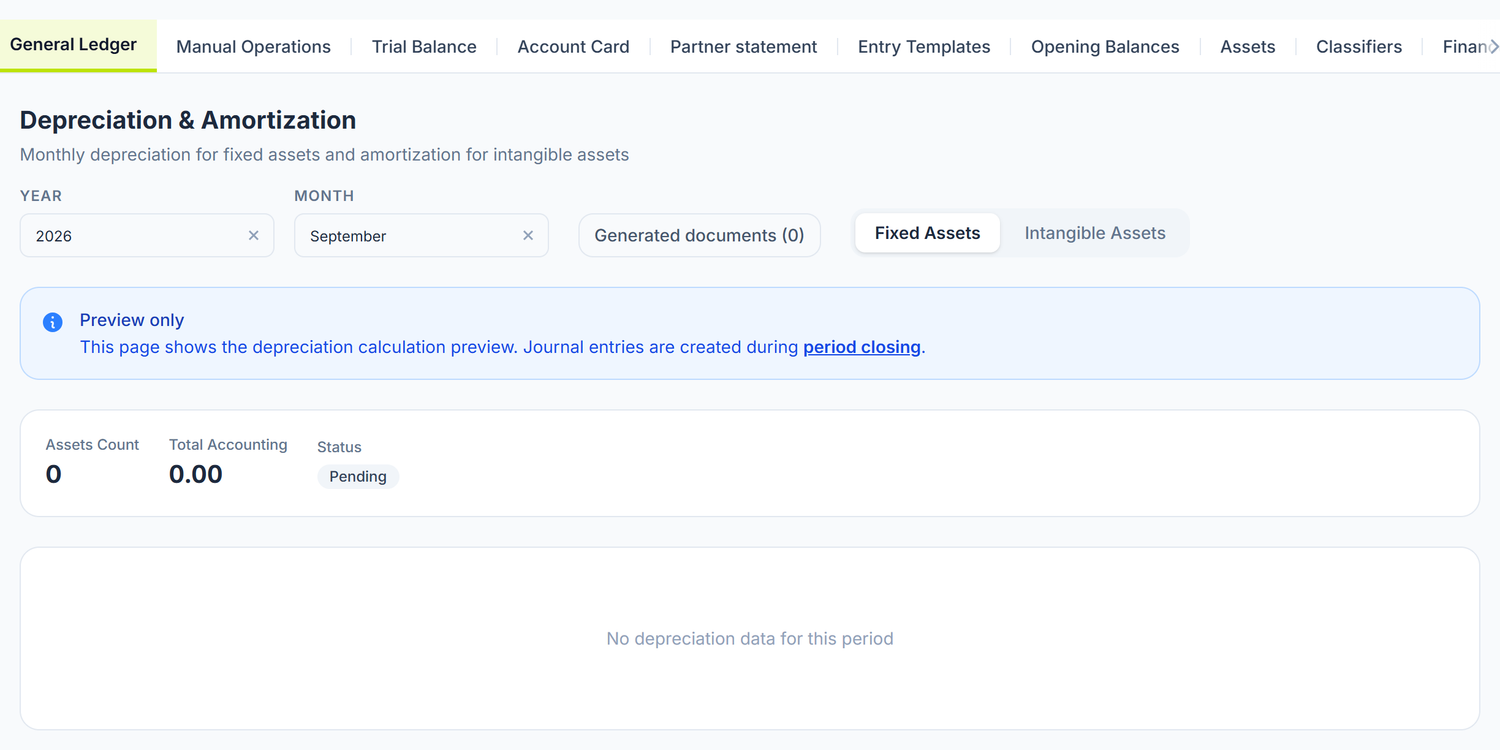
This screen shows you the calculation for the selected month — per asset, with the accounting and the fiscal values — but it has no posting button. The journal entry is created at the month close. See the "Where it is actually posted" section below.
Accounting depreciation vs. fiscal depreciation
In the Republic of Moldova the two calculations are parallel and different, and POSfix keeps both on the same table row:
| Aspect | Accounting depreciation | Fiscal depreciation |
|---|---|---|
| Purpose | Financial statements | The income tax calculation |
| Method | Straight-line, reducing balance or units of production — your choice | Straight-line only |
| Salvage value | Subtracted from the depreciable base | Not applied (base = the full cost) |
| Life | Useful life (months), set by the organization | Fiscal useful life (months), separate |
In the depreciation table, the fiscal columns are shown in green: Fiscal Book Value, Fiscal Amount, Fiscal Closing, plus a Total Fiscal on the card at the top.
Fiscal depreciation is calculated straight-line, whatever fiscal category is chosen on the card. The category only pre-fills the fiscal useful life. Any calculation of the "remaining value × annual rate" kind, with a declining base, does not match the way the platform calculates the fiscal column.
The accounting depreciation methods
On the fixed asset card, the Depreciation Method field has three values:
| Method | How it behaves |
|---|---|
| Straight-line | An equal amount every month. Default and most used |
| Reducing balance | Large amounts at the start, small towards the end. The panel switches to straight-line on its own when that gives more, and never goes below the salvage value |
| Units of production | The schedule is generated evenly distributed; the real amount of each month is corrected on the monthly document, while it is still a Draft |
The last month of the schedule takes up the rounding difference, so that the sum of all the months comes to exactly the depreciable value.
The salvage value really does matter. An 18,000 lei laptop over 36 months, with no salvage value, gives 500 lei a month. If you declare a salvage value of 1,800 lei, the monthly rate drops to 450 lei — but fiscal depreciation stays calculated on the full cost. That is where the difference between the two columns comes from.
The rules of start and participation
| Rule | Description |
|---|---|
| Starting month | Depreciation starts the month after the commissioning date. Commissioned on 3 or on 28 March — in both cases the first month is April |
| Who enters the calculation | Commissioned assets that are not fully depreciated — including the Suspended ones |
| Who does not | Assets in Draft, Disposed, Written Off and those with an exhausted book value |
| Asset with no schedule | An asset in operation without a depreciation schedule produces no line. The fixed asset list marks it with the No schedule badge |
The state in the list does not stop the depreciation. An asset moved to Suspended keeps appearing in the monthly calculation, exactly like one in operation. If you want to stop deducting a machine in conservation for tax purposes, you do it from the Asset state change document — see "State changes", below.
Assets taken over halfway through their life
For assets introduced through opening balances, the card has the Accounting accumulated depreciation (opening) and Fiscal accumulated depreciation (opening) fields. They appear only when the card is created; on a saved asset they disappear from the form. When they are filled in, the schedule is built on the remaining value, not on the full cost — the asset is not depreciated again from scratch. Under the field you are shown the resulting book value.
State changes — this is where you stop the accrual
Where to find it: Sidebar → Accounting → Assets → the State changes tab
The document says from which month and on which plane an asset stops accruing depreciation. It is the only place from which you stop the tax deduction of an asset in conservation or out of use.
To stop the tax deduction of an asset:
- State changes → New state change.
- Fill in Effective from month. It is a calendar month, not a date — the months already posted stay untouched.
- Choose the Reason. It rewrites the two checkboxes below on its own, so choose it before you touch them.
- Add the assets with Add Asset.
- Save, then Post.
The reasons in the list: Conservation, In reserve, Repair or upgrade, Seasonal use, Not used in business activity, Non-depreciable class (NAS pt. 61), Resumed and Other reason.
| Checkbox | What changes if you leave it ticked | If you untick it |
|---|---|---|
| Accounting depreciation | The asset stays in the monthly document and in the entry | It can only be unticked for the Non-depreciable class reason; on any other reason the checkbox is locked on "yes" |
| Tax depreciation | The green column keeps being calculated | The deduction stops from the chosen month |
Resumed restarts both planes. The month with no accrual is not lost — it is deferred, and the remaining schedule is reconciled, so the total depreciable value of the asset stays the same.
What you see in the "Depreciation & Amortization" screen
You select the year and the month, then switch between the two tabs: Fixed Assets and Intangible Assets.
The card at the top shows the number of assets, Total Accounting, Total Fiscal and the state of the month's document.
| Column | Description |
|---|---|
| Inventory Number (on intangible assets: Registration Number) | The unique code of the asset |
| Name | The name of the asset |
| Book Value | The book value at the start of the month |
| Depreciation | The accounting amount for the selected month |
| Closing Value | The book value after the month's depreciation |
| Fiscal Book Value · Fiscal Amount · Fiscal Closing | The green columns, on fixed assets only |
| Debit Account / Credit Account | The accounts the entry will be generated with |
The footer row totals every column.
The Generated documents (N) button opens the history of the monthly documents: number, period, amount and state. A click on a row takes you to that month.
Where it is actually posted
Where to find it: Sidebar → Accounting → the Accounting Periods tab
The wizard has six steps: Checks, Currency Revaluation, Depreciation, Costs, Financial Result and Confirmation.
The Depreciation step concerns fixed assets only. It shows you a table with the assets, the book value, the month's depreciation and the pair of accounts, plus the total; the Calculate and post depreciation button creates the monthly document and the journal entry.
Intangible asset amortisation has no step of its own. It runs at Confirmation, together with the rest of the operations — the list there calls it Intangible Assets Amortization. If you want to launch it separately, you find it in Accounting Periods → the month's Closing Documents button → Create document → Amortization.
The monthly document is editable while it is a Draft. You open it from the same Closing Documents screen, with a click on its row. You can change the amount on an asset, the accounts of the line, you can take an asset out of that month or add one that was missed. The remaining schedule rebalances automatically, so that the total depreciable value of the asset does not change because of one month's correction: if the edited month takes less, the difference is spread over the remaining months; if it takes more, the remaining months go down. The useful life is not changed. If there are no free months left for redistribution, the panel tells you explicitly on which assets a remainder was left unabsorbed.
The journal entry generated
One row is issued per asset:
| Operation | Debit | Credit | Amount |
|---|---|---|---|
| Fixed asset depreciation | The expense account from the card | The depreciation account derived from the group (124.x) | The month's accounting depreciation |
| Intangible asset amortisation | The expense account from the card | The amortisation account (113.x) | The month's accounting amortisation |
You choose the expense account by where the asset is used: 713.2 administrative, 712.2 commercial, 821 or 811.1 production. 713.1 is the expense for administrative personnel and has no business here. See Fixed asset records for the full table.
Every row carries the asset as an analytical dimension on both sides, so you can follow the depreciation on the asset's account card. On the fixed asset rows the Fiscal Amount is carried too, and the difference from the accounting amount is marked as a temporary difference — the basis for the reconciliation in the income tax return.
Lines with a zero amount and the ones the accountant took out of the document do not reach the entry.
Example. SRL "Tehno Plus" has three assets in operation, month of March:
| Asset | Where it works | Cost | Life | Monthly depreciation | Debit | Credit |
|---|---|---|---|---|---|---|
| Dell laptop | Accounting | 18,000 lei | 36 months | 500 lei | 713.2 | 124.3 |
| HP printer | The shop's till | 9,600 lei | 48 months | 200 lei | 712.2 | 124.3 |
| Delivery car | Deliveries to customers | 240,000 lei | 60 months | 4,000 lei | 712.2 | 124.4 |
Total March depreciation: 4,700 lei — of which 500 lei administrative and 4,200 lei commercial.
Unposting
From the Generated documents panel, on the Fixed Assets tab, a document in the Posted state has the Unpost button. The journal entry is deleted, the book values of the fixed assets are restored, and the document returns to the Draft state and can be recalculated.
There is no more storno by button. The document cycle is uniform: Draft → Posted → Deleted. There is no "Storno" button and no "Reversed" state. For a correction you use Unpost and recalculate, and for a substantive accounting correction you record a new document with negative values.
Fully depreciated assets
When the net book value of an asset reaches zero (or the declared salvage value):
- The asset stays in the register
- No more depreciation lines are generated
- The asset keeps appearing in the inventory and in the reports
- Writing it off remains a management decision
Do not automatically write off fully depreciated assets. A fully depreciated asset is not an unusable asset. Plenty of equipment works well past the end of its accounting useful life. A laptop depreciated over 3 years can work another two.
How it connects to other documents
| Document / Module | The connection |
|---|---|
| Fixed asset records | The asset card supplies the cost, the life, the method and the accounts |
| Accounting periods | The month-close wizard calculates and posts the depreciation |
| Journal register | The depreciation entries are found in the register |
| Trial balance | Checking the balances on 712.2 / 713.2, 124.x and 113.x |
| Account card | The detail of the movements on the depreciation account, with the analytical dimension per asset |
| Posting templates | The default depreciation accounts, editable for the whole organization |
Frequently asked questions
What happens if I forget to close a month?
That month's depreciation is not recorded. You open the close wizard for the month you missed and run the steps in order — the depreciation schedule already exists, so the calculation is redone for that period.
Can I calculate depreciation daily instead of monthly?
No. The calculation is monthly, in line with standard practice in the Republic of Moldova. The schedule is built by month, and the document has exactly one line per asset per month.
Is depreciation calculated for suspended assets?
Yes. A Suspended asset enters the monthly calculation exactly like one in operation — the state in the list is only a label. What actually changes for an asset in conservation is written in the Asset state change document, where you choose from which month and on which plane the accrual stops.
Can I change the depreciation method?
Yes, as long as the asset has no month of depreciation recorded — then the Depreciation Method field is editable on the card. After the first depreciation, the field locks.
What happens if I change the useful life?
Changing the life affects the future schedule: the remaining value is spread over the new remaining life. The months already posted are not changed.
How do I handle the difference between accounting and fiscal depreciation?
You have nothing to calculate by hand. The platform issues both the accounting and the fiscal amount on every entry row, and the difference between them is marked as a temporary difference. The green columns in the "Depreciation & Amortization" screen permanently show you the remaining fiscal value of each asset.
Why does an asset not appear in the month's calculation?
Check, in order: (1) the asset's state — a card left in Draft never enters the calculation; (2) the commissioning date — depreciation starts the following month, and the close wizard shows you the nearest planned month; (3) the book value — if it is exhausted, the asset no longer takes part; (4) the No schedule badge in the fixed asset list — the asset has no generated schedule.
How do I check the total depreciation expense for the year?
Open the Account card for the depreciation expense account (713.2 or 712.2) with an annual period, or the Trial balance filtered on the same account. The debit turnover is the total depreciation expense.
I posted the depreciation to the wrong accounts. What do I do?
Unpost the month's document, correct the expense account on the asset card (or directly on the document line, while it is a Draft) and recalculate the month.
How do I reflect the depreciation of an asset used seasonally?
If you want the accounting expense to follow the real rhythm of use, choose the Units of production method on the card and correct each month's amount on the monthly document, while it is a Draft. The remaining schedule rebalances, so the annual total does not change.
If you also want to stop the tax deduction in the idle months, you issue an Asset state change document with the reason Seasonal use and a second one, with Resumed, for the month the asset comes back into work.
Is intangible asset amortisation calculated separately?
Yes, they are two distinct monthly documents, and the "Depreciation & Amortization" screen shows them in two tabs. In the close wizard, however, only fixed asset depreciation has a step of its own; intangible asset amortisation runs at Confirmation or is launched separately, from Closing Documents → Create document → Amortization.
Related pages
- Fixed asset records — the asset register with full cards
- Intangible assets — the amortisation of intangible assets
- Accounting periods — the month-close wizard
- Journal register — the depreciation entries
- Trial balance — control of the balances on the depreciation accounts