How the restaurant works in POSfix
The restaurant in POSfix is the Windows cash register switched to restaurant mode, plus a few pieces that keep the floor: the tables, the bills, the kitchen and the screens. It is not a separate program you buy and install yourself. The pieces go on the main register, and you make the settings in the panel or in the venue's console.
The Coordinator, the program that keeps the floor, issues no fiscal receipts. Payment and the receipt stay at the register, as with any sale.
Where to find it: in the panel, Sidebar → HoReCa; at the venue, on the main register's computer
On the main register's computer, the Coordinator console shows on its Home page what is ready at the venue and what is left to do:
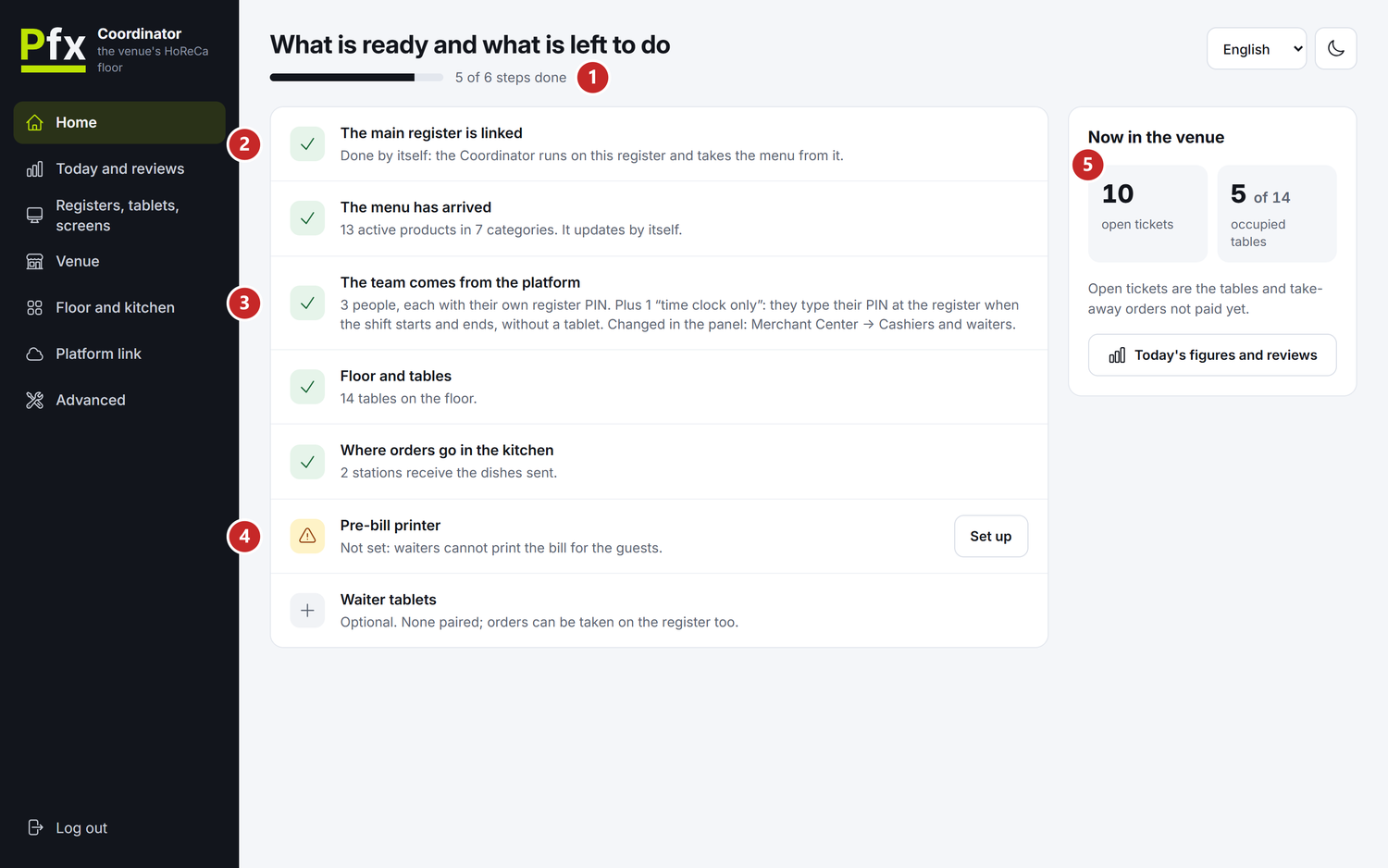
1 how many steps are done · 2 a step that is done · 3 the team, coming from the panel · 4 a step still to do · 5 the bills and tables right now
The restaurant's pieces
- The main register — the Windows cash register on the computer at the bar or at the counter. On it the tables are opened, the order is taken, the pre-bill is printed and the bill is paid.
- The Coordinator — the program that keeps the floor: the tables, the bills, the dishes sent to the kitchen, the screens. It runs on the main register's computer, without a window, and starts with Windows.
- The Coordinator console — the browser page where the manager sees what works at the venue and sets up the screens, the printers and the password. It opens on the main register's computer.
- The other registers on the floor — they link to the main register and work with the same tables and bills.
- The kitchen screen — a TV or a tablet in the kitchen, with the dishes to cook, one card per bill. It works on the venue's network, without the internet.
- The orders screen — the TV on the floor that shows the guests at the counter which orders are being prepared and which are ready.
- The panel — in the HoReCa menu you draw the rooms and tables, choose the kitchen stations and the bill rules, and see how the floor did.
- The QR code on the table — it opens the menu on the guest's phone. From there the guest calls the waiter, asks for the bill or sends an order.
To start the restaurant
- Ask the POSfix team to make one of your Windows registers the venue's main register. The HoReCa module must be in the subscription.
- Start the register. PosFix Launcher installs the Coordinator on its own — the HoReCa Coordinator row under Extra modules. Windows asks for administrator permission at the installation and at every update: accept it.
- On the main register's computer, open the Coordinator console and set its password: The Coordinator console.
- Draw the rooms, the tables and the kitchen stations, in the panel or in the console: Floor and settings.
- Check the team. The waiters are the company's cashiers and sign in with the same PIN: Cashiers and waiters.
- If the kitchen works on a screen, make the kitchen screen's link in the console and open it on the TV. The same goes for the orders screen at the counter: Registers, tablets and screens.
- If you want ordering from the phone, put the venue on the map and print the table codes: QR ordering.
The first four steps are required. You do the rest when you need them.
The menu is not written separately for the restaurant. The Coordinator takes it from the main register, so it is the register's catalog, with its prices. The dishes go to the kitchen by their category.
The main register
The main register is the register whose computer runs the Coordinator. A venue has only one. The other registers on the floor get their role from the POSfix team, then link to it with a PIN shown in the console.
The main register links to the Coordinator on its own, without a PIN. It also carries the panel's settings to the venue and sends the floor figures up to the panel. That is why its computer stays on while the venue works.
What works without the internet
The floor works on the venue's network. When the internet drops, the tables, the bills, the kitchen, the screens and the console carry on.
Only the link with the platform goes over the internet. The settings, the team and the catalog come from the panel, the floor figures go up to the panel, and the requests come from the guests' phones. What changed in the meantime reaches the venue when the internet is back.
Who does what
- The waiter and the cashier work at the register: they open the table from Tables, take the order, send the dishes to the kitchen, print the pre-bill and take the payment — step by step in The register in restaurant mode.
- The cook and the barman see the dishes on the kitchen screen or on the printer's ticket. On the screen they press Start when they begin a dish and Ready when it can be served.
- People who don't sell — the cook, the cleaner — type their PIN on the register screen when they start and when they end their shift. Their role is "Time clock only".
- The manager sets up the screens and printers in the console and follows the Home page, with what is left to do.
- The owner and the accountant work in the panel: the floor and its rules, performance, tips. Sales at the tables go into the reports like any sale of the register.
- The guest scans the code on the table, if you turned on QR ordering.
What can confuse you
The "Kitchen" tab in the panel is not the kitchen screen. HoReCa → Kitchen shows consumption, low stock and recipe cost. The dishes to cook appear on the TV in the kitchen, opened with the link from the console.
The "Customer screen" in the Launcher is not the orders screen. The customer screen is the display next to the register, where the shopper sees what goes on the receipt. The orders screen is the TV with the numbers of the ready orders.
The pre-bill is not a "Payment request". The pre-bill is the bill printed for a table, before payment. A "Payment request" is the panel document you send to a customer so they pay you.
Related pages
- The tables at the register — how the waiter works at the register: the table, the bill, the pre-bill and the payment
- The Coordinator console — the first sign-in, the password and the Home page
- Floor and settings — the rooms, the tables, the kitchen and the bill rules
- QR ordering — the table codes and the Coordinator's link with the platform
- Cashiers and waiters — the team, the PINs and the hours worked