Why didn't the money arrive after a ticket or voucher payment?
Because Voucher, Check, Ticket and Subscription don't go through the bank. The register only records that the customer pays with a document your company sold earlier, and you received the money for it back then, at the sale.
If the customer gave you their meal card, the right method was TME. Of the methods for tickets, it's the only one that takes the money from the meal card, through the bank terminal, just like Card.
Where to find it: in the cart, Checkout → the three-dot button → More methods.

2 the top buttons: Cash, Card and TME · 3 the three-dot button, for the others
Which method to choose
| The customer gives you | You tap |
|---|---|
| A bank card | Card |
| A meal card from their employer | TME |
| A voucher or value certificate you sold | Voucher or Check — the receipt shows the name you chose |
| A ticket with a value, issued by you | Ticket |
| A subscription bought from you | Subscription |
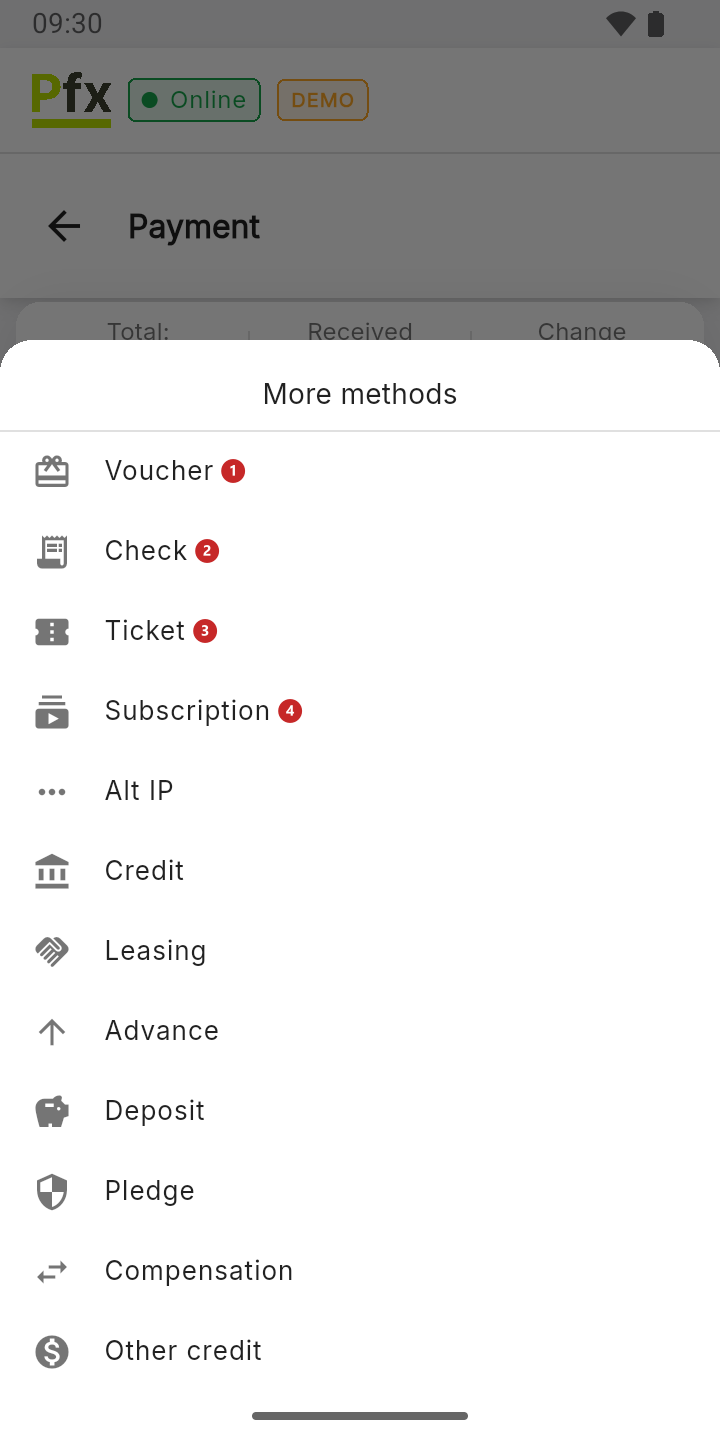
1 Voucher · 2 Check · 3 Ticket · 4 Subscription
A voucher isn't a bank card. It's your company's own document, with a value you set yourself. Write its number and value on it, so you always know which voucher has been used.
A voucher or ticket issued by another company is a different case. Ask your accountant which method to choose for it.
To take a meal card payment:
- Tap TME. If it isn't among the top buttons, you'll find it under the three-dot button.
- Tap COLLECT.
- The customer holds the card to the terminal. The receipt is issued once the bank approves the payment.
The money reaches the company's account the same way as a card payment, on the bank's terms.
To sell a voucher or a subscription:
A voucher is sold like any product, with its own receipt.
- Create the product "Voucher", "Check", "Ticket" or "Subscription" in the catalog, once.
- At the sale, put the product in the cart. If you sell vouchers of different values, tap the row in the cart and type the value in Unit price — see To correct a product.
- Take the payment with Cash or Card. This is when the real money comes in.

2 the name, for example "Voucher" · 3 the price · 4 the category · 5 the VAT rate
Tell the company's accountant that you sell vouchers. They choose the product's VAT rate and know that selling a voucher isn't yet a sale of goods, so the revenue isn't recorded twice.
To accept a voucher as payment:
- Put the goods the customer is taking in the cart, not the "Voucher" product.
- Checkout → the three-dot button → Voucher. You choose Check, Ticket or Subscription the same way.
- Type the voucher's value and tap COLLECT.
- If the goods cost more, take the difference with Cash or Card.
Example: you sold a voucher worth 500 lei, and the customer takes goods worth 650 lei. The first receipt, at the sale, has "Voucher 500" paid in cash. The second receipt has the goods worth 650 lei, paid with Voucher 500 and Cash 150.
The register gives no change on a voucher. If the voucher is worth more than the goods, only the price of the goods goes on the receipt. What happens to the rest of the voucher is the company's call: tell the customer before they pay, and tell the accountant how much is left.
How to take part of a payment one way and the rest another way is in Payment and the fiscal receipt.
An advance on an order
For goods the customer picks up later, the register has the order with an advance: in the cart, More → Advance. The register keeps track of how much the customer left and how much they still owe. The steps are in Advance and open orders.
What can trip you up
I don't see TME on the payment screen. It was moved under the three dots. You bring it back to the top from More → General Settings → Payment methods order, where it's called Tichet de masă. On the same screen, Bilet is the Ticket method, not the meal card. See To change the order of payment methods.
You chose Ticket or Voucher for a meal card. The customer's card wasn't charged, so the money won't arrive, even though the receipt shows the payment. If the customer is still at the register, put the goods back in the cart and take the payment with TME, on a new receipt. Then give the company's accountant the number of the wrong receipt, so you decide together how to correct it.
With TME the register says it can't process the card on its own. The bank terminal isn't linked to the register. See When the card goes through a separate terminal.
Related pages
- Payment and the fiscal receipt — every payment method at the register.
- Catalog and VAT rates — how to create the "Voucher" product on the register.
- Advance and open orders — goods paid now and picked up later.