Audit log
Why it matters
The audit log is not configured — it works from day one. Every important action leaves a trail, and your job is to know how to read it.
When an inspection or an external auditor comes and you have to show who changed what and when, the log is where you reconstruct the story.
The log gathers in one place the actions from every area — accounting, banking, purchases, payroll, stock, production, administration. Each row carries the module it came from, so you don't have to search in several screens.
How you open it
Where to find it: Sidebar → Settings → the Audit Log tab
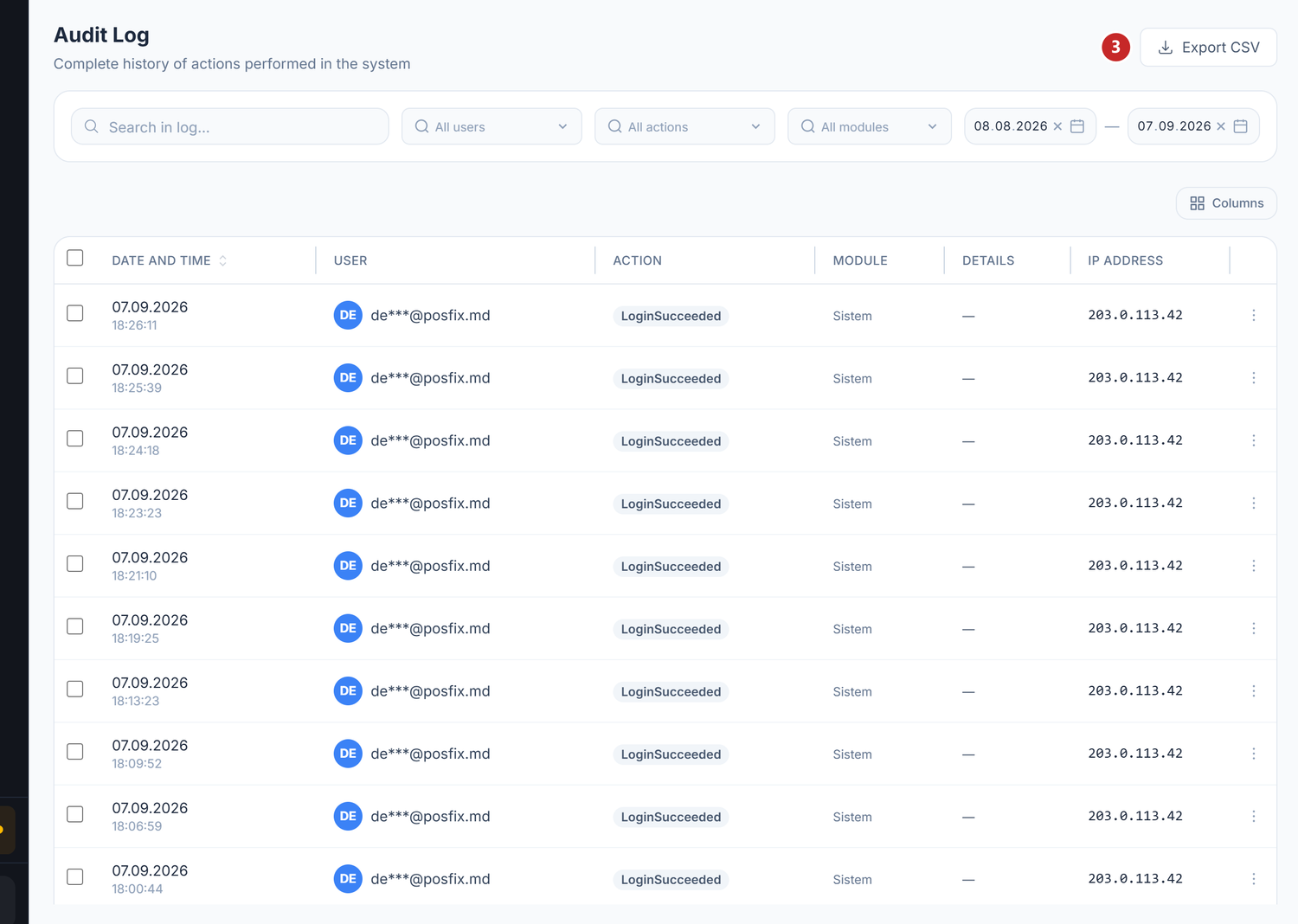
1 search in the text · 2 filter by action, user or module · 3 download what you filtered
Each row carries the date and time, the user, the action, the module and the IP address the work came from.
Two things to know about what you see in the columns. On sign-in rows, a partially masked e-mail
address appears instead of the name. And in the Action column the verb is written the way the
platform stores it, in English — LoginSucceeded, LoginFailed — even though in the filter above you
pick it from the translated list.
On opening, the log shows you the last 30 days, the most recent actions first.
The filters
The filter bar under the title has:
| Filter | What it does |
|---|---|
| Search in log... | Free search in the user's name, the action verb (Unpost, Restore), the name of the entity touched and the action's description |
| User | Narrows to one user of the organization; All users by default |
| Action | Login, Create, Edit, Delete, Confirm, Export CSV; All actions by default |
| Module | Ten values, written in Romanian without diacritics: Sistem, Contabilitate, Banca, Achizitii, TVA, MijloaceFixe, Salariu, Inventar, Productie, Administrare; All modules by default |
| Date range | Two date fields, From and To |
The filters apply immediately, with no search button.
The free search therefore also reaches the entity name. If the document number ended up there, you find it; if not, you don't — don't rely on this, narrow down better by module, range and user.
The columns of the list
| Column | What it holds |
|---|---|
| Date and time | The date on the first line, the time on the second; it can be sorted from the header |
| User | The initials in a coloured circle plus the name |
| Action | A coloured label: Login, Create, Edit, Delete, Confirm, Export CSV |
| Module | The area the action came from |
| Details | The description of the action; if the service doesn't send one, the name of the entity touched is shown, otherwise "—" |
| IP Address | Where the action was made from |
Sorting by Date and time is done on the server, meaning over the whole filtered result, not just over the page in front of you.
The list is paginated, with 25 rows by default; you can choose 10, 20, 50 or 100.
The details of an action
Right-click a row → Details. The Audit Log Detail window opens:
| Field | What it holds |
|---|---|
| Date and time | The exact moment |
| User | The name and, in brackets, the role |
| Action | The same coloured label |
| Module | The functional area |
| Details | The description of the action; most of the time it is missing from the row and is not displayed |
| Entity Type | What kind of object was affected |
| Status | OK if the action succeeded, Failed if it failed |
| Error | The error message, when the action failed |
| IP Address | The address the work came from |
Below these, when they exist, two blocks appear: Submitted data — the values the user sent with the action — and Result — what the server answered.
The log does not keep the value from before the change. So you can't compare "before / after" field by field. You see what was requested, who requested it and whether it succeeded.
Example. Someone changes the price of an item from 25 lei to 30 lei. Under Submitted data you
find 30, the new value, sent in the action. The old price of 25 lei appears nowhere in the log.
Failed actions stay too. The log doesn't keep only what succeeded: a rejected attempt appears with the status Failed and with the reason for the refusal in the Error field — often exactly what you are looking for when you investigate "why didn't it work".
The export
The Export CSV button at the top of the screen downloads the records with the current filters applied. The file carries the start date of the range in its name.
You use it to send the record to an auditor or to process it in Excel.
What gets recorded
The six actions you can filter on
| Action | When it appears |
|---|---|
| Login | On entering the account |
| Create | A new document, partner, catalogue item |
| Edit | Fields changed on an existing entity |
| Delete | An entity deleted |
| Confirm | A document was posted and generated entries in the journal register |
| Export CSV | Someone exported data |
Other actions — in the list, but not in the filter
The log keeps more than the six above. The Action filter doesn't have them yet, and in the Action column they appear with the untranslated label:
| What happened | The label in the list |
|---|---|
| Unposting — the journal entry generated by the document is deleted | Unpost |
| Restoring a deleted document | Restore |
| Confirming a timesheet or a salary calculation | Confirm |
| Cancelling that confirmation | Unconfirm |
You find them with the free search: you type Unpost in the Search in log... field and you
get every unposting. The Confirm filter doesn't bring them to you.
Watch out for the homonym: Confirm in the filter means posting, while Confirm in the list is
the confirmation of a timesheet or a salary calculation. They are different things.
Plain browsing is not recorded: opening a document without changing it and navigating through screens produce no rows in the log. That is how the log stays readable.
The correction of a posted document is made through a new document with negative values, not through a reversal button. In the log you will therefore see Create and Confirm on the correcting document, not a separate reversal action.
That doesn't mean the journal entry can't disappear. Unposting deletes the entry generated by the
document, and its trail in the log is the Unpost row — look for it there, not under Delete.
Use cases
External financial audit. The auditor asks for the record of changes in the period checked. You filter by range and by module, then press Export CSV.
Debugging a difference. A balance doesn't match. You filter by the Contabilitate module and by the suspect range, then open the details of the Edit rows. There you see the value sent with the change, not the one replaced — for the old value you look in the document and in the journal register.
Internal control. You check periodically who deletes documents and how often. The filter on the
Delete action gives you the list in a second. Check Unpost separately from the free search — there
you see who dissolved journal entries.
Investigating a refusal. A colleague says "the system wouldn't let me". You filter by that user and look for the rows with the status Failed — the reason is in the Error field.
What can be changed later
| Element | Can it be changed? | Conditions |
|---|---|---|
| The records in the log | No | The log is written once; it has no editing and no deletion |
| Stopping the recording | No | There is no switch to disable it |
| The filters | Yes | They are viewing only, they don't touch the data |
| The export | Yes | Any time, with the filters applied |
| Access to the log | Yes | Depends on the role and on the accounting module being contracted |
| The retention | No | There is no automatic deletion of the records |
Troubleshooting
| Problem | Cause | Fix |
|---|---|---|
| I can't find an action from three months ago | The log opens on the last 30 days | Widen the range from the two date fields |
| Too many results | No filter applied besides the range | Filter by user, action or module |
| I don't see the Audit Log tab | The accounting module is not contracted or your role doesn't cover it | Ask the Owner to check the module and the role |
| The export is empty | The current filters return nothing | Widen the range or remove a filter |
| I don't see any change on a document | The document was only opened, not edited | Correct behaviour — browsing is not recorded |
| I search for a document number and find no row | The number enters the search only if the service put it in the entity name | Narrow by module, range and user, then open the rows |
| The Details column shows "—" | The emitting service sends neither a description nor an entity name | Current behaviour — you navigate by Action, Module and Entity Type |
| A document's journal entry disappeared and I can't find who | Unposting is not in the Action filter | Type Unpost in Search in log... |
| A row has no user | The action was made by an automatic process | Correct behaviour — not every action has a person behind it |
Frequently asked questions
Can I export the log?
Yes, in CSV format, with the current filters applied. The file downloads straight from the browser.
Does the log slow the system down?
No. The recording is done alongside the action itself, in a dedicated service, and doesn't hold the user up.
Who has access to the log?
The organization's leadership users — Owner, Manager and the account administrators. There is no separate "auditor" role in POSfix; to an external auditor you give either an account with the right role, or the CSV export.
How long are the records kept?
There is no automatic deletion. The records stay in the system for as long as the organization exists.
Can I follow everything that happened to one particular document?
Not directly. The free search covers the user, the action verb, the entity name and the description — but the document number ends up there only if the service that wrote the row put it in the entity name. On many actions it doesn't.
Narrow by module, by range and by user, then open the details of the rows. The free search is also
what brings you the actions that have no entry in the filter, such as Unpost.
Does the log also record actions coming from integrations?
Yes. The rows carry the module they came from, and when the action has no human user behind it, the User column stays empty.
What happens if a user is deleted?
Their records stay intact, with the name kept as of the moment of the action.
Does the audit log replace the accounting register?
No. The audit log is traceability — who did what and when. The journal register is the accounting instrument — which entries were generated. They are complementary.
Why do some rows have the status "Failed"?
Because the log also keeps the rejected attempts. The reason for the refusal appears in the Error field of the details window.
Related pages
- Access policies — the scope of action of each role
- Journal register — the accounting entries generated by documents
- Integrations — connecting external services
- Accounting periods — closing periods protects finished data