Currencies and exchange rates
Why you set up currencies
If you work with partners outside Moldova or hold bank accounts in foreign currency, you need official rates at the date of each transaction. Without them the lei equivalent is computed wrong, exchange differences aren't generated at month-end close, and the financial statements come out crooked.
POSfix fetches the official rates of the National Bank of Moldova (BNM) daily and applies them to each document by its date. You only choose which currencies you work with.
The organization's currencies
Where to find it: Sidebar → Accounting → Classifiers → the Currencies tab
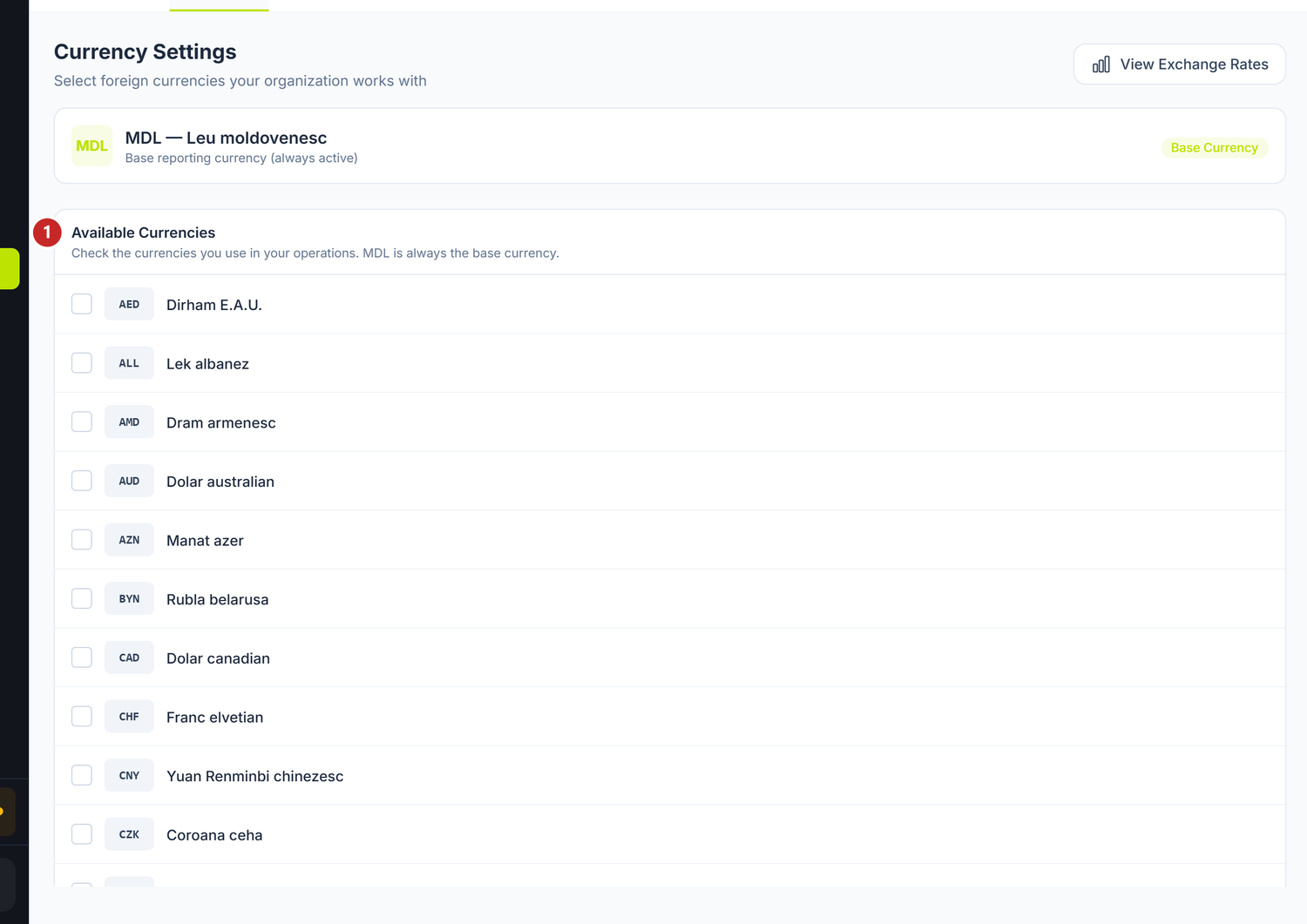
1 the list of currencies, with the tick on each one
The Moldovan leu sits separately, above the list, labelled Base Currency — it cannot be unticked. The View Exchange Rates button in the top-right corner takes you to the rates by day.
The base currency
At the top of the screen you see the base currency — MDL, the Moldovan leu — marked Base Currency and always active. Accounting is kept in it, and the trial balance and the financial statements are generated in it. The base currency does not change.
How you activate a currency
Below the base currency you have the list of available currencies. You tick the ones you work with and untick the ones you no longer need — it saves immediately, there is no separate save button. Under the list the number of ticked currencies is displayed.
The ticked currencies then appear in the currency selectors on documents and in the rates table.
The tick does not order a rate download. POSfix stores every rate published by BNM, whatever you have ticked; the tick only decides which currencies appear in the selectors and in the rates table. If you untick a currency, you lose no rate from history — tick it again and the rates are there. Keep the list short only so the table stays easy to read.
The View Exchange Rates button at the top of the screen takes you straight to the rates table.
The exchange rates
Where to find it: Sidebar → Accounting → Classifiers → the Exchange Rates tab
The screen shows the rates on one date, not a history. You pick the date from the date selector at the top of the page and the table reloads.
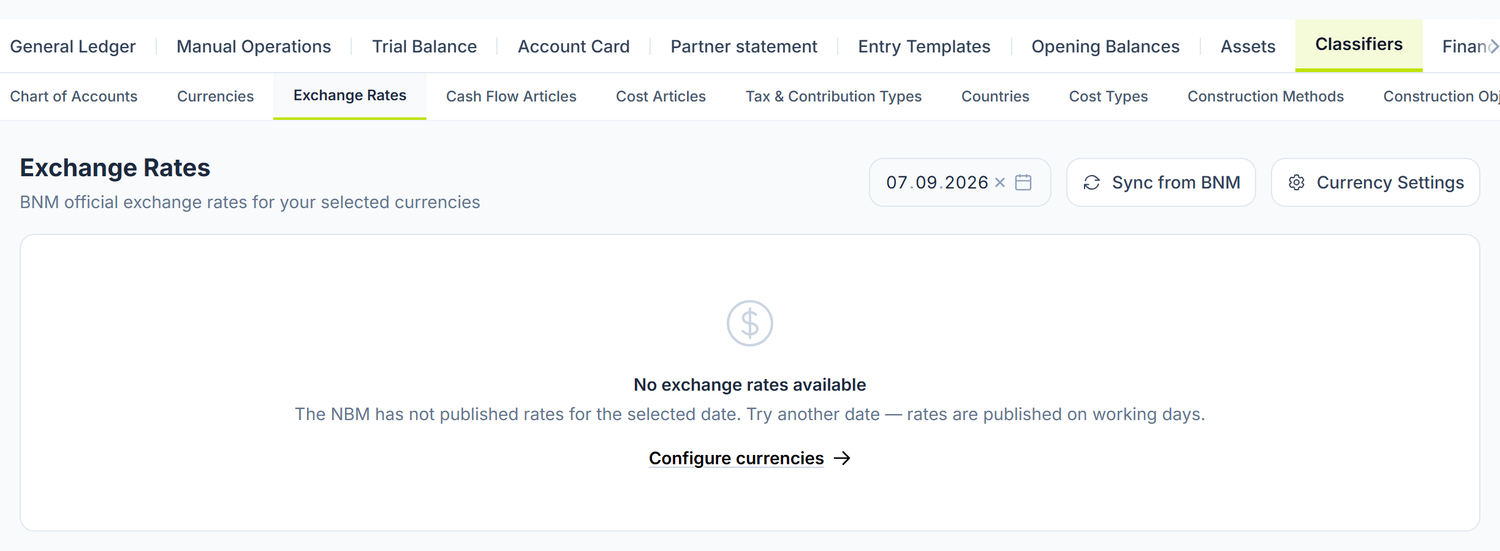
An empty table means no rates were found for the chosen date — usually because it's a weekend or because BNM hasn't published the day yet. The panel already tries to fetch them on its own when the day opens, so Sync from BNM repeats what has just been done; if it's still empty, pick another date.
Which currencies you see in the table you choose from Currency Settings, top right; the Configure currencies link in the middle of the screen leads to the same place.
| Column | What it holds |
|---|---|
| Currency | The currency code (EUR, USD…) |
| Name | The name of the currency |
| Units | How many units the rate is expressed for. POSfix brings the rate down to one unit right at fetch time, so the column always shows 1 |
| Official Rate | The BNM rate, brought down to one unit |
| Rate / Unit | The same value — the rate actually used in the conversion |
Under the table the source is written: National Bank of Moldova (BNM).
The two rate columns always coincide. Be careful, though, when you compare with bnm.md: there some currencies are published for 10 or 100 units. Divide by that nominal before comparing.
Example. BNM publishes the Japanese yen for 100 units, not for one. POSfix divides by 100 and shows you the rate of a single unit, so the figure on screen is smaller than the one on the BNM site. It is not an error — it's the same value, brought down to one unit.
Syncing
The rates are fetched automatically, daily, from the BNM site. The Sync from BNM button at the top of the screen forces a fetch for the selected date — useful when you need a past date for which you still have no rates.
After you press it a band appears over the table: green for success, red for failure. The message itself comes in English — Rates synced successfully or Failed to sync rates. The colour tells you everything you need; you close it with the x on the right.
If the table is empty, the screen tells you why and offers you the Configure currencies link — it means you haven't ticked any foreign currency.
BNM does not publish on weekends and holidays. When there is no exact rate at the requested date, POSfix uses the last rate published before that date. You have nothing to do by hand.
The screen does not mark rates taken this way, though — a rate from two weeks ago looks just like today's. If the daily sync failed, the document is posted at the old rate, with no warning. When the amount matters, compare the value with the one on bnm.md before you post — brought down to one unit, if the currency is published there for 10 or 100.
How the rate is applied in a document
The converter is not a separate screen. It sits right in the amount field of the money documents — bank operation, payment order, cash receipt or disbursement. To the right of the field you have two small icons; the one with the crossed arrows, Currency conversion, opens a panel with three fields under it.
To record an amount in foreign currency:
- Press the Currency conversion icon in the amount field
- Pick the Currency — POSfix loads the Exchange rate of the document's date on its own
- Write the Currency amount
- Under the panel the calculation line appears, and the lei equivalent goes into the amount field; it is the one that reaches the Journal register
The Exchange rate field is editable. If you write a value yourself, the yellow warning Rate manually changed appears under the panel, and POSfix no longer reloads the rate when you change the document's date.
Use the option only when you have an accounting reason — the general rule stays the official BNM rate at the date of the transaction. If you change the currency, the automatic fetch restarts.
Exchange differences
Revaluing foreign-currency balances
Revaluation is not a document you create. It is the first step of the month-end close wizard: it recomputes the lei equivalent of foreign-currency balances at the rate at the end of the period and issues the journal entry.
The currency screen asks you for no account. The accounts the difference is written on come pre-filled, and the ones that can be changed you find in Posting templates, the Default Accounts tab.
The step is idempotent: if you run the close again on a month already processed, nothing is doubled.
Why a revaluation can come out empty
Not everything in foreign currency is revalued. Money and settlements — the cash desk, the bank accounts, receivables, payables, loans — change their lei equivalent at each close. Advances, stock and non-current assets stay at the rate of the day of the operation, however much the currency moves.
That's why, if all you have on the books are advances in foreign currency, the revaluation ends with no entry. It's not a fault: it had nothing to recompute.
What can be changed later
| Element | Can it be changed? | Conditions |
|---|---|---|
| The base currency (MDL) | No | Set when the organization was created |
| Ticking a new currency | Yes | Any time, from the Currencies tab |
| Unticking a currency | Yes | It disappears from the selectors and from the rates table; historical documents stay untouched |
| The rates fetched from BNM | No | They are official; the screen has no manual entry form |
| The rate on a document | Yes | The Exchange rate field in the converter, while the document is Draft |
| The sync rhythm | No | Automatic daily, plus the Sync from BNM button on demand |
Troubleshooting
| Problem | Cause | Fix |
|---|---|---|
| The rates table is empty | You haven't ticked any foreign currency | Press Configure currencies and tick the currencies you need |
| Rates are missing for a past date | They haven't been fetched for that day yet | Select the date and press Sync from BNM |
| The rate on the document isn't today's | The document uses the rate of its own date, not today's | Correct behaviour — check the document's date |
| The rate no longer updates on the document | It was edited by hand, so it is "frozen" | Re-enter the value you want, or change the currency to restart the automatic fetch |
| The currency doesn't appear in the document's selector | It isn't ticked in the Currencies tab | Tick it and reopen the document |
| The revaluation generates no entry | You have no money and settlements in foreign currency at that date | Check the balances in the cash desk, the foreign-currency bank accounts, receivables and foreign payables |
| I have a foreign-currency balance on an advance and it wasn't revalued | Advances stay at the rate of the day of payment | Correct behaviour — they are not recomputed at close |
| The rate on the document is older than the document's date | BNM didn't publish that day, or the sync failed | Compare with bnm.md, brought down to one unit; if the day is missing, press Sync from BNM on that date |
Frequently asked questions
Can I use a rate different from the official BNM one?
The accounting rule is the official BNM rate at the date of the transaction. Technically, the rate field in the document's converter is editable — use it only when you have a documented accounting reason. The commercial rate at which your bank actually bought or sold the currency generates an exchange difference; it does not replace the official rate.
What do I do if BNM hasn't published the rate for a certain date?
BNM does not publish on weekends and holidays. POSfix automatically uses the last rate published before that date. As a rule you have nothing to do. The screen does not mark these rates, so on large amounts check the value on bnm.md.
Can I delete a currency I no longer use?
You untick it. It disappears from the selectors and from the rates table. The documents recorded in that currency stay intact, and its rates stay stored — if you tick it again, the history is there.
Where do I see the rate history for a currency?
The rates screen shows one date at a time, not a series. To see another day, you change the date in the selector.
How often are foreign-currency balances revalued?
At every month-end close — it is the first step of the closing wizard. You have no separate document to create. Only monetary items are revalued; advances, stock and non-current assets stay at the historical rate.
Why do "Official Rate" and "Rate / Unit" look the same?
Because POSfix normalizes the rate to one unit right at the fetch from BNM. For the same reason the Units column always shows 1.
The difference appears only when you compare with bnm.md: there some currencies are published for 10 or 100 units. Divide by the nominal before you compare.
Related pages
- Chart of accounts — the accounts by currency and the exchange differences
- Multi-currency — details on multi-currency accounting
- Bank accounts — setting up foreign-currency bank accounts
- Bank operations — documents in foreign currency with the rate applied
- Month-end close — the currency revaluation step