Financial statements
The financial statements are the forms you file at the close of the reporting period. The screen fills them in, prints them and keeps your version — the filing stays with you, on the state portal.
You have two screens, depending on the set you are asked for.
The full set, 6 pages. It takes its figures from the accounts on its own.
Where to find it: Sidebar → Reports → the Balance Sheet tab
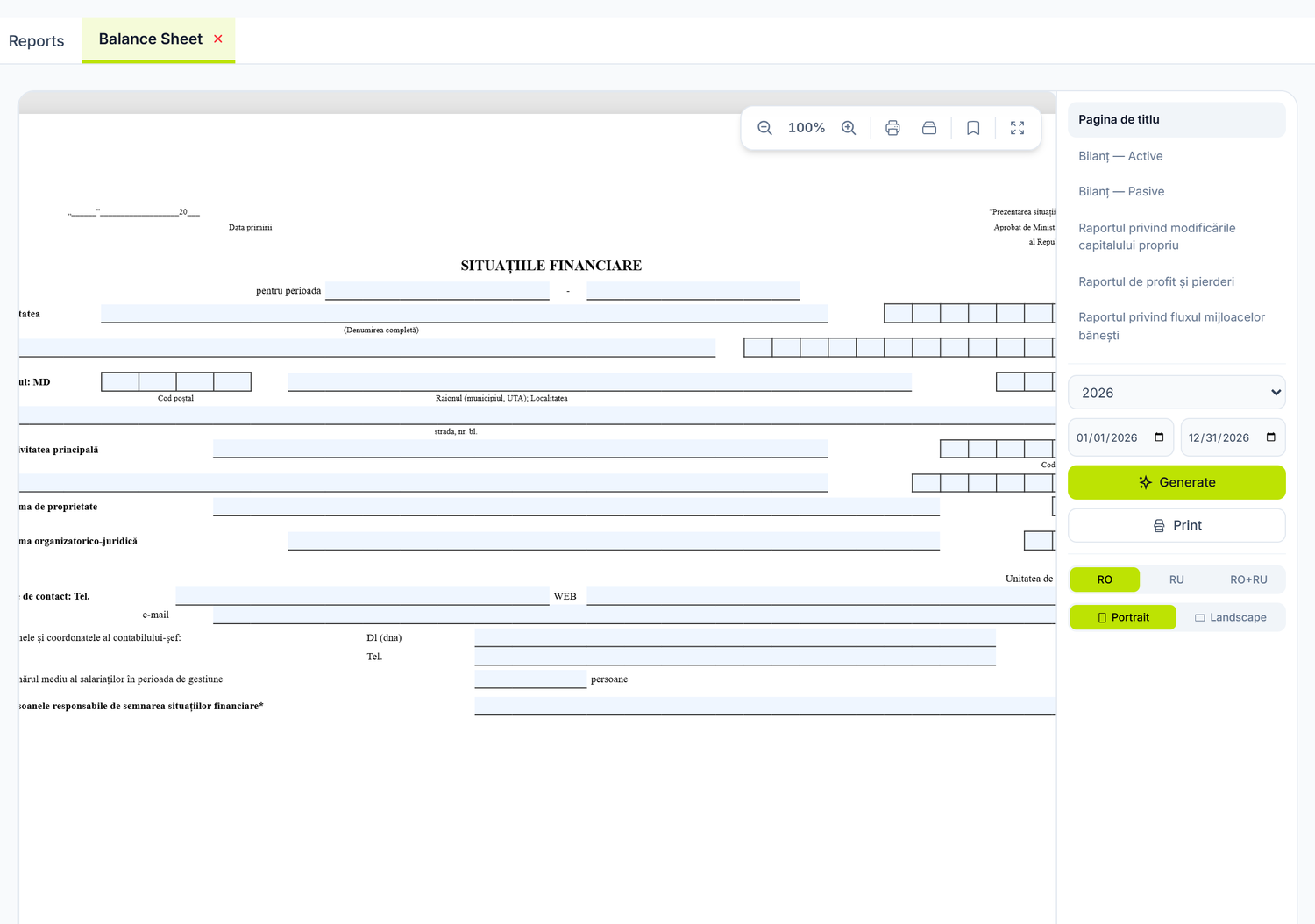
The abridged set, 4 pages. It opens empty and stays empty after Generate too — you fill it in cell by cell, from the trial balance.
Where to find it: Sidebar → Reports → the Simplified Financial Statements tab
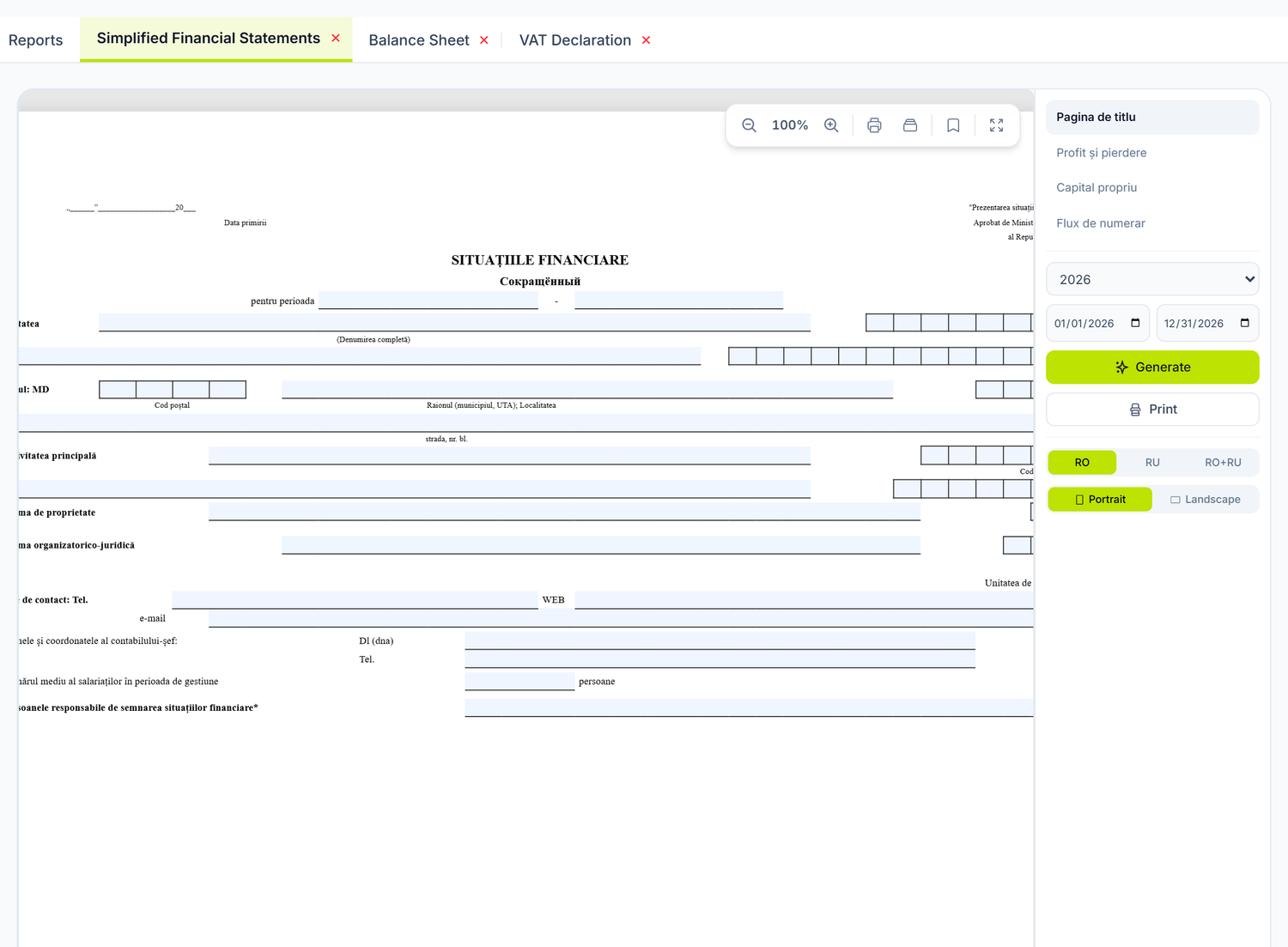
The tabs appear only after you press the card. Both are dynamic tabs: you open them from the Reports tab, the Financial group, and then they stay in the top bar until you close them with ×. The first time you open the screen, do not look for them in the bar — they are not there.
Simplified Financial Statements delivers the abridged set, not the simplified one. You can see it on the form: the pages carry the printed titles "SITUAȚIILE FINANCIARE prescurtate" and "SITUAŢIA DE PROFIT ŞI PIERDERE PRESCURTATĂ".
Abridged and simplified are different sets in the law and are required of different categories of entity. Check which one applies to you before you pick the screen. If you are the one required to file the simplified set, take it from Balance Sheet and print only the pages you need.
When you need them
- Annually — for filing the annual financial statements
- Quarterly — if your entity has an interim reporting obligation
- Any time — for internal analysis, for the bank, for investors or for a partner asking about the company's position
Deadlines change and differ by category of taxpayer, so do not memorise them from here. The Fiscal Calendar screen in the sidebar brings them straight from sfs.md.
What each set contains
Balance Sheet — 6 pages
| Page | What it contains |
|---|---|
| Title Page | The entity's identification data and the reporting period |
| Balance Sheet | The assets |
| Balance Sheet — Liabilities | Equity and liabilities |
| Equity Changes | The movements in class 3 over the year |
| Profit and Loss | Revenue, expenses and the result of the period |
| Cash Flow Statement | Receipts and payments, by activity |
Simplified Financial Statements — 4 pages
| Page | What it contains |
|---|---|
| Title Page | The entity's identification data and the reporting period |
| Second page | The abridged balance sheet — Assets |
| Third page | The abridged balance sheet — Liabilities: equity, liabilities, provisions |
| Fourth page | The abridged profit and loss statement (Annex 2 to the same standard) |
You switch pages from the list at the top of the right-hand panel. The labels in the list do not match the content — look at the title printed on the form, not at the name in the list.
How to generate — step by step
1. Check the source data
Before you generate, make sure that:
- Every document in the period is Posted, not in Draft
- The Trial balance shows the Balanced label
- You have run the month close for every month of the period
- You have no abnormal balances left uninvestigated
2. Open the screen
Sidebar → Reports → the Balance Sheet tab (or Simplified Financial Statements).
3. Choose the period
In the right-hand panel you pick the year from the list (the last five years), then adjust the from and to dates if you need to. By default the period is 1 January – 31 December of the current year.
4. Generate
Press Generate. The forms fill in from the accounting data of the period. You stay on the page you were looking at — regenerating does not send you back to the title page.
5. Check, adjust, print
- Go through every page and check the figures
- Cells marked as editable can be filled in straight on the form, for the data the system does not have (the name of the tax inspectorate, the date of submission and the like)
- Switch the language from the right-hand panel: RO, RU or RO+RU. The third option prints both languages on the same form — the way official forms are usually filed
- Choose the orientation: the buttons read Portrait and Landscape
The rest of the tools sit in the floating bar in the top right corner of the sheet, all as icons with an English tooltip: − and + for zoom between 50% and 200%, a printer ("Print") for the current page, a second printer ("Print All") for every page at once, a bookmark ("Save") and the full-screen arrows ("Fullscreen"). The second printer appears only when the form has more than one page.
How to get a PDF. There is no download button. You press the print icon and, in the browser's print window, choose "Save as PDF".
6. Save the version
The bookmark icon in the floating bar keeps the full set of pages, manual adjustments included.
You reopen it from the right-hand panel, with the Open Saved button — which appears only after you have saved at least one version; until then there is nothing to look for there. The button carries the number of versions and opens the Saved Reports window, where each row shows the year, the date of the last change, who changed it and the state of the version.
Where the data comes from
The forms are built from the accounting entries of the period — the same ones the trial balance is raised from:
| Page | What it takes |
|---|---|
| Balance Sheet | The closing balances of the accounts in classes 1–5, aggregated onto the form's rows |
| Profit and Loss | The turnovers of the accounts in classes 6–7 for the period |
| Cash Flow | The movements of the cash accounts, by flow item |
Which means: if the trial balance is correct and balanced, the full Balance Sheet set comes out filled in, without you entering a single figure by hand. The table above describes only the full set — Simplified Financial Statements is filled in entirely by hand.
What gets forgotten most often. Documents left in Draft do not reach the forms: supplier invoices received in January for December deliveries, bank operations from the last days of the month, the payroll calculation for the last month and the depreciation for December.
Closing the year
The annual forms are correct only after the year is closed. The year close runs from the month-close wizard, in December, together with the income tax calculation, and it carries the date of 31 December. The details are in Accounting periods.
711 and on 351 after the closeThe close first settles the distribution expenses (712) onto 711, and then closes 711 onto 351 at the balance it had before that transfer. At any company with distribution expenses, two equal and opposite balances remain after the year close: 711 debit and 351 credit, exactly the amount of the year's distribution expenses.
This is not a sign that the close did not happen, and running it again changes nothing. The balance sheet still balances, because the result row reads both accounts and the two remainders cancel out.
What stays distorted is the profit and loss statement: the same amount is counted twice, once under "Cost of sales" and once under "Distribution expenses", so the net profit on the form comes out lower. The check below catches it. If it appears, do not file the form and ask support for help.
What to check before filing
- Does the trial balance balance? → open the Trial balance over the whole period and look for the Balanced label
- Is every document posted? → you have no drafts left from that year
- Are depreciation and payroll calculated for every month?
- Is the year closed? → you can see it in Accounting periods
- Generate both pages and compare the result on "Profit and Loss" with the one in the balance sheet
Step 5 is the one that catches the errors. If the two figures differ, do not file the form: note the difference and ask support for help.
How it connects to other screens
Posted documents (invoices, bank operations, payroll, depreciation)
        ↓ generate accounting entries
  General Ledger
        ↓ aggregation by account
  Trial balance
        ↓ closing balances → balance sheet; turnovers 6–7 → profit and loss
  Financial statements
        ↓ the basis for
  Tax returns
Where the data comes from:
- Trial balance — the same balances and turnovers
- All posted documents of the period, through the ledger and the trial balance
What depends on them:
- Statistical and tax reports — some of the forms lean on the same accounting data
- The income tax calculation — the adjusted accounting profit is its starting point
Common mistakes
-
Not closing the year — you generate the balance sheet without closing the revenue and expense accounts. Classes 6 and 7 keep balances, and equity does not reflect the real result.
-
Having unposted documents from December — invoices received in January for December deliveries stay in Draft. The balance sheet understates liabilities and shows too much profit.
-
Not reconciling the bank account — the
242.1balance in the balance sheet does not match the statement. Check the Account card before generating. -
Ignoring the abnormal balances in the trial balance — you find them by breaking the account out by partner, in the Trial balance. Otherwise the balance sheet comes out formally correct while misrepresenting the financial position.
-
Generating without checking the depreciation — if you have not calculated it for every month, the fixed assets look overstated and the expenses understated.
Troubleshooting
The balance sheet does not balance
- Check the Trial balance — if it does not balance, neither will the balance sheet
- Check that the year close has been done: the accounts in classes 6 and 7 must have a zero balance at 31.12.
711and351are the exception, where the known remainder from the "Closing the year" section stays — it does not unbalance the balance sheet - Look for accounts with a balance on the wrong side, which need reclassifying
The "Net profit of the reporting period" row in the balance sheet is empty
At 31.12, after the year close, the result has already moved to 332, so it appears on the "Retained earnings (uncovered loss) of previous years" row. This is not an error. Total equity stays correct.
The profit in Profit and Loss does not match the amount carried to 332
- Check that you used the same period for both generations
- Compare the "Cost of sales" and "Distribution expenses" rows with the debit turnovers of accounts
711and712in the trial balance - If the difference persists, do not file the form — ask support for help
The form is empty or full of zeros
- If you are on Simplified Financial Statements, this is normal behaviour — the abridged set is filled in by hand
- Check the period — you may have picked one with no activity
- Check that you have posted documents in the period
- Check that you have entered the opening balances
I pressed Generate and nothing changes
Look at the error message on the screen. Most often the form template is not available for the chosen year, or the period sent is empty. Start again with the year from the list at the top of the panel.
Frequently asked questions
Why does my balance sheet not balance?
Check the trial balance first — if it is not balanced, the balance sheet cannot be. Frequent causes: journal entries with wrong formulas, missing analytical accounts, or the year close not done.
Can I generate interim financial statements?
Yes. You can choose any date range, not just the full year. Interim reports are useful for internal analysis and for the bank.
What is the difference between the two screens?
Balance Sheet gives the full set, 6 pages, and fills itself in from the accounts. Simplified Financial Statements gives, despite its name, the abridged set, 4 pages, and is filled in by hand. If you are the one required to file the simplified set, take it from Balance Sheet and print only the pages you need.
Can I change the figures on the form by hand?
Only in the cells marked as editable — the ones the system has no data source for. The rest of the figures come from the accounts and are recalculated on every Generate. What you edit by hand stays in the form and in the saved version, but it does not go back into the accounts.
Can I generate the forms in Russian?
Yes. The language switch in the right-hand panel has three positions: RO, RU and RO+RU. The last one prints both languages on the same form. The structure and the figures stay the same.
How do I get the file I file?
From this screen you get the form printed or saved as PDF from the print window. Balance Sheet has no XML export. The returns that have an electronic file for the SFS have a Download XML (SFS) button of their own — see Statistical and tax reports.
What do I do if I filed financial statements with errors?
You correct the wrong documents or entries, regenerate the forms, save the new version and refile it as a corrected form.
Do I have to close the year before working on the next one?
No. You can work on the next year in parallel. But the annual financial statements are correct only after you close the year.
How do I quickly check whether the balance sheet is plausible?
Compare it against the external sources you have at hand: the bank statement for the cash accounts, and the real payment obligations for the liabilities to personnel and to the budget. If the balance sheet totals do not close, the problem is in the trial balance, not in the form.
Related pages
- Trial balance — the data source for the financial statements
- Account card — detailed investigation on individual accounts
- Statistical and tax reports — the returns and the statistical forms
- Accounting periods — the month and year close
- Posting rules — the rules that generate the entries the balance sheet is built from