The salary calculation
The salary calculation carries the month from base salary to the amounts you pay out: it takes the days worked from the timesheet, the allowances, the confirmed bonuses, the vacation pay and the exemptions, then pulls out the deductions, the tax, the net and the employer contribution — for every employee at once. It pays nothing; payment starts from the payroll order.
Where to find it: Sidebar → Team → the Salary Calculation tab
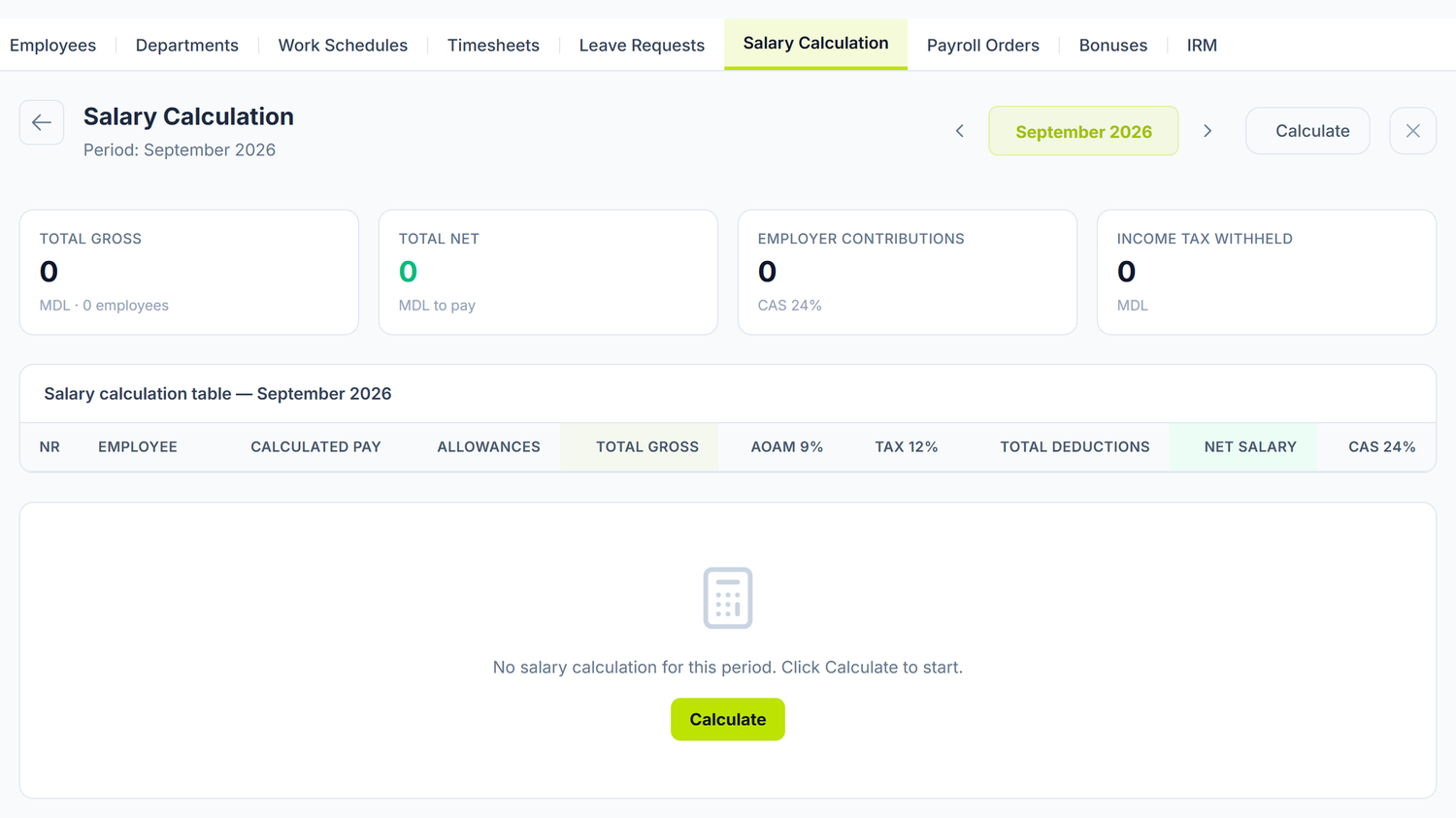
You pick the month from the period selector in the header. There is one calculation document per month, no more.
On a fresh month the screen is empty: in the middle you see the message "No salary calculation for this period" and a Calculate button. Everything starts there.
When you run the calculation
- At the end of the month — you fill in and confirm the timesheet
- You check the employee cards: base salary, allowances, exemptions
- You confirm the month's bonuses, if there are any (Team → Bonuses)
- You run Calculate
- You check the figures and press Post
- From the same screen, Create Payroll Order
The calculation runs even if the timesheet isn't confirmed — even if the month has no timesheet at all (it then assumes a full month worked, minus the working days covered by posted leave). Don't count on the system to refuse: confirm the timesheet first, otherwise the figures describe a month that never happened.
Where the rates and the exemptions come from
You don't enter them per employee and you don't edit them from your company: they are platform data, maintained centrally after the Codul fiscal. Every value has a date it applies from, and the calculation picks what was in force in the calculation month — not what is in force today. That is why recalculating an old month gives the same figures as the first time.
The rates (CAS, AOAM, income tax) and the exemptions change separately, each one when the law changes it. It is normal to see rates that took effect in one year next to exemptions that took effect in another. If a figure looks wrong to you, tell support the month and the amount — there is no way for you to correct it yourself.
Exemptions reach an employee through the exemption request in the Exemptions tab of their card. Without an active request, the employee enters the calculation with no exemption at all.
The period also carries a reference minimum wage, as a value to consult. Checking base salaries against the national minimum stays your job, before you post the calculation.
Above an annual income ceiling, the personal exemption is lost. The panel accumulates the gross income of the months already posted, adds the current month and, once the ceiling is passed, sets the personal exemption to 0 for that month only. Earlier months stay untouched, and the exemptions for spouse and dependents are not touched at all. The employer isn't required to track the loss of the personal exemption: the person settles the difference in their annual return, and you don't reopen posted months for it . An abandoned draft moves nothing in the running total.
The calculation table
Above the table, four indicators over the included lines: Total gross, Total net, Employer contributions and Income tax withheld.
The table has one row per employee, and the columns run left to right along the path of the amount: the include checkbox, the employee with their department, Calculated pay, the allowances, Total gross, the deductions, Total deductions, Net salary and the employer contribution. The footer sums them all, for the included lines.
Two of them change the result, so they deserve your attention.
Correcting an amount by hand
While the document is a draft, the Calculated pay column is a field you write in. The derived amounts — deductions, contributions, allowances — are recomputed from the figure you put in, and the field gets an amber border: that is the sign the amount no longer comes from pro-rating.
The correction survives a recalculation. If you press Calculate again, the figure you typed stays. To go back to the automatic amount, press the circular arrow next to the field, Back to the automatic amount.
Excluding an employee
The checkbox in the first column takes the line out of the calculation: it doesn't enter the totals, it produces no accounting entries and it doesn't reach the payroll order. The row stays visible, pale, marked excluded — so it shows as a decision, not an oversight.
The detail of a line
Click a row and the breakdown opens, in three blocks:
- Gross income — the base salary, the allowances, the overtime pay, the sick leave pay, the vacation pay and the compensation for unused leave, up to total gross
- Employee deductions — the health deduction, the taxable base, then each applied exemption separately (personal, personal with disability, spouse, spouse with disability, dependent, dependent with disability), the tax, the total deductions and the net
- Employer contributions — the contribution and the total employer cost
This is where you check why the figure comes out the way it does. An exemption missing from the list means it isn't on the employee's active request.
The dimensions of the journal entry
The section appears after you press Calculate and disappears on posting. On an uncalculated month it doesn't exist, so don't look for it there.
Six selectors end up as dimensions on the journal entry: Product Group, Cost article — wages, Cost article — contributions, Tax type — income tax, Tax type — health insurance and Tax type — social insurance. The panel proposes them from the nomenclature; you change them if your chart uses other codes.
Posting
Once you have checked the figures, you press Post. The document moves from Draft to Posted and generates the journal entry. You see it without leaving the screen: the journal entry toggle in the header opens it below the document.
Posting is refused if the accounting period of the month is closed or locked — see Accounting periods.
Unpost brings the document back to draft and deletes the entry. Only then can you recalculate or correct.
On a posted document the Calculate button no longer exists — don't look for it, it isn't hidden somewhere. It comes back once you unpost. Recalculating a draft month deletes the lines and rebuilds them, keeping the amounts corrected by hand.
Each line of the entry carries the employee's department as an analytical dimension.
The panel debits the same account for every employee, whatever the department, and the department form has no expense account field. If you need a different allocation, you do it after posting, through a journal entry.
What the calculation does not do
So you don't search in vain:
- It withholds no alimony, enforcement orders or advances. There is no deductions register on the employee card. Amounts like these are handled outside the calculation.
- It does not pick up the sick leave pay automatically from the sick leaves register.
- It doesn't take leave left as a draft. Only posted leave reduces the worked days and brings in the leave pay — of any type, maternity and unpaid leave included.
- It gives no warning when the base salary is below the national minimum wage.
- It cannot be run selectively on one department — it runs across the whole organization, and you take out the lines you don't want with the checkbox.
Common mistakes
| Mistake | Consequence | How to avoid it |
|---|---|---|
| Leave left as a draft | Its days don't come off the salary, and the leave pay doesn't enter the payroll | Post the month's leave before the calculation |
| Calculation run on a month with no timesheet | A full month worked is assumed — absences are not subtracted | Fill in and confirm the timesheet first |
| Bonuses left in draft | They don't enter the gross and they aren't taxed | Confirm the bonus documents before the calculation |
| Exemption not registered through a request | Income tax overstated | Check the employee's Exemptions tab |
| Employee without posted payrolls, gone on leave | The leave shows 0 leave pay, with a warning on the Calculation tab | Post the payrolls of the base months. For a new employee with no payroll at all, correct the calculated pay in that month's payroll — but it enters gross pay as salary and inflates the average of the next leave |
| Maternity leave not recorded | The employee gets a full salary, plus the employer contribution on top of it, for a month in which she did not work | Record it as a leave, with the maternity type, and post it |
Troubleshooting
The calculation doesn't run
- The period isn't a draft: if the month's document is posted, unpost it
- The period's rates are missing: if no contribution period covers the month, the calculation stops with an explicit message
- Employees with no base salary: the line is generated, but with 0 — check the cards
The figures don't match a manual calculation
- Check the exemptions: open the line detail and compare each applied exemption
- Check the allowances: they are percentages of the calculated amount, not of the whole base salary
- Check the days: the month's norm comes from the employee's schedule (the production calendar only for those without one) — compare it with the total in the timesheet
- Check the income ceiling: above it, the month's personal exemption becomes 0
Income tax is 0 when it shouldn't be
The total exemptions exceed the taxable base (gross − AOAM). Check whether the employee has exemptions configured wrongly — an increased exemption without entitlement, say, or dependents too many.
Posting is refused
The accounting period of the month is closed or locked. Open the period from Accounting periods and try again.
Salary calculation no. … was made before a change in the leave or compensations of … — after the calculation, a leave or a compensation of this month was posted, unposted or deleted. Calculate the month again, then click Post.
Frequently asked questions
Does the employee pay the social contribution?
No. Only the health contribution and the income tax are withheld from the employee's salary. The social contribution is entirely the employer's and is added on top of the gross, as a separate cost.
How is the vacation pay calculated?
On the leave document, not in the payroll. The payroll takes the ready-calculated amount from the posted leave whose payroll month is the payroll's month. How it is reached you see on the leave's Calculation tab — the details are in Leave.
How do the bonuses enter the calculation?
The bonus documents in the Team → Bonuses tab, in the Confirmed state for that month, are added to the employee's gross income and taxed like a salary.
What does the panel do when the employee passes the annual income ceiling?
It cuts their personal exemption from the month it was passed, not retroactively. Earlier months stay as they were calculated: the employer isn't required to track the loss of the exemption, and the person settles the difference in their annual return. The exemptions for spouse and dependents are untouched by this ceiling.
How do I process alimony or an enforcement order?
There is no mechanism for extra deductions in the calculation. Amounts like these are administered outside the payroll records.
What do I do when an employee is dismissed?
You set the termination date and the legal ground on the card. The month's timesheet stops at that date, so the salary comes out pro-rated. You pay the leave days left through the compensation for unused leave, posted before the termination month is calculated.
Don't put the sick leave pay in the same field. That one is a social insurance benefit, and the panel would treat it as a salary (see Leave).
How do I calculate the salary of a part-time employee?
You set the Work Norm on the employee's card (0.5, for instance). The pro-rating is applied automatically, on top of the days worked / month norm ratio.
Where do I see the total employer cost?
In the line detail, the last row of the Employer contributions block, under the name "Total employer cost". It is the gross income plus the employer contribution.
Can I run the calculation for one department only?
No. The calculation covers the whole organization; the lines you don't want you take out with the exclude checkbox.
How do I handle percentage allowances?
You declare them on the employee card, in the Salary tab, as a name + a percentage. At calculation, the percentage applies to the month's calculated amount (so it too drops in proportion with the absences).
What happens if I recalculate a month?
The lines are deleted and rebuilt from the current data (timesheet, cards, bonuses, leave). The amounts you corrected by hand are kept. It works only on a document in draft state.
Related pages
- Timesheet — the source of the days worked
- Employee card — the base salary, the allowances and the exemptions
- Leave — the leave pay, calculated on the document
- Payroll orders — paying the calculated salaries
- Accounting periods — the posting gate
- The IRM report — reporting employment relations