Withholding ledger
The Withholding ledger gathers the tax you withheld when you paid private individuals, for instance for rent or services. The non-salary boxes of the IPC return and the rows of the annual IALS statement are filled in from it.
Withholdings from salaries aren't here — the payroll keeps those. The ledger doesn't create the withholding either: it receives it from the payment document, when you post it.
Where to find it: Sidebar → Team → the Withholding ledger tab
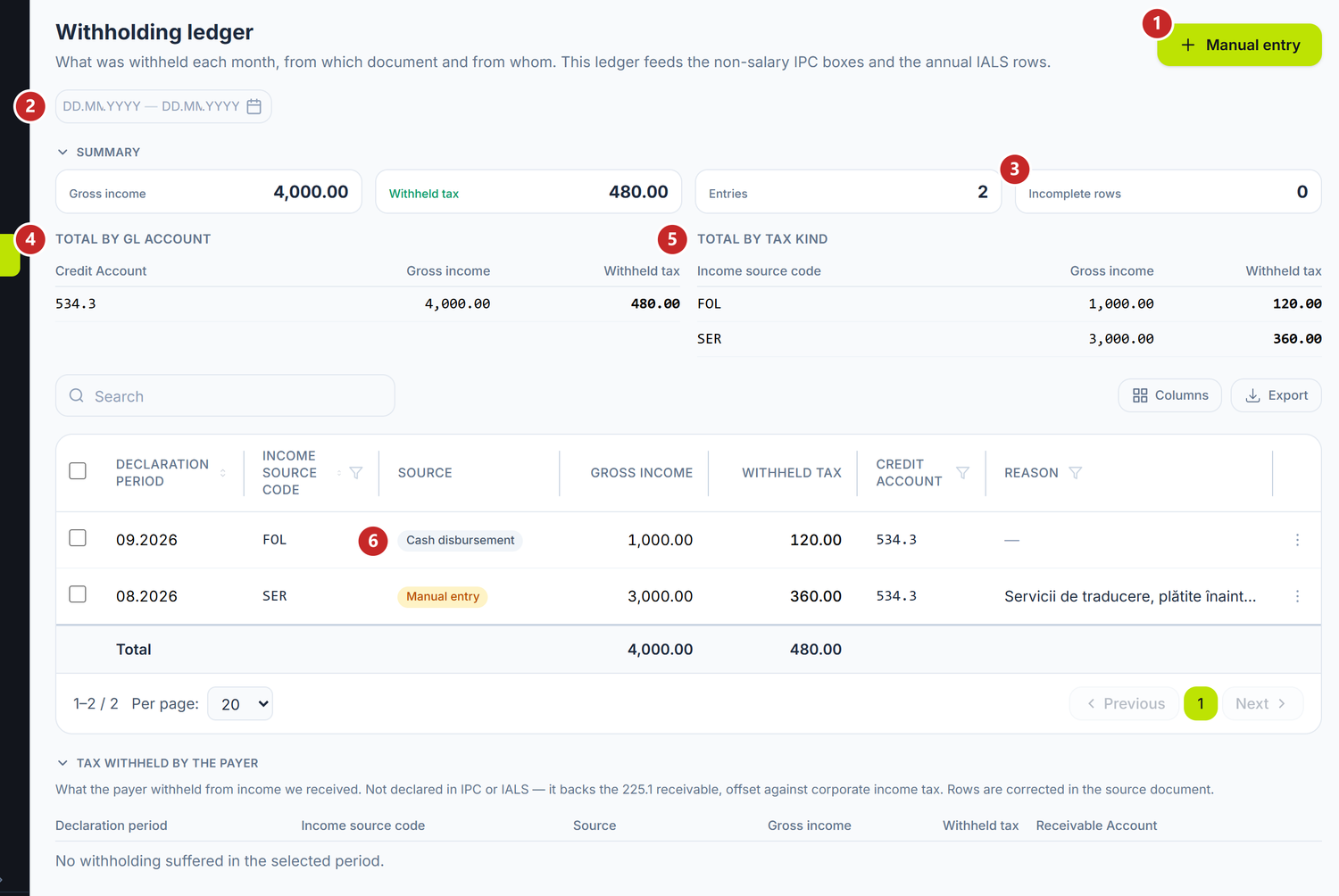
1 manual entry · 2 the period · 3 incomplete rows · 4 the total by account · 5 the total by tax kind · 6 the document the row comes from
Each row shows the declaration month, the income source code (FOL, SER and the others), the document it comes from, the gross income, the tax withheld and the account the liability was recorded on.
Where the rows come from
You withhold on the payment document, with the Withholding tax at source toggle. The row appears in the ledger when you post the document:
- the cash disbursement from the cash desk;
- the outgoing bank operation — including one created from a payment order with withholding, through Create Bank Operation or from the statement row filled in from the order;
- the purchase act from a private individual;
- the advance report, on the rows where the holder paid a private individual.
If you unpost, the row disappears. A row that came from a document isn't corrected here: open the document, correct it and post it again. Otherwise the change would be lost at the next posting.
The summary: what was withheld and where it landed
The cards at the top add up Gross income, Withheld tax and the number of rows, for the chosen period. Below them, two tables split the same figures.
Total by GL account shows how much was recorded on each liability account. The figure compares directly with that account's credit turnover in the trial balance. If they differ, a document was posted without reaching the ledger, or the other way round.
Total by tax kind groups by income source code — exactly as it is declared.
Incomplete rows
The Incomplete rows card counts the rows without a credit account or without a tax kind. They don't melt into the total, because each gap breaks something else: a row without an account reaches the declaration but not the accounts, and one without a tax kind the other way round.
As long as the figure isn't 0, open those rows and complete them before filing the declaration.
To add a manual row
The manual row is for withholdings that have no document in POSfix — for instance, payments made before you moved to the platform. It enters IPC and IALS, but creates no journal entry: you make that one separately.
- Press Manual entry.
- Choose the Declaration period — any day of the month the payment was made in.
- Choose the Partner or the Employee — the person you paid.
- Type the Reason, so you know in a year why the row exists.
- Turn on Withholding tax at source, choose the Tax type, type the Gross income and check the Tax rate.
- Save.
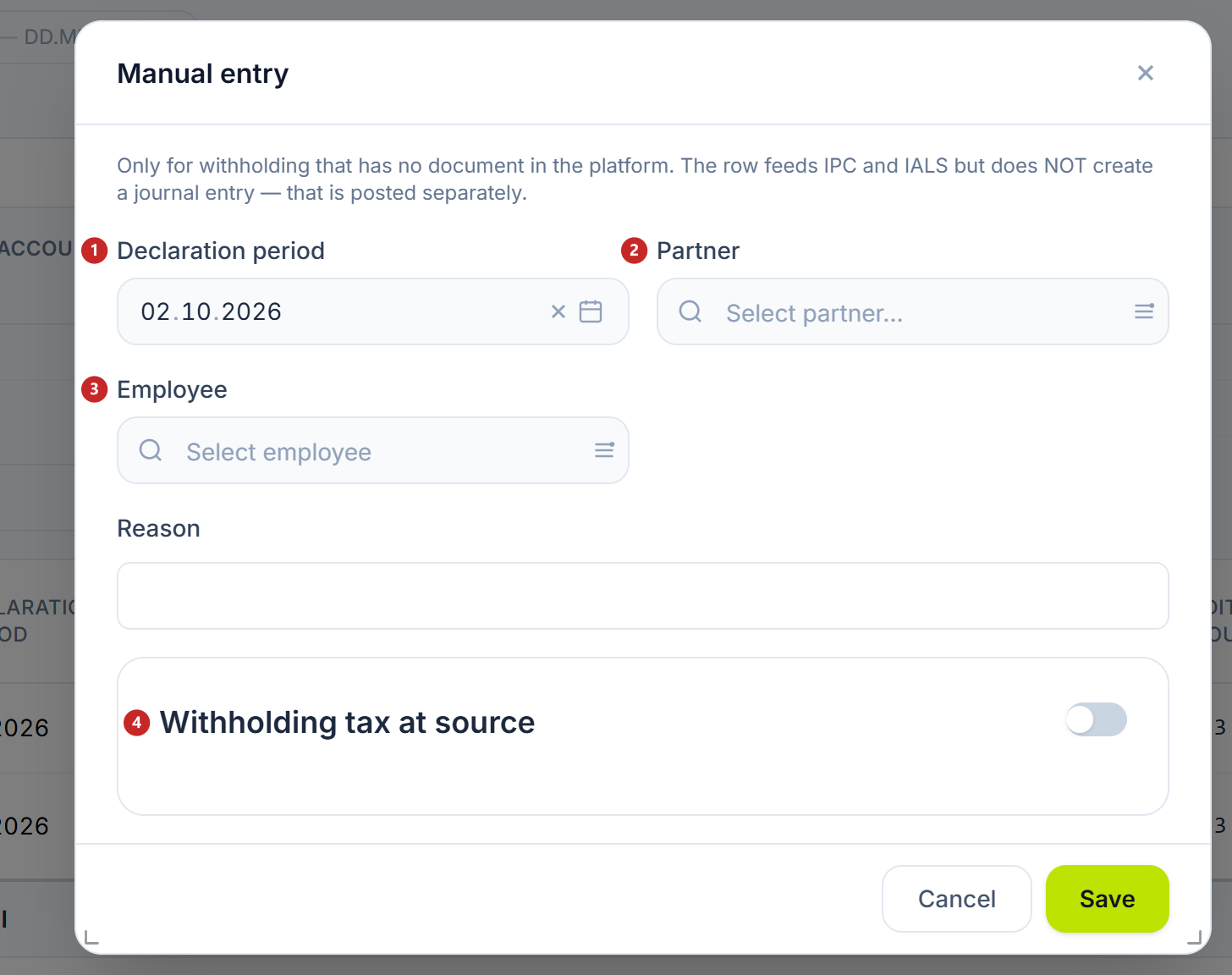
1 the declaration month · 2 the partner · 3 the employee · 4 the withholding block, the same as on payment documents
You open a manual row with a click to correct it, and delete it from the row's three-dot menu.
Tax withheld by the payer
The bottom section, Tax withheld by the payer, holds the other direction: the tax a customer withheld from you, out of the money they paid you. The rows come from cash receipts with withholding.
They aren't declared in IPC or IALS — there you declare only what you withheld. The amount is a receivable from the budget, which you credit against the company's income tax when the withholding isn't final.
What can trip you up
- You made the payment with withholding, but the row doesn't appear — the document isn't posted yet. On a payment order, the withholding reaches the ledger only with the posted bank operation. On an operation that came from an imported statement or one brought in from maib, the order's withholding isn't carried over by itself: complete it on the operation before posting.
- You corrected a row that came from a document and the change disappeared — rows from documents are rewritten at every posting. Correct the document.
- The list is empty — the chosen period doesn't cover the months with payments. Clear the period selector to see everything.
- The total by account doesn't match the trial balance — look in the list for the document posted without withholding or the manual row without an entry.
Related pages
- Payment orders — withholding on the order, which passes into the bank operation
- Cash receipts and disbursements — withholding on the cash disbursement
- Tax obligations — where the figures go: monthly IPC and annual IALS
- Trial balance — the liability account's turnover, to compare with the total