Departments
Departments define the organizational structure of the company. An employee can be assigned to one, and that membership groups the lists, filters the timesheet and lands as an analytical dimension on the payroll journal entry. It does not, however, change the account the salary is recorded on — see below.
Where to find it: Sidebar → Team → the Departments tab
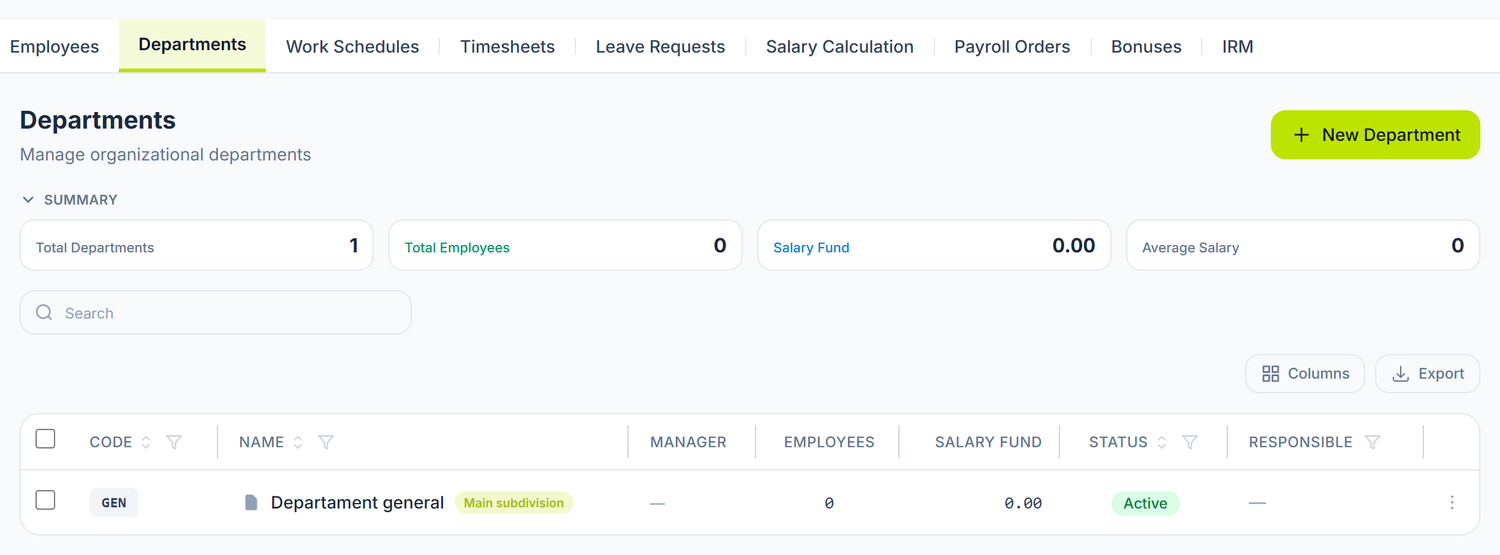
The app says Department almost everywhere — on the tab, on the New Department button, on the field labels; only one toggle is named Main subdivision. In the text we use "department" and "subdivision" interchangeably.
Why you need departments
Departments are usually the first step in setting up the payroll module. They serve several purposes:
- Grouping employees — the employee list and the timesheet can be filtered by department
- Accounting analytics — the employee's department lands as a dimension on every line of the payroll journal entry
- Accountability — each department can have a designated manager
- Tracking the salary fund — for each department the list shows how many active employees it has and what their base salaries add up to
The hierarchy
Departments are organized as a tree — one can contain sub-departments:
Administration
   Accounting
   Human Resources
Production
   Shop 1
   Shop 2
Sales
   Retail
   Corporate
The hierarchy is optional. For a small company you can have only level 1 departments.
The fields of a department
Department Code and Department Name are required. The code is short and uppercase (ADM, CONT, IT), it is unique in the organization and it can no longer be changed after saving — on edit, the field is locked. The rest — Manager, Parent department, Display order, Description — are optional.
A single control changes something outside the screen:
| Toggle | What changes when you turn it on | If you leave it off |
|---|---|---|
| Main subdivision | When another screen needs a default department, it picks this one | The first active department by Display order is picked, then by name |
The row actions
The menu on each row has, besides Edit:
- View Employees — opens the employee list filtered on that department. It is the short way from the structure to the people.
- Deactivate / Activate — a deactivated department disappears from the selectors where you pick a department, but stays on the employees and on the historical documents. It is what you use when a shop closes but you want to keep its past.
The salary fund
In the list, the Employees and Salary Fund columns are computed, not typed by you: the number of active employees of the department and the sum of their base salaries.
Above the list, four indicators over the whole filtered set: Total Departments, Total Employees, Salary Fund and Average Salary.
It is not a planned budget. The salary fund is a sum of current salaries. There is no budget field per department and no plan/actual comparison.
Departments in accounting
When the salary calculation is posted, every line of the journal entry carries the employee's department as an analytical dimension. That is how you track payroll expense by department from the general ledger and from the account card.
The department form has no expense account field. All salaries are debited to the same account, whatever the department. If you need a different allocation, you do it after posting, through a journal entry.
How you create departments
- Open Team → Departments
- Press New Department
- Enter the code and the name
- Select the parent department (if it is a sub-department)
- Optional: pick the manager, the display order and mark it as main
- Press Save
Create the top-level departments first, then the subordinate ones — the parent has to exist before you can select it.
You cannot delete a department that has employees assigned, nor one that has sub-departments. Move the employees and the sub-departments first, then delete it. A department that is no longer used but that you want to keep in history can only be deactivated.
Moving employees between departments
When an employee transfers:
- Open the employee record
- On the Employment tab, change the Department field
- Save
The change shows at the next run of the salary calculation and in the timesheet filters. The record keeps a single current department — the membership history is not stored.
How it connects to other documents
| Document | How it uses the department |
|---|---|
| Employees | Optional field on the employee record |
| Timesheet | Department filter; the code shows under the employee's name |
| Salary calculation | Shows under the employee's name and lands as a dimension on the journal entry |
| Payroll statements | The employee's department travels with the payment line |
| General ledger | Payroll entries carry the department as an analytical dimension |
Frequently asked questions
How many hierarchy levels can I have?
There is no technical limit. In practice, 2-3 levels cover most companies in Moldova. A department cannot be its own parent.
Can an employee belong to several departments at once?
No. Each employee has at most one department at a time.
Can I run the salary calculation for a single department?
The calculation runs over the whole organization, for the selected month. What you can do: exclude individual lines you don't want before posting, or filter the timesheet by department while you fill it in.
What is the salary fund and is it required?
It is not a field — it is a column computed from the base salaries of the department's active employees. There is nothing to fill in anywhere.
Can I rename a department?
The name, yes — it changes everywhere immediately. The code, no: on edit the field is locked, because it identifies the department.
Are departments reported in the IRM?
No. The IRM report contains only hire, termination, suspension and return events — a transfer between departments is not a reportable event and generates no line.
Can I have a department with no employees?
Yes. It will show in the list with 0 employees and a salary fund of 0.
How do I organize the structure for a company with several sites?
You create level 1 departments for each site (e.g. "Head office", "Bălți branch"), then sub-departments for the internal structure of each.
Does the department change the account the salary is recorded on?
No. The account is the same for all departments, and the department attaches to the line only as an analytical dimension. Any other allocation you do through a separate journal entry.
Can I move a sub-department from one parent to another?
Yes. You edit the sub-department and change the Parent department field. The employees in it stay unchanged.
Related pages
- The employee record — the data of the employees assigned to departments
- Timesheet — the timesheet can be filtered by department
- Salary calculation — the department lands on the journal entry
- Trial balance — checking the payroll accounts
- Guide: The full payroll flow — from timesheet to paying the salaries, step by step