The table's bill
The bill holds the dishes ordered at a table: from it the register sends them to the kitchen and, at the end, takes payment for them. The bill isn't the fiscal receipt; the receipt is issued only at payment.
Where to find it: on the register, the right-hand panel, after you open a table from Tables
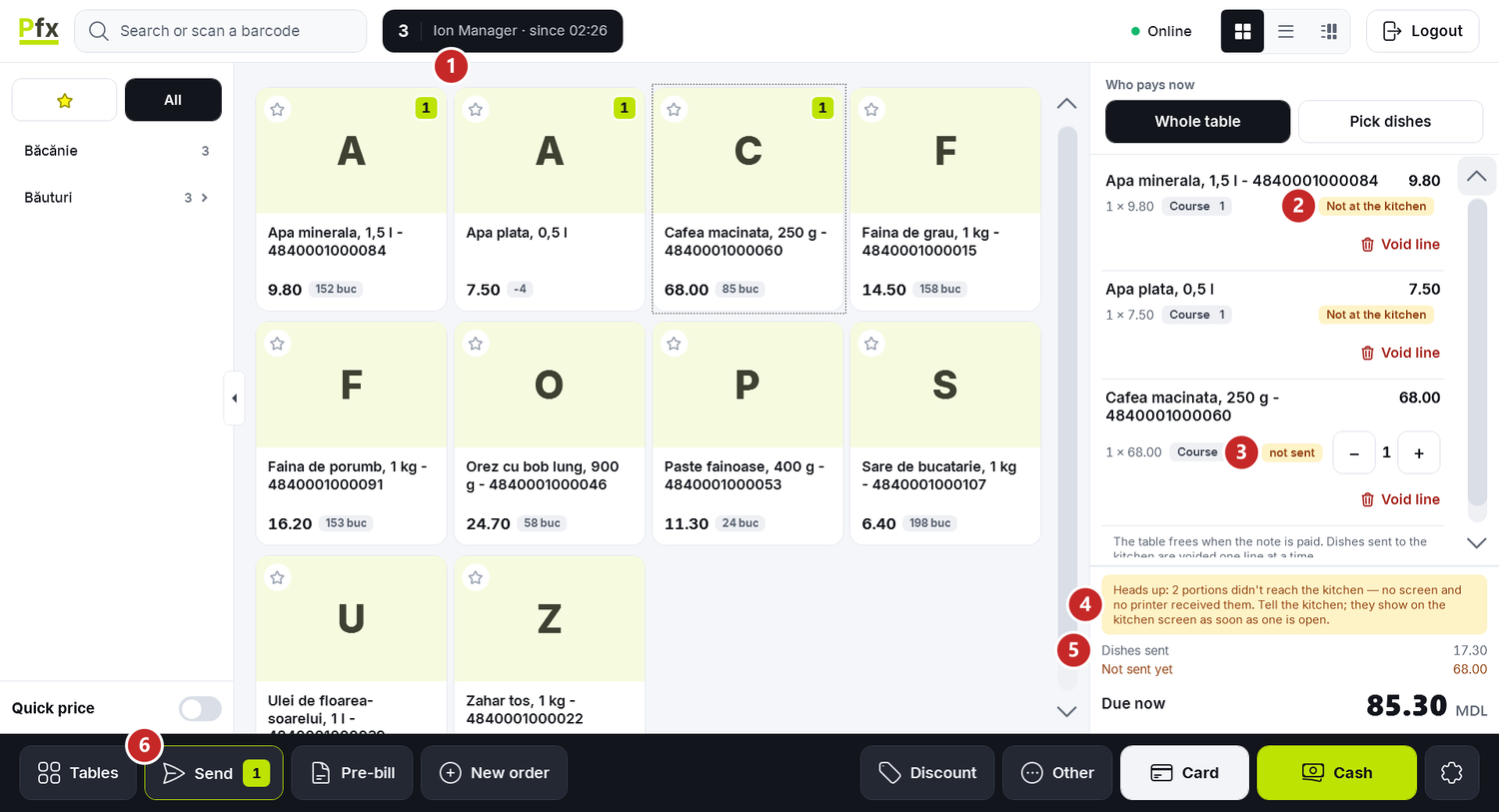
1 the table, the waiter and the opening time · 2 a dish sent that didn't reach the kitchen · 3 a dish not sent yet · 4 the band of portions that didn't reach the kitchen · 5 the bill's subtotals · 6 Send, with the portions to send
In the bottom bar, next to Send, are Tables, Pre-bill and New order, and on the right the payment buttons. Whole table and Pick dishes, above the lines, say who pays — see Pre-bill and paying.
To take the order
- Open the table from Tables.
- Tap the dishes in the menu. Each tap puts a line with one portion on the bill.
- On a line not sent yet, − and + change the number of portions. − on the last portion removes the line.
A dish with required options — how it's cooked, the side dish — first opens the dish window. There you choose the options and the Course — the order in which the dishes are served — and write a Note for the kitchen if you want. Then press Add to the bill.
To send to the kitchen
Press Send. The number on the button says how many portions are to be sent. Every dish not sent yet leaves at once, each with its course number, so the kitchen knows what is served first.
After sending, the line no longer changes: the portions stay as they were, and what's no longer needed is voided. When there's nothing left to send, the button reads All sent.
The state of each line
- Sent 19:31, on green — the dish reached the kitchen at that time.
- not sent — the dish is on the bill but hasn't left yet.
- Not at the kitchen, on amber — the dish was sent, but no screen and no printer in the kitchen received it.
- Voided — the line is voided and isn't paid.
- Paid — the line has already been on a receipt.
- Payment awaiting confirmation — the line is on a receipt issued by the register, and the Coordinator hasn't confirmed the payment yet. Don't take payment for it again.
Not at the kitchen
When a dish doesn't reach the kitchen, the register tells you twice. Right after Send a window appears:

1 how many lines didn't reach the kitchen and why it can happen
Then, while the dish isn't at the kitchen, the amber band sits above the subtotals: "Heads up: 2 portions didn't reach the kitchen — no screen and no printer received them. Tell the kitchen; they show on the kitchen screen as soon as one is open.".
What you do: tell the kitchen what was ordered. The dish shows on the kitchen screen by itself once the screen is open, and the line turns to Sent.
Usually the kitchen screen is closed, the station's printer doesn't answer, or the dish's category goes to no station. You check them in the Coordinator console: The kitchen screen and Settings in the console.
The bill's subtotals
- Dishes sent — what you sent to the kitchen and hasn't been paid yet. It's what left the register, not necessarily what arrived.
- Not sent yet — the dishes on the bill that haven't left yet.
- Paid — what has already been paid, after a receipt for part of the bill.
- Left on the table after this receipt — shows when only part of the table pays, and says what's left to pay.
- Due now — the amount of the receipt you're making now.
To void a line
Press Void line under the line.
- A dish not sent yet is voided on the spot.
- A dish sent to the kitchen asks for a manager's PIN, in the Manager PIN to approve the void window. A manager who is signed in to the register doesn't type their PIN.
- A line that has already been on a receipt can no longer be voided on the bill.
To void the whole bill
Void the note sits under the lines as long as nothing on the bill reached the kitchen and nothing is paid. It's for a table opened by mistake or a customer who leaves before ordering.
- Press Void the note.
- The register asks "Void the note?". Press Void the note once more; Back to the note takes you back.
The register says "Note voided, the table is free.", and the table becomes free again.
When there are sent dishes on the bill, the button is replaced by: "The table frees when the note is paid. Dishes sent to the kitchen are voided one line at a time.". You then void the sent lines, one by one, and then the bill.
What can trip you up
""…" is on the stop-list: the kitchen ran out." The dish ran out and is on the stop list. It comes back to the menu once it's taken off — you see the list under Tables → More → Stop list (what ran out).
"The pre-bill is printed: the bill no longer changes." The guests got the pre-bill, and the venue freezes the bill after it. A manager cancels the pre-bill with their PIN, then the bill can change — see Pre-bill and paying.
"On a note the price comes from the menu. For a quick price, detach the note." The Quick price switch at the bottom left doesn't work on a bill. To sell at a price you type, press New order and sell from the cart, without a table.
"Failed to send course to kitchen". The register didn't reach the Coordinator. Try again in a few seconds; if it repeats, check the main register's computer.
Related pages
- The tables at the register — opening a table and the counter order.
- Pre-bill and paying — the pre-bill, who pays and the receipt.
- The kitchen screen — what the cook sees when you send the dishes.