Shift and time clock at the restaurant register
On the restaurant register, the people's shifts are kept by the Coordinator, not by the register. So a waiter can end their shift on any register of the venue, and the hours reach the panel, under Hours worked.
The shift starts by itself at the first sign-in of the day. Below is only what differs from a shop register: the tables still open and the Coordinator.
Where to find it: on the register, Logout at the top right
To end your shift
- Press Logout.
- At "Going home or just stepping away?" choose End shift. Just sign off takes you off the register, but your hours keep running.
- If you have no open tables left, the shift ends and the register signs you out.
The Sign off window is the same on every register — see Signing in to the register.
To hand over your tables
If you still have open tables or bills, the register doesn't let you leave with them. You give them to a colleague who is on shift:
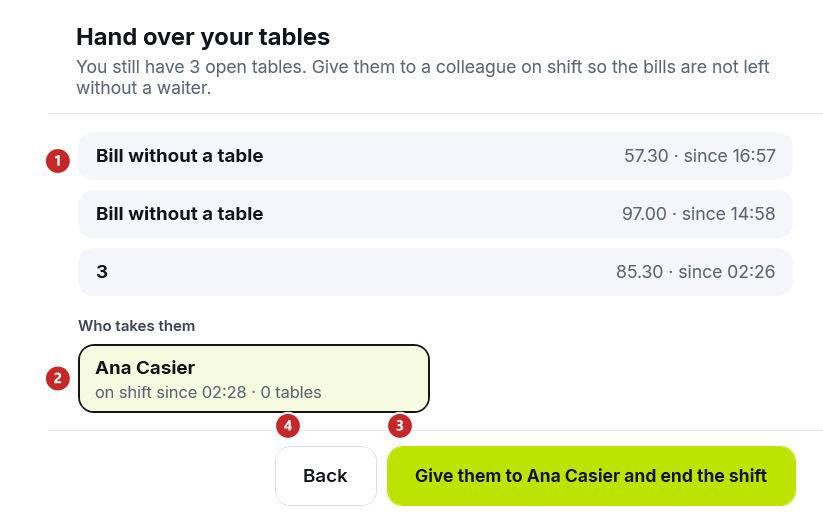
1 your open tables and bills, with the amount and the time · 2 the colleague who takes them · 3 the button that hands them over and ends your shift · 4 Back
- Under Who takes them choose the colleague. Next to the name you see since when they've been on shift and how many tables they have.
- Press Give them to … and end the shift.
The colleague gets all the tables at once and becomes their waiter. You leave the register, with your shift ended.
If nobody else is on shift, the register says "Nobody else is on shift. Settle or close your tables, then end your shift." and keeps you on the register. Take payment for the tables, void the empty bills, then try again.
Time clock only
A person with the Time clock only role types their PIN on the PIN screen of any register in the venue, as on a shop register. On the restaurant register, the time clock goes through the Coordinator, on the venue's network, so it works without the internet too.
If the time clock couldn't be recorded, a red band appears under the keys, with the person's name:
- "Ion, your time was NOT recorded: the Coordinator is not answering. Try again in a minute." — the main register's computer is off or not on the network;
- "Ion, your time was NOT recorded: the Coordinator does not have you on the team yet. Try again in a minute." — the person was added recently in the panel, and the team hasn't reached the venue yet.
In both cases the person types their PIN once more in a minute. What the time clock card looks like and where the role is set: Signing in to the register.
What can trip you up
"The Coordinator is not answering, so the shift could not be ended now. It closes by itself at closing time and shows in the panel as "to check"." The register signs you out anyway. The shift closes at the venue's closing time, and the manager puts in the real time in the panel.
"Not every table could be handed over: one is being paid right now at another register. The shift stays open; try again in a minute." A table was being paid at another register just then. Wait for the receipt, then try again.
Related pages
- Cashiers and waiters — the people, the roles and the hours worked.
- Signing in to the register — the PIN, the time clock and signing off, on any register.
- Floor and settings — the venue's closing time and the waiters' shifts.