Cash desks
The cash desk is the place in POSfix where you keep track of cash: how much money you have on hand, what came in and what went out. You create it once, and from then on the cash receipts and disbursements move its balance by themselves. What this screen doesn't do: it doesn't configure the fiscal device — the cash register is set up in Merchant Center → the Terminals tab.
Where to find it: Sidebar → Money → the Cash Desks tab
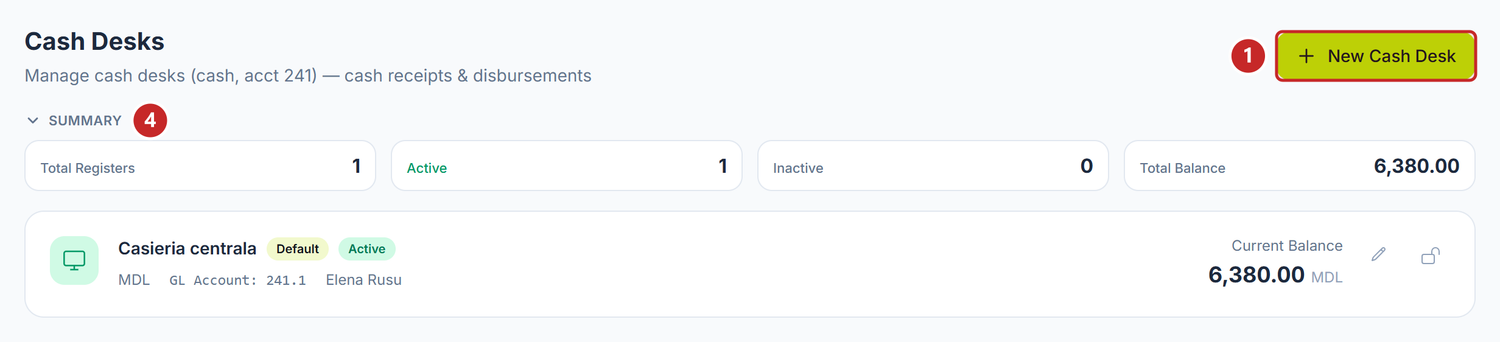
1 the New Cash Desk button · 2 the pencil, opens the desk for editing · 3 the padlock, switches it to inactive · 4 the Summary band
The list shows them all, including the ones taken out of use; the default desk comes first, the rest in alphabetical order. Each card carries the name, the currency, the GL account and the responsible person, and the two icons in the top right corner are its only buttons.
At the top, the Summary band adds up four figures — Total Registers, Active, Inactive and Total Balance — so you can see at a glance where you stand.
To create a cash desk
- Money → the Cash Desks tab → New Cash Desk.
- Type the Name. It is the only field without which the save button stays inactive.
- Check the Currency — it comes prefilled with the company currency.
- Leave the proposed GL Account,
241.1. - Enter the Opening Balance, that is, the cash sitting in the desk today.
- Fill in, if you want, the Responsible Person and the Linked terminal.
- Tick Set as default, if you want it to be the desk proposed automatically.
- Press Create.
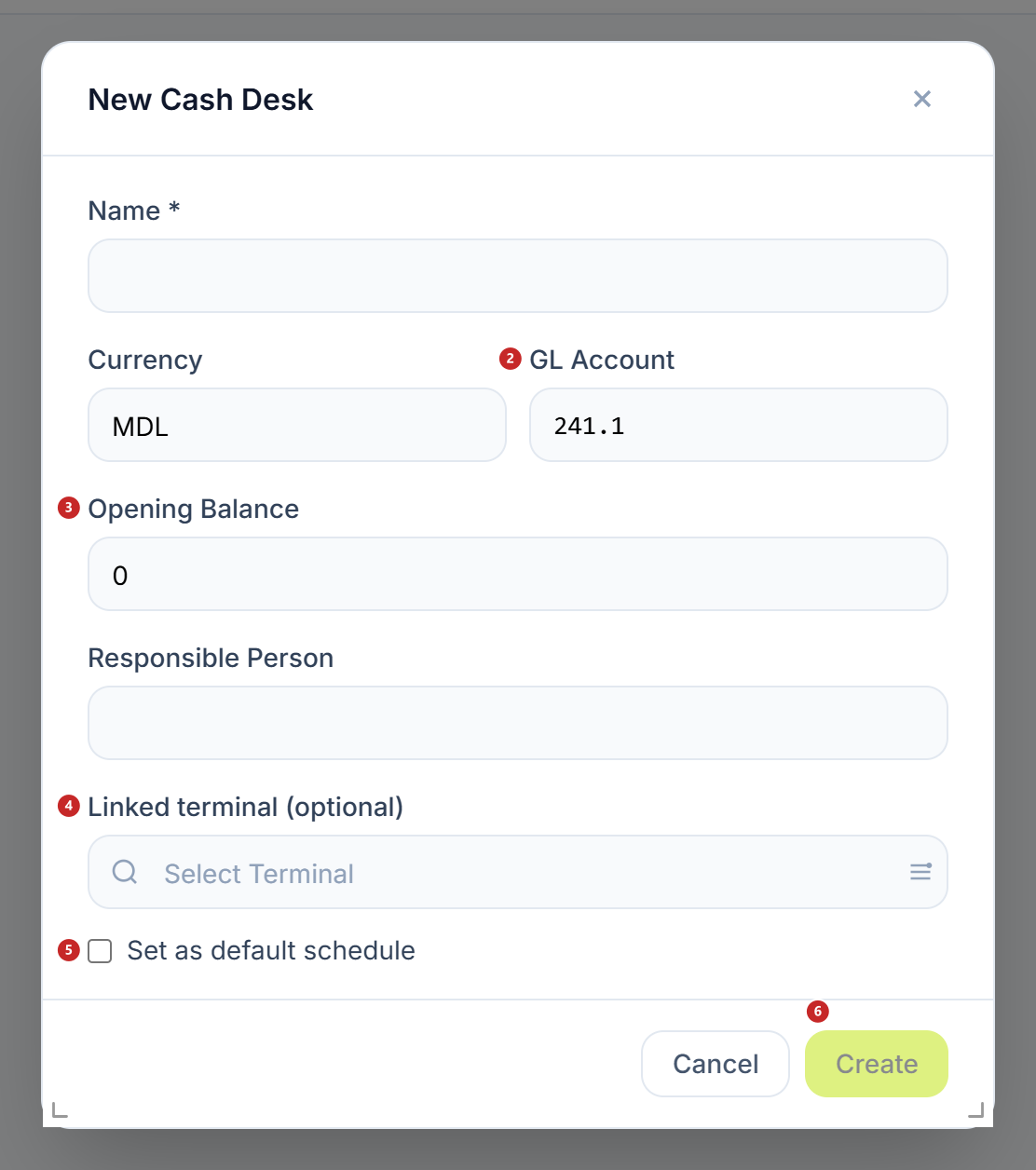
1 the name, the only required field · 2 the GL account · 3 the opening balance · 4 the linked terminal · 5 the default desk · 6 the Create button
If you leave the currency empty, the desk is created on MDL. The responsible person is free text, not a link to the employee sheet — you write it however suits you, but don't go looking for it in the HR records.
When you reopen the desk for editing, the button is called Save, and Cancel closes the window without writing anything.
To take a cash desk out of use
- Press the padlock on its card. It asks for no confirmation, so press it when you are sure.
- The label on the card switches to Inactive.
A cash desk is never deleted, and it is good that it is so — old documents stay tied to it. If you closed it by mistake or want to use it again, press the padlock a second time and the desk comes back active.
Current Balance
The current balance starts from the opening balance, then moves by itself: it adds the posted receipts and subtracts the posted payments. Drafts don't count towards it.
This is also where the most frequent confusion starts. When the figure on the screen doesn't match the money counted in the desk, look first for the documents left in Draft — that is usually where the difference is.
There is one more thing to know about this figure: it counts the cash receipts and disbursements, that's all. If the cash came in by some other route — a journal entry written by hand, a month-end correction — the balance on the card lags behind, even though the money is there in the ledger. The bank account, the neighbouring screen, takes its balance straight from the ledger, so the two are not read the same way. When in doubt, the figure in Accounting → Trial Balance, on account 241, is the one that counts.
The current balance is recomputed on the spot, because it always starts from the opening balance. The posted documents stay where they are — only the starting point moves, by exactly the difference you wrote. Touch this field only when the starting amount was wrong from the beginning; for day-to-day corrections you have the cash receipt or the cash disbursement.
The default cash desk
The Default label marks the desk the panel proposes by itself on documents where you don't choose another. It is a convenience, if you work most of the time with the same desk.
One detail that surprises: deactivating doesn't lift the label. A closed default desk is no longer proposed anywhere, but it stays marked as the default, so tick another desk explicitly after you take the first one out of use.
The account goes on the document, not on the desk
The journal entry is made on the account written on the cash receipt or cash disbursement, and if you leave it empty there, on 241.1. The account on the desk's sheet doesn't propagate into the entry. So if you keep the desk on another analytical account — 241.2, for example, for the desk of a workplace — write the account on every document, not just in the sheet.
The Linked terminal field on the sheet is a reference link: it notes which cash register the desk corresponds to, so you can find it again easily. It changes nothing in the calculation and doesn't link receipts automatically.
The toggles
| Toggle | What changes when you turn it on | If you leave it off |
|---|---|---|
| Set as default | The card gets the Default label and moves first in the list, while the label disappears from the old desk | Documents where you don't choose the desk fall onto the first active desk |
| The padlock (Deactivate) | The label switches to Inactive, and the Active figure in Summary drops by one | The desk stays active and appears on new documents |
| Summary | The band with the four figures collapses, and the panel remembers the choice until your next visit | The figures stay open |
What can trip you up
Insufficient cash in register …. Required: 500, Available: 120. — the desk balance is below the amount you are trying to pay, and the message tells you exactly how much you have available. As a rule, receipts are missing in Draft: post them and the payment goes through.
An inactive cash desk still appears in the list on the documents. The panel asks only for the active desks, but the server ignores the request for now. You don't have to leave the form to check: the cash desk search window has an Active column.
Total Balance doesn't match anything. The figure in Summary adds all the desks together, including the ones held in another currency, so it has no way of coming out as a meaningful amount. The balance you can rely on is the one on each card separately.
The terminal is missing from the list. It means it isn't registered in Merchant Center. You add it there, then reopen the cash desk window and it appears.
Related pages
- Cash receipts and payments — the documents that move the cash desk balance
- Bank accounts — the same thing, for the money in the bank
- Bank operations — depositing cash at the bank
- Opening balances — the company's opening balances