Goods receipts
A goods receipt confirms the physical reception of the goods at the warehouse, when the invoice hasn't arrived yet. You use it so your stock is right from the day of unloading, not from the day the paperwork shows up.
Where to find it: Sidebar → Purchases → the Goods Receipts tab
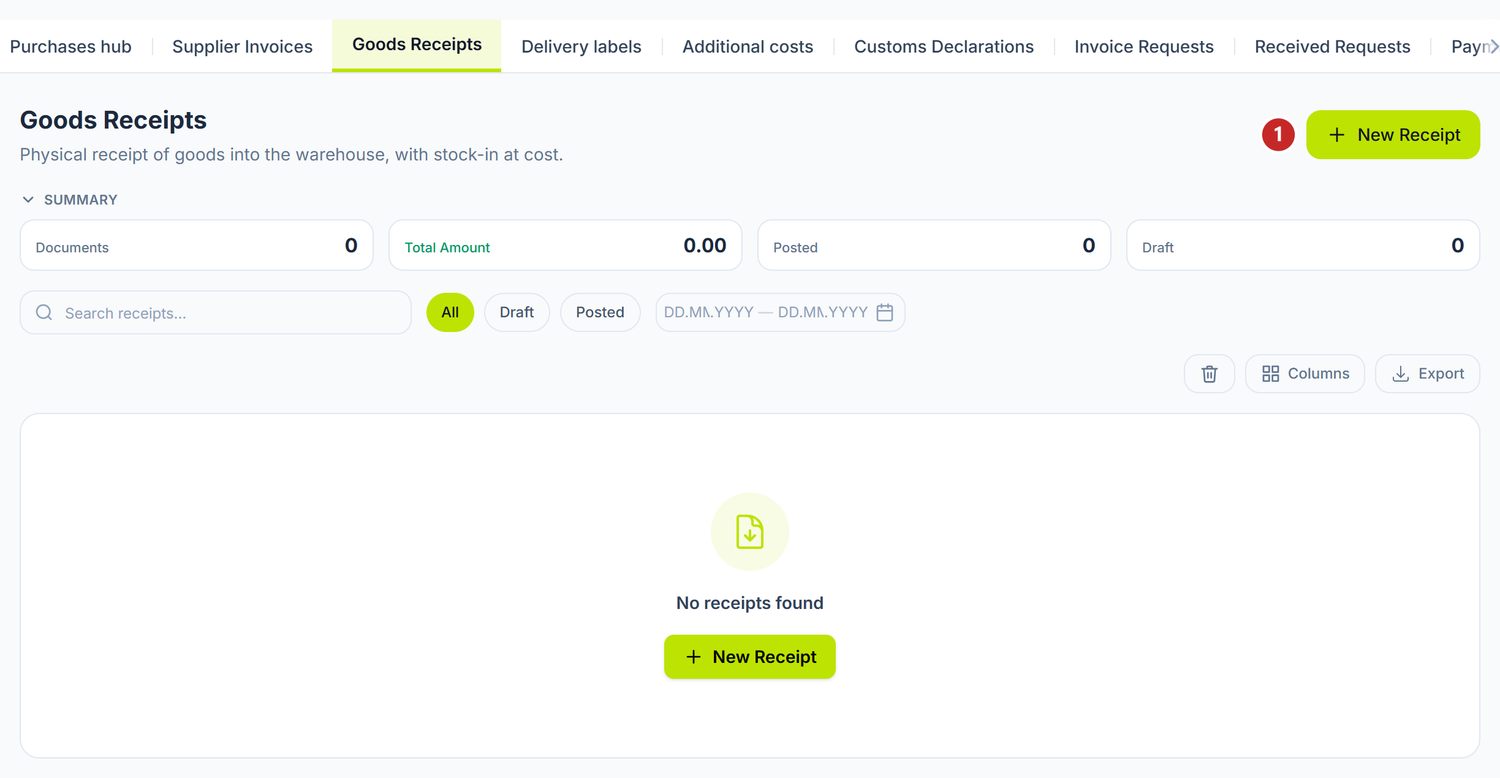
1 new goods receipt
When you need a goods receipt
- The goods arrive on Friday, the invoice comes on Monday.
- You want the warehouse keeper to confirm quantities without waiting for accounting.
- You want to compare what was received against what was invoiced.
If the goods and the invoice come together, skip the receipt: tick Include reception straight on the supplier invoice.
What you do here
- Open Purchases → the Goods Receipts tab and press New Receipt.
- Fill in the Date — the date of the actual reception.
- Pick the Supplier.
- Pick the Warehouse. That is where stock grows on confirmation.
- Pick the Currency. For a foreign currency the day's BNM rate also appears, and you can override it.
- Add the lines: product, quantity, unit, purchase unit price. With Add from nomenclature you bring in several items at once, instead of hunting them down one by one.
- Fill in Validity / lot on the lines with perishable products.
- Press Save. The document stays a Draft.
- Once the quantities are checked, press Post. The badge on the receipt turns to Confirmed — the goods receipt doesn't use the word "Posted", even though the button is the same as on every other document.
The form's fields
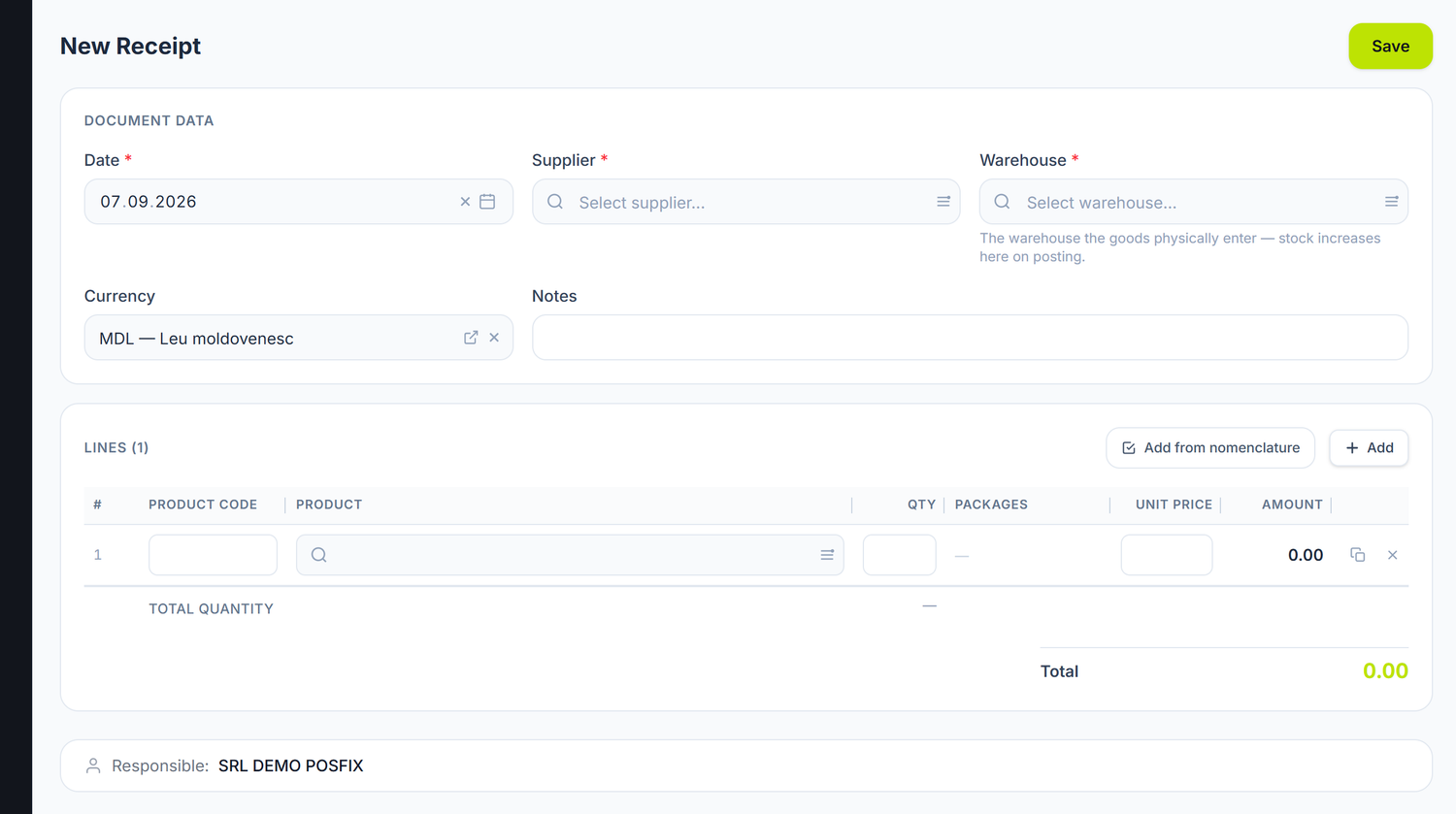
The form has two zones: the header and the line table. Lines are added in two ways. Add puts an empty row in, where you type the code or search for the product. Add from nomenclature opens the full list with tick boxes: you pick several items at once, you can tick everything from a single box, and you type the quantity right there, on the row — much faster on a delivery with many articles.
At the bottom, the Responsible bar shows who drew the document up; it fills itself in with the signed-in user. After saving, the organization's owner or an administrator can reassign it to someone else.
A few columns are not visible on an empty receipt — they appear only when the lines call for them. Which ones and when, below.
| Field | What it means | Required |
|---|---|---|
| Date | The reception date. The journal entry is made on this date | Yes |
| Supplier | Who you received the goods from | Yes |
| Warehouse | Where the goods physically enter. On posting, stock grows here | Yes |
| Currency | The currency of the prices on the lines | No |
| The BNM rate | Appears only for a foreign currency. It fixes the stock cost | Conditional |
| Notes | Internal remarks | No |
The rows always carry Product Code, Product, Qty, Packages, Unit price and Amount. The remaining columns appear only when they have something to show:
- UoM and Enters stock — when some product on the document has packages declared. The second tells you the real quantity landing in stock, in the base unit: you type "2 sets" and see 20 pieces coming in.
- Validity / lot — when some row is a perishable product. It isn't one field but three: Made, Expires and Supplier lot no. You set the production date and the expiry fills itself in, from the product's shelf life. You can change it.
Packages is an active column only on products kept in measured lots — rolls, bales, pieces of varying length. The button on the row opens Package breakdown, where you write the groups as "count × size": 3 rolls × 25 m, 2 rolls × 18 m. The row's quantity is made from their sum, so you no longer compute it yourself. On ordinary products the column shows a dash.
What happens on posting
A goods receipt does one thing: it puts the goods into the warehouse, at the cost on the document. The debt to the supplier is created by the invoice, not by the receipt — which is why the credited account is a transit one until the invoice arrives.
The document lifecycle
The receipt goes through Draft → Confirmed → Deleted.
| State | What you can do |
|---|---|
| Draft | Edit freely. Stock doesn't move. You can Delete the document. |
| Confirmed | Stock has grown, the journal entry exists. The form is locked. |
To correct a confirmed receipt, press Unpost from the ⋯ menu. The entry is deleted, stock returns, and the document goes back to Draft.
What you can do on a confirmed receipt
| Button | What it does |
|---|---|
| Record invoice | Opens a supplier invoice, pre-filled and linked to this receipt |
| Allocate cost | Spreads transport, customs or insurance over the receipt's lines |
The Record invoice button only shows while the receipt has no invoice linked to it yet.
Print labels appears on any saved receipt, if you turned label printing on in the settings. It opens the label panel on the goods from this receipt, so you no longer look the products up one by one.
Special cases
From receipt to invoice
The correct flow is: goods receipt → Record invoice → the invoice picks up the lines and is linked to the receipt. On an invoice started this way, the Include reception tick stays locked, with the message "Reception is handled by the linked goods receipt." The goods do not enter stock a second time.
Differences at reception
You record the quantity actually received, not the one on the invoice.
Example. You ordered 500 kg of flour, you received 480 kg. The receipt has 480 kg. When the invoice for 500 kg arrives, you take the difference up with the supplier: either you get a top-up delivery, or a correction invoice.
Goods that arrived without a firm price
You fill in the price from the order or the offer. When the invoice arrives with a different price, the price difference is reflected on the linked invoice, which adjusts the stock value.
Several receipts for a single delivery
Every physical reception is a separate receipt. Goods arriving in batches get one receipt per batch.
Reception in foreign currency
You pick the currency and check the rate. The panel takes the day's BNM rate; the BNM ✓ badge tells you the value comes straight from BNM. If you change it by hand, you get a warning. The stock cost is fixed at the rate on the document.
Common mistakes
| Mistake | Consequence | How to avoid it |
|---|---|---|
| You make a receipt, then a brand-new invoice with Include reception ticked | The goods enter stock twice and the debt is doubled | Start the invoice from the receipt, with Record invoice |
| You record the quantity from the invoice, not the one you counted | Stock doesn't reflect reality | Count physically and enter the actual quantity |
| You forget to post the receipt | Stock doesn't grow, the inventory reports are wrong | Check the drafts in the list periodically |
| You leave the wrong warehouse | The goods show up in a different shop | Check the Warehouse before posting |
Troubleshooting
| Problem | Cause | Fix |
|---|---|---|
| Stock doesn't grow after saving | The document is a Draft | Press Post. |
| I can't find the supplier in the selector | The partner doesn't have the Supplier role | Open the partner card → Partner Roles → tick Supplier. |
| The Record invoice button doesn't appear | The receipt is still a draft, or it already has an invoice linked | Post it. If it has an invoice linked, open it from the links panel. |
| The quantity in the Enters stock column differs from what I entered | You picked a package holding several units | That's normal. The column shows the quantity in the base unit. |
| I posted it wrong | The document is locked | The ⋯ menu → Unpost → correct it → post again. |
Frequently asked questions
Do I need a goods receipt for every invoice?
No. You use it only when reception happens before the invoice. For services or purchases with no goods, the invoice is enough.
Does the goods receipt update stock?
Yes, but only on posting. While it's a draft, stock doesn't move.
Why has it no VAT?
Without a fiscal invoice you have no right of deduction. VAT appears on the supplier invoice, which also closes the debt on 521.4.
Can I link several receipts to a single invoice?
The panel's flow links the invoice to a single receipt, through the Record invoice button. For deliveries in batches, one invoice per receipt is cleanest.
Does the receipt show in the VAT return?
No. VAT enters the ledger together with the supplier invoice.
What if I received less than I ordered?
You record the actual quantity. You clarify the difference with the supplier before posting the invoice.
Can I import goods receipts from e-Factura?
No. From e-Factura you generate supplier invoices. The receipt you make at the physical reception.
Related pages
- Supplier invoices — the document with VAT that closes the debt on
521.4 - Partners — the supplier register
- Warehouses — where the goods are unloaded
- Stock movements — quantity corrections outside purchases
- Returns — the goods that go back to the supplier