Warehouses
A warehouse is a physical storage location — a shop, a storeroom, a central depot or a place of business. All quantitative and value records of stock are kept per warehouse, so at any moment you can see what you have, in what quantity and where.
Where to find it: Sidebar → Nomenclature → the Warehouses & Stores tab
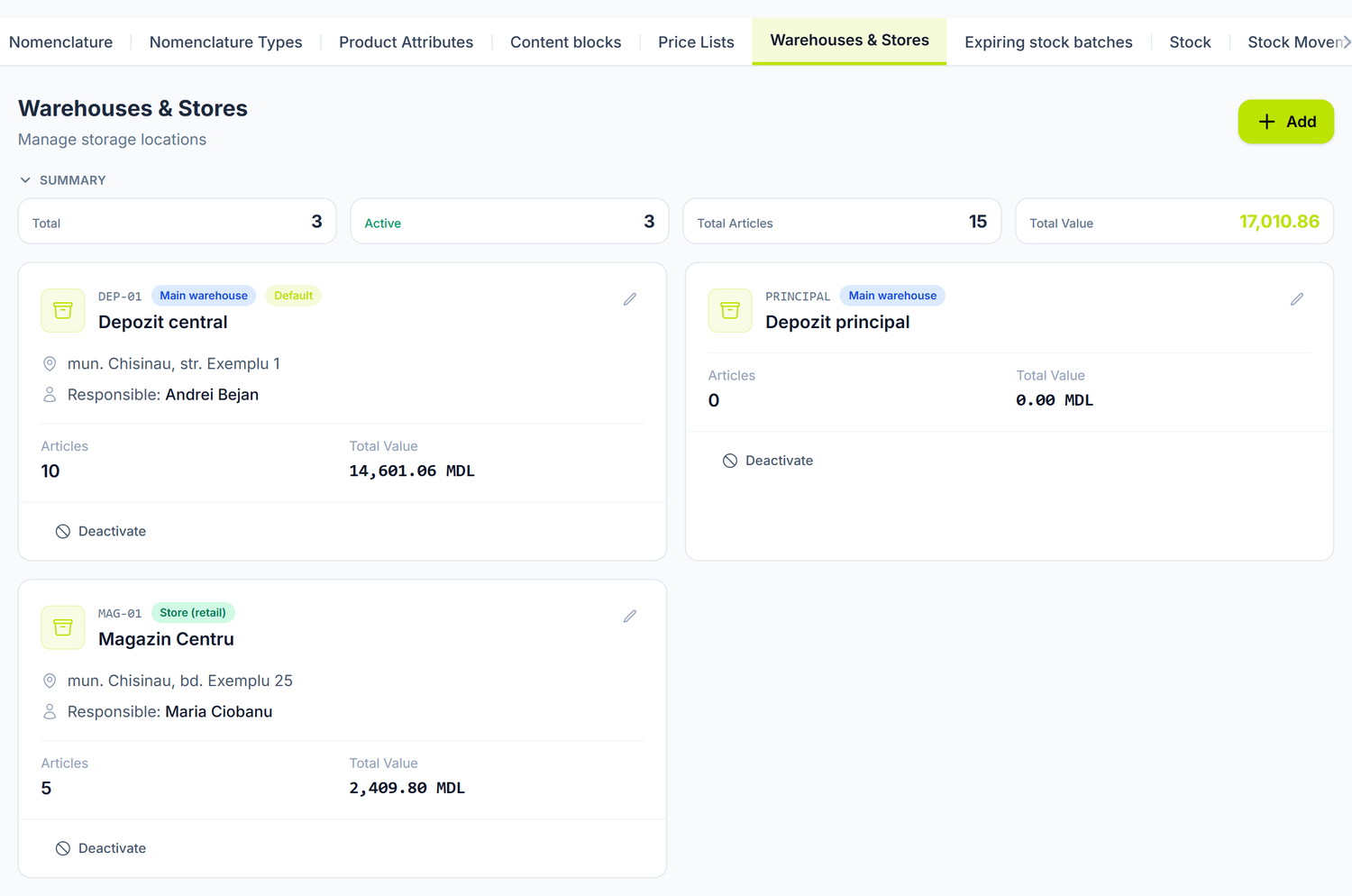
Each warehouse is a card, with its type, the number of articles and the value of its stock. The figures at the top add them all up. The actions sit on the card: the pencil opens it for editing, and Deactivate drops it out of the selection lists without erasing its history.
Why you need warehouses
Without at least one warehouse configured you cannot work with stock. The warehouse is a required or contextual field in:
- Goods receipts — the goods enter a specific warehouse
- Stock movements — a transfer runs between two warehouses; a write-off and a surplus, on one
- Inventory counts — the physical count is done per warehouse
- Sales documents — the stock is relieved from the warehouse indicated
Set the warehouses up before you record any stock movement. Adding a new warehouse later is possible, but moving the existing stock takes transfer documents.
To create a warehouse
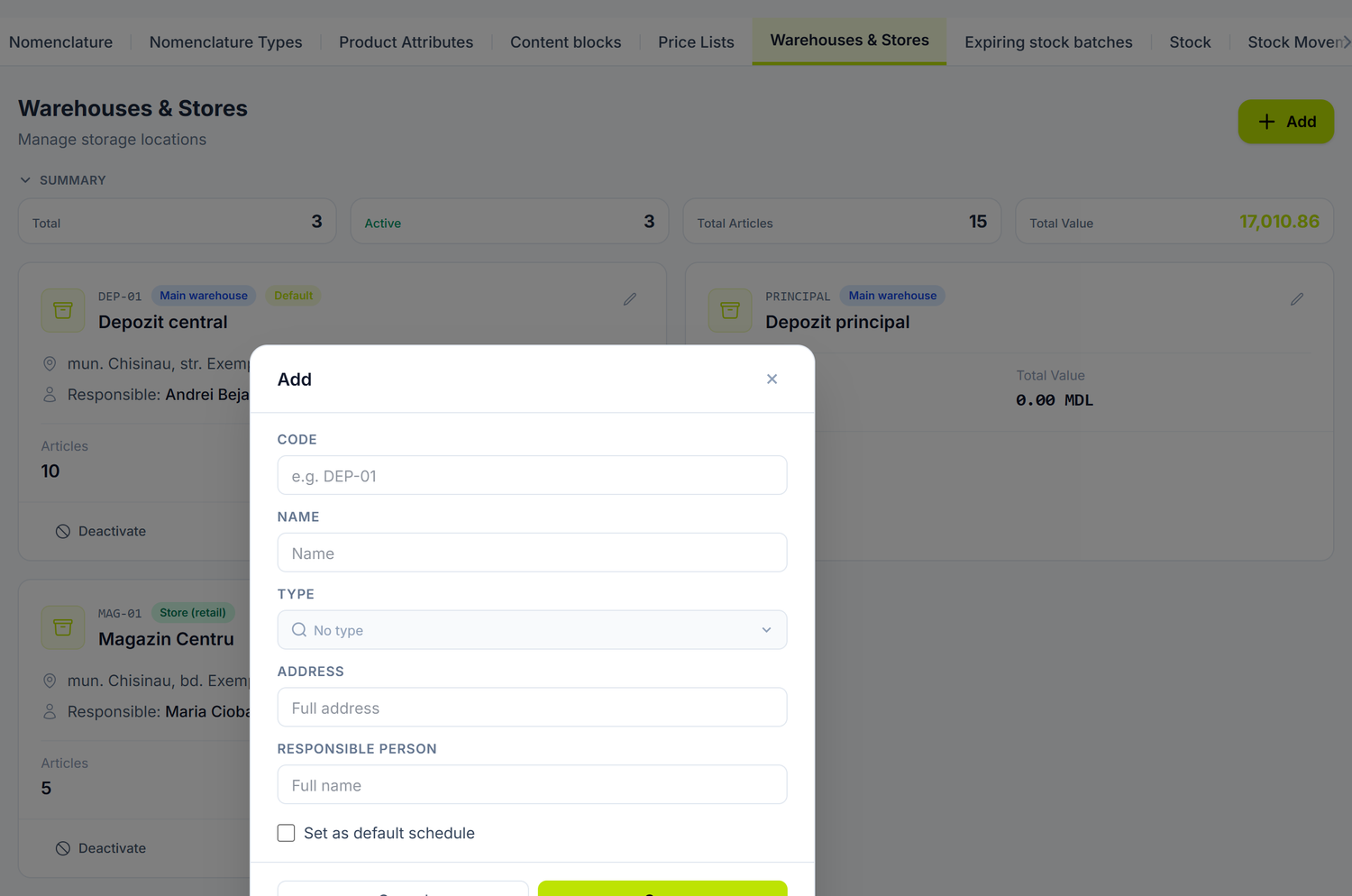
The window opens over the list, and everything a warehouse needs fits inside it.
- Press Add.
- Write the Code and the Name. The code is final after saving; the name can be changed at any time.
- Pick the Type (what each one means, below). Address and Responsible Person are optional.
- Save.
The form has a single toggle:
| Toggle | What changes when you turn it on | If you leave it off |
|---|---|---|
| Set as default | The warehouse is preselected in new documents, and the one that was default until then loses the mark | You pick the warehouse every time |
The active / inactive state is not edited from the form — you switch it from the warehouse card, with the Deactivate / Activate button.
The warehouse has no negative-balance setting in the panel. The balance can go below zero, and forbidding that cannot be requested from the interface — see Stock movements.
Warehouse types
| Type | When you use it |
|---|---|
| Main warehouse | The central supply depot |
| Store (retail) | A place of business with a till |
| Storage | A secondary storage space |
| Production warehouse | Feeds the production shop |
| Transit warehouse | Goods in transit between locations |
The default warehouse
Only one warehouse can be the default — the invariant is guarded by the platform, so you cannot end up with two. If you have a single location, mark it as default and stop picking it on every document.
The responsible person (the custodian)
The field identifies the warehouse custodian. The name shows on the card in the list, and you can use it on inventory-count and handover records.
The responsible person is free text, used for identification. It generates no journal entries and does not limit who can work in that warehouse — working rights come from the user's permissions.
Typical setup scenarios
A single warehouse — a small company
"Optim Serv" SRL in Chișinău has one site with one storeroom. It sets up one warehouse ("DEP-01 — Central warehouse", type Main warehouse) and marks it as default. Every movement is recorded there.
A central warehouse plus places of business
"Casa Materialelor" SRL in Bălți has a central wholesale warehouse and 3 retail shops. It sets up 4 warehouses:
- DEP-CENTRAL (Main warehouse) — supply from suppliers
- MAG-01, MAG-02, MAG-03 (Store) — fed through stock transfers from the central warehouse
Specialised warehouses
A furniture factory separates its materials by location:
- DEP-LEMN (Production warehouse) — raw materials
- DEP-ACCESORII (Storage) — fittings and accessories
- DEP-PRODUSE (Main warehouse) — finished furniture
What you see on the warehouse card
The card shows how many items have a balance other than zero (Articles), what the stock in that location is worth and who the custodian is, if you filled it in. It also carries the Default badge on the default warehouse and Inactive on the deactivated ones.
The item-by-item breakdown is in Nomenclature → Stock → Stock Balances, filtered by warehouse.
The warehouse brings no account of its own
The warehouse does not bring its own stock account. The account comes from the item's category, and the warehouse is written as the second subaccount on it.
Two practical things follow. A transfer between warehouses leaves the same account on both sides and changes only the subaccount, so you don't need separate analytical accounts per location — you read the per-warehouse balances from Stock Balances or from the account card, expanded by subaccount.
When the transfer genuinely calls for a different account — handing goods over for sale in your own shop, for instance — you write it on the transfer document, in Debit Account and Credit Account. The warehouses stay on the subaccount, as on any transfer.
Active and inactive warehouses
An inactive warehouse no longer appears in the selection lists of new documents, but its history stays intact. Deactivate a warehouse when:
- The physical location has been closed
- The stock has been moved entirely to another warehouse (through a transfer)
- The warehouse was created by mistake
The platform does not stop you from deactivating a warehouse that still holds stock — the check stays with you. Before deactivating, open Nomenclature → Stock → Stock Balances, filter on that warehouse and transfer or consume everything left. Otherwise the value stays in the trial balance, in a location you no longer see in new documents.
The link with other documents
- Goods receipts — goods are received into a specific warehouse
- Stock movements — transfers between warehouses, write-offs, surpluses, opening stock
- Inventory counts — the physical count is done per warehouse
- Sales documents — stock relieved from the selected warehouse
- Products — the per-warehouse stock is shown in the card's Warehouses & Stores tab
Frequently asked questions
How many warehouses can I create?
There is no technical limit. Create as many as reflect the reality of your organization, but don't fragment excessively — every extra warehouse means more transfers to manage.
Can I delete a warehouse?
From the list you only have Deactivate — deletion is not offered in the interface, precisely so that the movement history stays readable. Deactivating drops the warehouse out of the selection lists without touching the existing documents.
Does the warehouse influence the GL account?
No. The account comes from the item's category; the warehouse is written as a subaccount on the stock account. A transfer keeps the same account on both sides and changes only the warehouse subaccount.
What is the "in transit" warehouse?
It is a warehouse type from the list (Transit warehouse), used for goods on the road between locations. It works like any other warehouse — useful when transport between points takes more than a day and you want to see separately what is under way.
Do I have to have a custodian on every warehouse?
Not in the platform — the field is optional. Fill it in on every active warehouse anyway: the name reaches the warehouse card and comes in handy at inventory counts and handovers.
Can I run an inventory count on several warehouses at the same time?
You create one inventory-count document per warehouse, because each warehouse has its own stock. You can keep several counts open in parallel, but each stays a separate document.
How do I transfer all the stock from one warehouse to another?
You create a stock movement of type Transfer, with the source and destination warehouses, add the items with their quantities and post it. The Add from nomenclature button brings several items in at once.
What happens to the old documents if I deactivate a warehouse?
Nothing — the existing documents stay unchanged and in the history. The deactivated warehouse only stops appearing in the selection lists of new documents.
Can I have a warehouse with no physical address?
Yes, the address is optional. Useful for "logical warehouses" — goods held at a partner's, for instance.
How do I see all the movements of a warehouse?
Open the stock movements list and filter by warehouse. For the accounting view, use Nomenclature → Stock → Stock Ledger or the account card on the stock account, expanded by the warehouse subaccount.
Can I change the warehouse code?
Not after creation — the field becomes non-editable. The name, type, address and responsible person can be changed at any time.
How do I organise the warehouses if I have several localities?
One warehouse per physical location, with clear coding: CHI-01 (Chișinău), BAL-01 (Bălți), CAH-01 (Cahul). Supply runs through transfers from the central warehouse or through goods receipts straight into each location.
Related pages
- Products — the catalogue of items kept in stock
- Stock movements — transfer, write-off, surplus, opening stock
- Physical inventory count — checking the stock per warehouse
- Goods receipts — receiving goods into a warehouse
- Trial balance — balances on the stock accounts