Physical inventory count
The inventory count compares what you counted in the warehouse with what the records show, item by item. On confirmation, the differences can turn into documents by themselves: a surplus for the goods found in excess and a write-off for the shortage, both posted. While it is a draft, the count doesn't move stock.
Where to find it: Sidebar → Nomenclature → the Inventory Counts tab
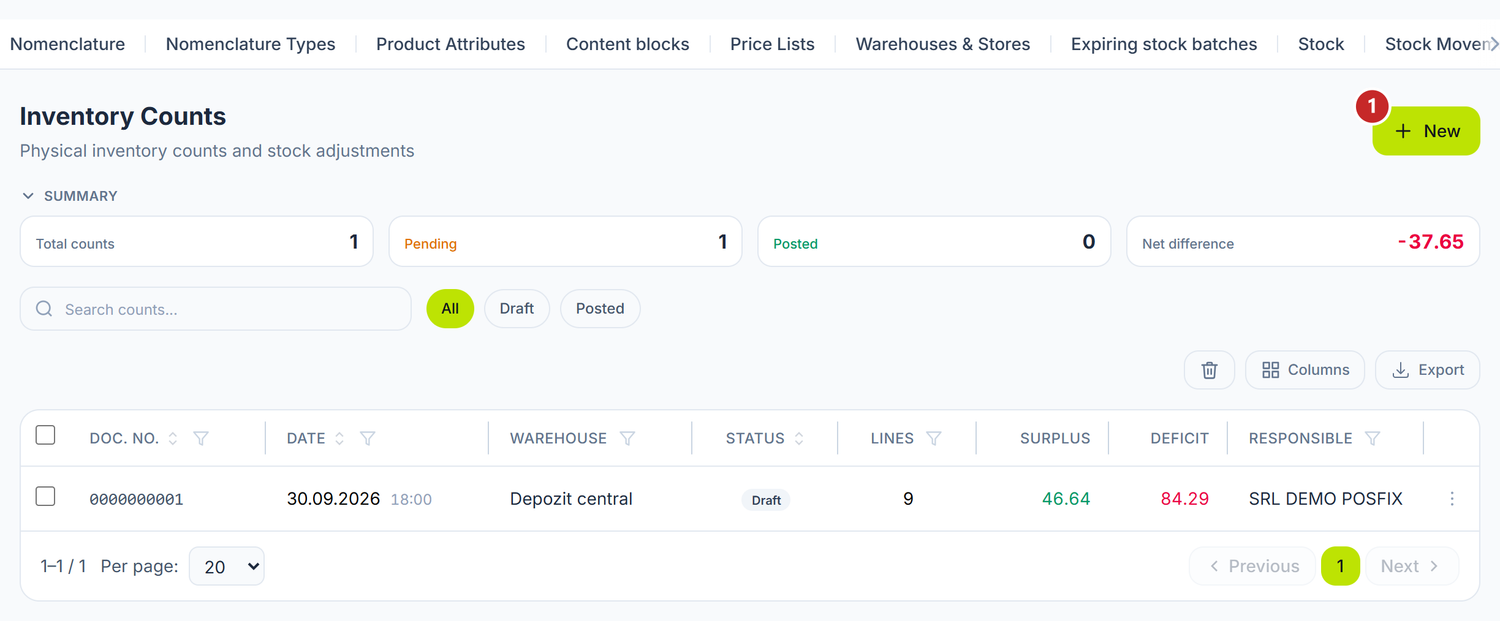
1 new count
The Surplus and Deficit columns show at a glance how much was found in excess and how much is missing. While the document is a draft, the figures can still change.
To run an inventory count
- Press New.
- Choose the Count date and time and the Warehouse.
- Add the commission members.
- Turn on Generate adjustment documents automatically if you want the surplus and the write-off made by themselves — on a new document it is off. With it on, Restore VAT on shortage appears too.
- On the lines below, press Load Stock from Warehouse and correct the quantity wherever you counted something different.
- Save, then Confirm.
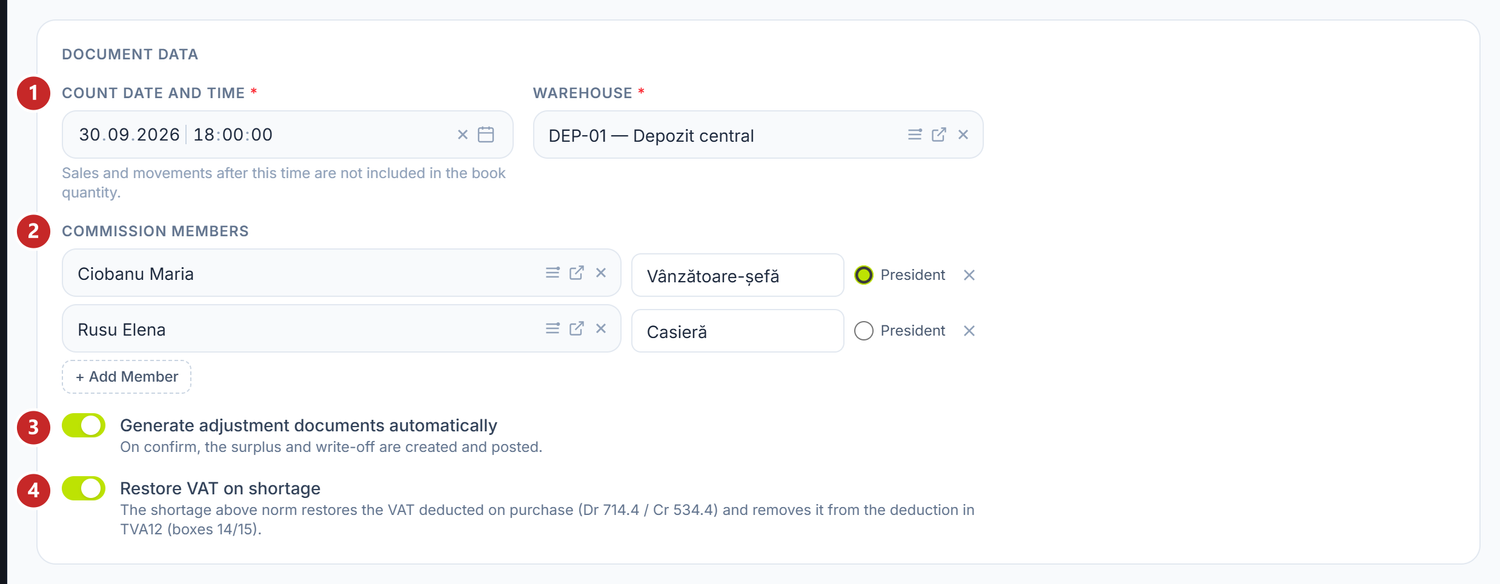
1 the moment of the count · 2 the commission · 3 the adjustment documents · 4 VAT on the shortage
Count date and time matters down to the minute. The book balance is taken from the records up to that moment, so sales made after you started counting don't spoil the arithmetic.
On a saved document that has lines, the panel asks before changing the day or the warehouse: on a new day it re-reads the book balance and keeps what you counted, on another warehouse it replaces the lines. On one not yet saved the change applies at once, so choose the warehouse before you start typing quantities. A changed hour applies on save.
The commission
The commission members are chosen from the list of employees. Next to each one you type the role and mark a single President. On confirmation, the commission also goes onto the generated write-off act, which is where it's printed from.
The lines and the count
Load Stock from Warehouse brings all the items with a balance, with their book quantity and cost. If you count only a few items, add them one by one from the search field or with Add from nomenclature.
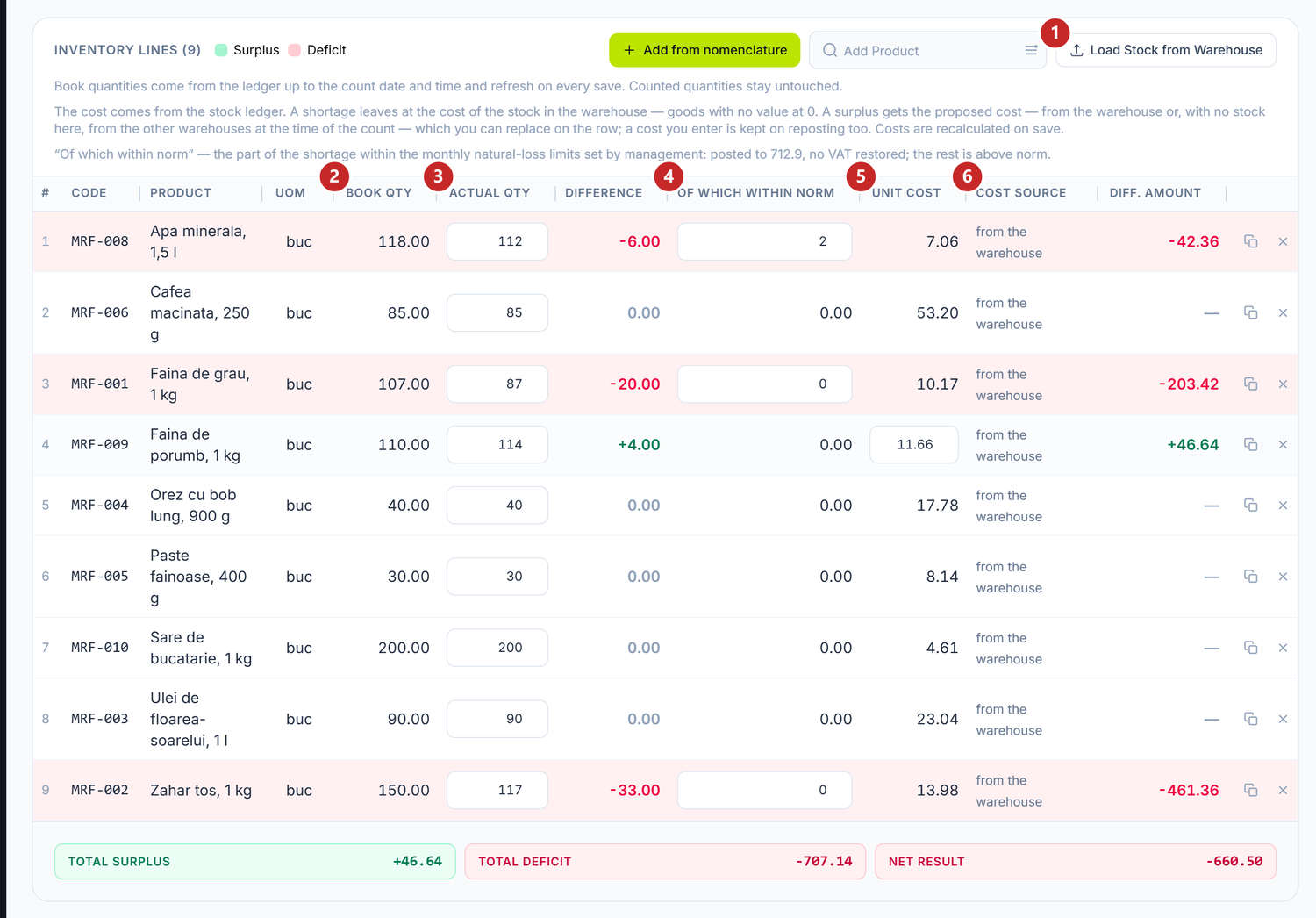
1 loading the stock · 2 what the records show · 3 what you counted · 4 the within-norm part of the shortage · 5 the cost · 6 where the cost comes from
After Load Stock from Warehouse, Actual Qty comes filled in with the book quantity: you change only the rows where you found something else. A row left untouched means "found what the records show", and an emptied field means zero pieces, so a shortage of the whole book quantity. A row with a surplus turns green, one with a shortage red, and under the table you see Total surplus, Total deficit and Net Result.
The book balance is refreshed at every save, from the records up to the hour of the count. The quantities you typed stay untouched.
The within-norm part of the shortage
On a shortage row, Of which within norm takes how much of it falls within the natural-loss norms approved by the manager. That part is written off separately, without restored VAT; the rest of the shortage is above the norm. You decide the figure, by the company's norms — the panel doesn't know them.
The cost
The cost comes from the records; you don't type it. The shortage goes out at the cost the goods had in the warehouse. Goods without a value in the records go out at 0, and the Cost source column flags it; their cost is completed by itself when their receipt comes in.
On a surplus the panel proposes a cost: from the warehouse being counted or, if the goods aren't there, from the other warehouses at the same moment. You can type the real cost over it, from a recent invoice or the market price, and your figure stays even if the document is reposted. Choose it carefully: the surplus goes straight to income.
The toggles
| Toggle | What changes when you turn it on | If you leave it off |
|---|---|---|
| Generate adjustment documents automatically | On confirmation, the surplus and the write-off are created and posted | The count stays a record: stock doesn't move, and you make the surplus and the write-off yourself |
| Restore VAT on shortage | The shortage above the norm restores the VAT deducted at purchase, and the amount enters the VAT register | The shortage is written off without restored VAT — for instance, goods bought without VAT deducted |
The second toggle appears only with the first one on. The panel pre-fills it from the accounting policy at the count date, and for a company that isn't a VAT payer it's locked. The restoration enters the VAT register by itself, as a deduction adjustment, so you don't enter it into the return by hand. It's an estimate: book cost × the item's rate. If the goods were bought without VAT deducted (from non-payers, before you registered) or at another rate, the figure comes out higher than what you deducted — compare it with the invoices and correct boxes 14 / 15 in the return's grid before filing.
The confirmation
On Confirm the count moves to Posted. With the first toggle on, up to two new documents appear, linked in the Generated stock movements block: the surplus and the deficit, each only if it has rows. The write-off has separate rows for the within-norm part and for the part above the norm, each with its own treatment.
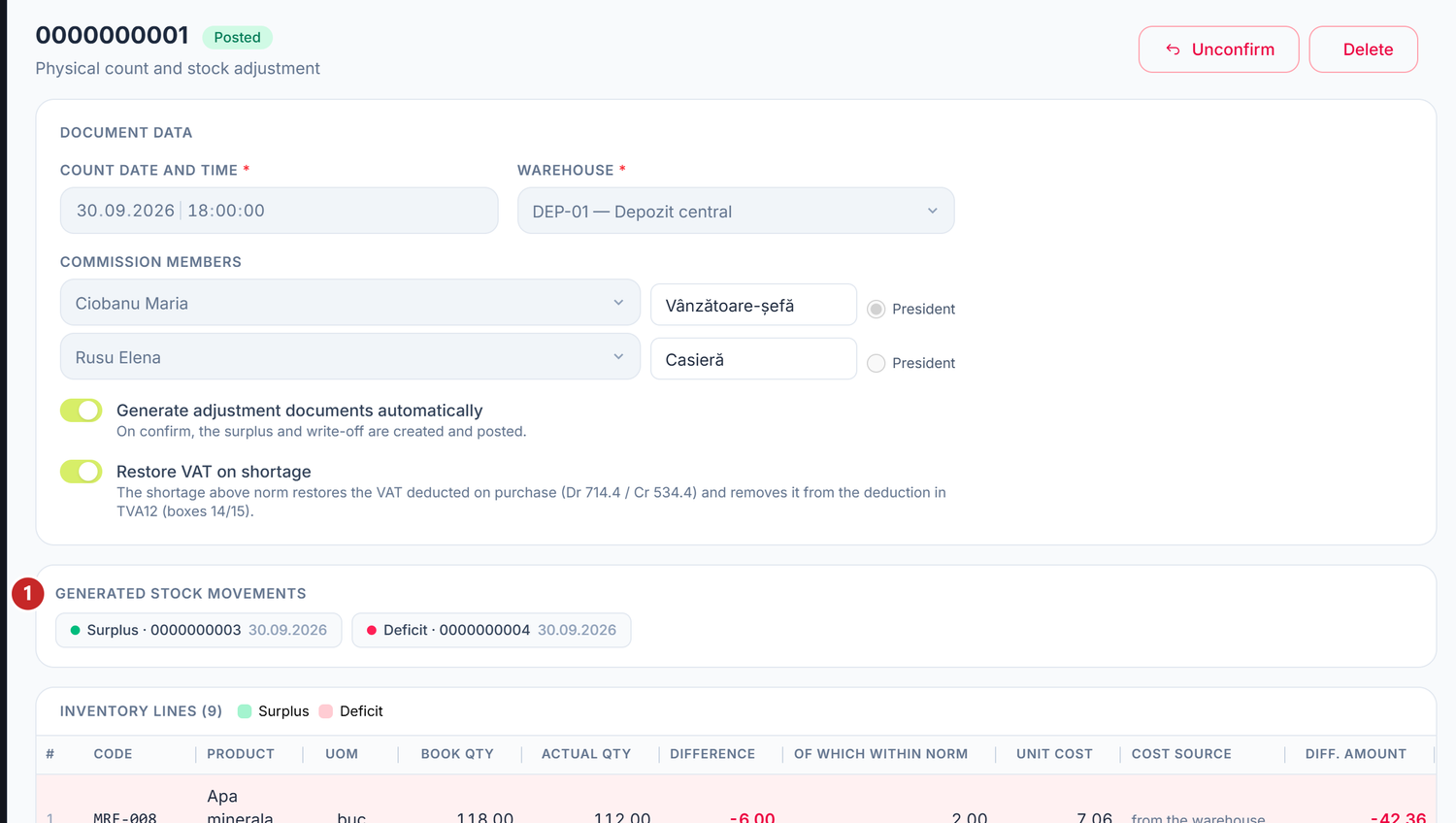
1 the documents created on confirmation
To correct a confirmed count, press Unconfirm: the generated movements are withdrawn with their journal entries, the stock goes back, and the document becomes a draft again. A count deleted by mistake is brought back from the list of deleted ones, from the bin icon in the table header.
What can trip you up
The within-norm part exceeds the shortage on rows …— you entered more in Of which within norm than is missing. Correct the named rows.The surplus cannot be recorded without a cost on rows …— the goods found have no value in any warehouse at the time of the count. Type the cost on those rows.The same item appears on the document more than once.— merge the rows into one, with the total counted quantity.Services are not stock-counted — rows …— remove the services from the list; they hold no stock.- The book balance changed after saving — meanwhile a document dated before the hour of the count was recorded. Check the rows once more before confirming.
Frequently asked questions
Can I count several warehouses at once?
You make one count per warehouse — each warehouse has its own stock. You can keep several open in parallel.
How do I load the stock when the company opens?
Not through an inventory count: at the first count the book stock is zero, so everything in the warehouse would come out as a surplus, that is, income. Balances from a previous program come in through Nomenclature → Opening Stock; a new company's goods come in through a goods receipt or a supplier invoice.
How often do I have to run an inventory count?
You set the frequency, by the company's rules: monthly for expensive or easily stolen items, less often for the rest.
Related pages
- Stock movements — the surplus and the write-off created on confirmation
- VAT in the Republic of Moldova — where the VAT restored on a shortage goes
- Warehouses — the places where you count