Debt adjustments
An adjustment settles a receivable or a payable with no money moving. You use it for mutual offsetting, for transferring a debt, for writing off a time-barred receivable, or for settling advances by hand.
Where to find it: Sidebar → Sales → the Debt Adjustments tab
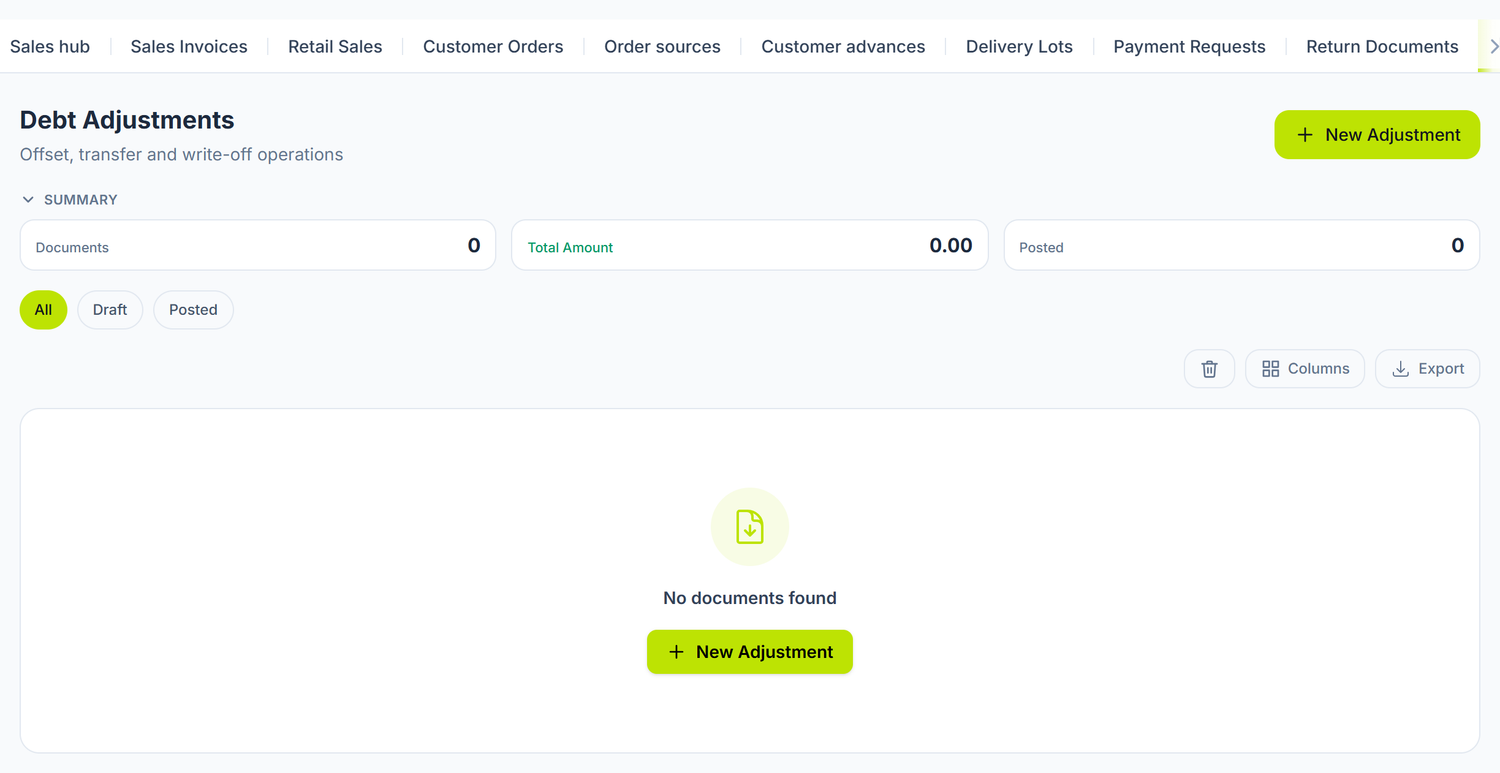
The same register is also available from Purchases → the Debt Adjustments tab.
When you need it
- Offset — the partner is your supplier and your customer at the same time, and instead of two payments you settle the obligations against each other.
- Transfer — you move a payable or a receivable from one account to another.
- Write-off — a receivable has become time-barred, or a payable can no longer be claimed.
- Advance Settlement — you correct an advance balance left open by hand.
You need no adjustment for the normal advance. The supplier invoice settles the advance on 224.3 itself, and the sales invoice the one on 523.1, right at posting. The adjustment is left for the cases automatic settlement doesn't cover.
Automatic settlement only moves the advance balance. The VAT owed on an advance collected from a customer is not generated for you — you record it by hand, in the month of collection. See sales documents.
What you do here
- Open Sales → the Debt Adjustments tab and press New Adjustment.
- Fill in the Date.
- Pick the Type: Offset, Transfer, Write-off or Advance Settlement.
- Pick the Partner.
- Fill in the Amount and the Currency.
- Pick the Department, if you split the operation across departments.
- In the Accounting Correspondence section pick the Debit Account and the Credit Account.
- Write a Description — you will recognise it at an audit.
- Press Save, then Post.
Type is only the operation's label: you see it in the list and in reports. The journal entry is made from the Debit Account and the Credit Account, exactly as you picked them. If you mix them up, the entry will be wrong even though the type is right.
The form's fields
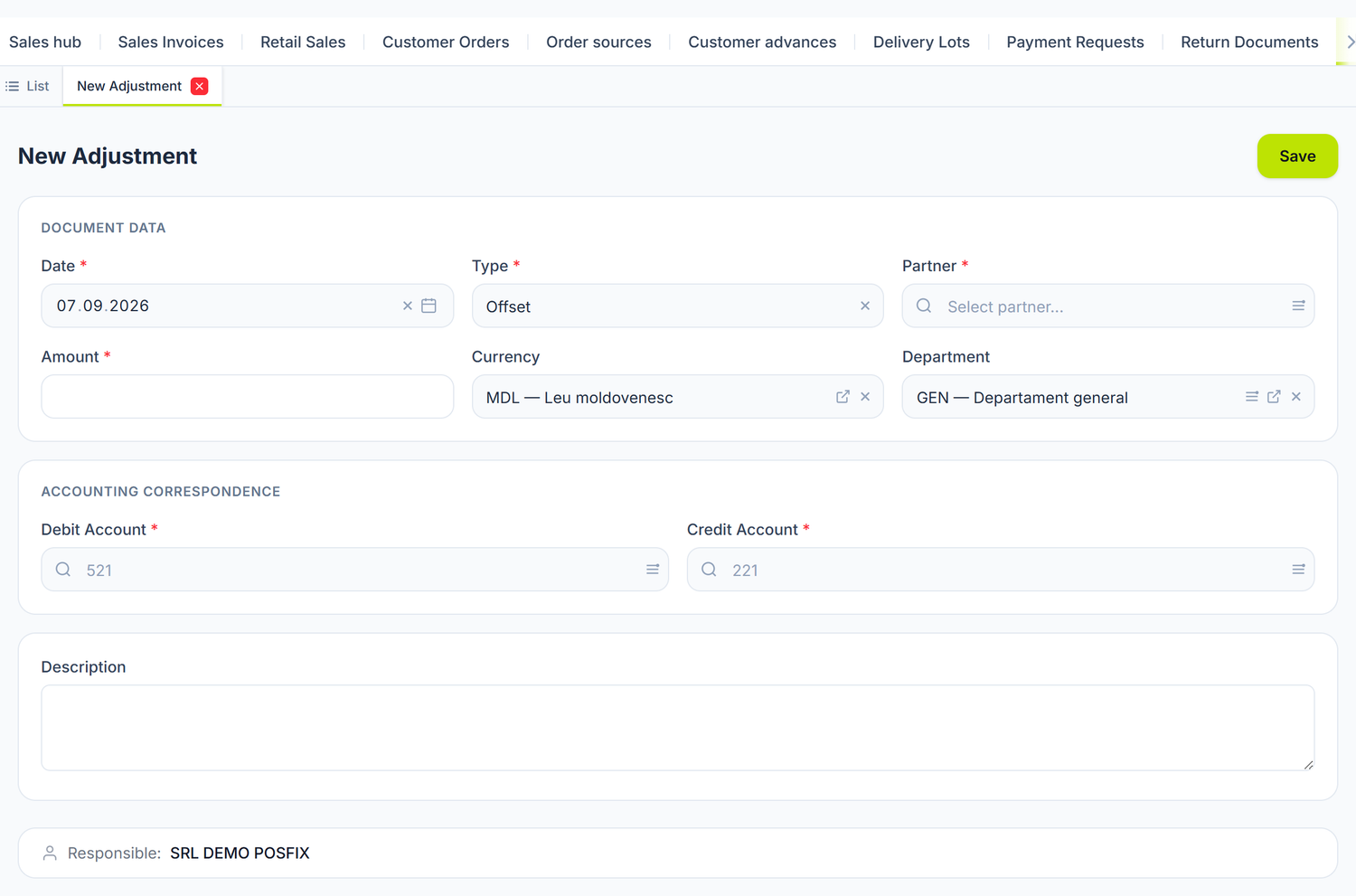
The form has no lines — an adjustment is a single amount, not a list of articles. And the two
account fields start out empty: 521 and 221 are only example text, not filled-in values.
Changing the Type neither opens nor hides anything on the form.
| Field | What it means | Required |
|---|---|---|
| Date | The date of the journal entry | Yes |
| Type | The operation's label: Offset, Transfer, Write-off, Advance Settlement | Yes |
| Partner | The partner whose balance changes. It reaches the accounts' analytics | Yes |
| Amount | The adjusted value, positive | Yes |
| Currency | The operation's currency | No |
| Department | Splits the operation across departments | No |
| Debit Account | The account that is debited | Yes |
| Credit Account | The account that is credited | Yes |
| Description | The explanation of the operation | No |
An adjustment has a single partner. For an operation between two partners you make two documents, one for each.
The journal entry
The adjustment generates a single line: Debit Account / Credit Account at the value in Amount.
The two fields in Accounting Correspondence are not pre-filled from the Type. The panel shows you 521 and 221 only as faded text in the box — that is an example, not a value. What you pick is what stays.
Always pick analytical accounts, with a dot. The panel does not stop you if you put a synthetic account in: the only check at posting is that the account exists in the chart of accounts.
Turnover on a synthetic account breaks the account ledger and the analytical trial balance. Fixing it means unposting.
A worked example
SRL „Dacia Vin" works with SRL „Trans Logistic" in both directions:
- it bought transport services for 45.000 lei → a payable on
521.1; - it sold wine for 28.000 lei → a receivable on
221.1.
The steps:
- Open the Reconciliation on SRL „Trans Logistic" and confirm the two balances.
- Create an adjustment:
| Field | Value |
|---|---|
| Type | Offset |
| Partner | SRL „Trans Logistic" |
| Amount | 28.000 lei |
| Debit Account | 521.1 |
| Credit Account | 221.1 |
- Press Post.
Result: the 28.000 lei receivable is settled in full. The payable drops from 45.000 to 17.000 lei. You pay the rest by payment order.
The document lifecycle
The adjustment goes through Draft → Posted → Deleted.
| State | What you can do |
|---|---|
| Draft | Edit freely. Balances don't change. You can Delete the document. |
| Posted | The entry exists, the balances have changed. The form is locked. You open the entry with the J button. |
To correct it, press Unpost from the ⋯ menu. The entry is deleted, the balances return, and the document goes back to Draft.
The adjustment list
The Summary panel at the top of the list gives you Documents, Total Amount and Posted. Under it you have the state filter buttons. The Type column is colour-coded by category, and the table can be exported.
Special cases
Partial offsetting
You offset the smaller of the two amounts. The rest stays as a balance and is settled by payment.
Example. The partner owes you 50.000 lei, you owe them 35.000 lei. You offset 35.000 lei. A receivable of 15.000 lei is left, which you collect normally.
Offsetting in a barter deal
A barter has three documents, in this order:
- A supplier invoice for what you received.
- A sales invoice for what you delivered.
- An adjustment of type Offset, which settles the two balances.
Transferring a debt between two partners
You make two adjustments of type Transfer, one on each partner: one takes the balance off the initial partner, the other puts it on the new one. The amount and the date must match.
Writing off a time-barred receivable
The panel asks you for no supporting document as a file — you fill in the type, the amount and the accounts, and that's that. That doesn't mean you need no file: the internal decision, the correspondence with the debtor and the proof of the time limit stay with you.
A write-off on this screen does not decide the tax treatment. The document takes the receivable off the books. Whether the amount is also deductible is a separate question, answered by the document in your file, not by the platform.
Common mistakes
| Mistake | Consequence | How to avoid it |
|---|---|---|
| You offset more than the balance | The partner's balance goes negative | You check the balances through reconciliation first |
| You pick the right type but the wrong accounts | The entry is wrong even though the label looks fine | You check the Debit Account and the Credit Account before posting |
| You use a synthetic account, with no dot | The entry goes through, but the account ledger and the analytical trial balance stay wrong | You pick analytical accounts: 521.1, not 521 |
| You write a receivable off without the document confirming it is bad | The expense is not tax-deductible | You obtain the document confirming it is bad, before the write-off |
| You correct with a new document, without unposting the wrong one | The entry is doubled | You unpost the wrong document, then correct |
Troubleshooting
| Problem | Cause | Fix |
|---|---|---|
| I can't post, fields are red | The date, the type, the partner, the amount or the accounts are missing | The offending field is marked red. Fill it in and try again. |
| "Account '539.1' not found" or a similar message | The account you typed doesn't exist in your chart of accounts | Pick it from the selector or create it in the chart of accounts. |
| The partner's balance hasn't changed | The document is a draft | Press Post. |
| The entry looks inverted | You swapped the debit and the credit | Unpost, correct the accounts, post again. |
| I can't find a field for the second partner | An adjustment has a single partner | You make two documents, one for each partner. |
Frequently asked questions
When do I use mutual offsetting?
When the partner is your supplier and your customer at the same time. Offsetting settles the obligations with no money moving. A bilaterally signed offsetting deed is still recommended as evidence, not as a condition of validity.
Can I offset amounts in different currencies?
Not in a single document. Each adjustment has a single currency. For obligations in different currencies you make separate documents.
Do I need the partner's agreement?
The panel asks for no agreement: you save and post on your own. The bilaterally signed deed you keep as evidence at an audit and at reconciliation, not as a condition for the document.
How do I check the balances first?
From Reconciliation. You pick the partner and the period, press Generate and look at the closing balance.
Can I unpost a posted adjustment?
Yes. The ⋯ menu → Unpost. The entry is deleted, the balances return.
What is the difference between a write-off and an offset?
With Offset both partners have obligations that settle each other. With Write-off you give up a receivable, which becomes an expense, or a payable, which becomes revenue. A write-off affects the accounting result; the tax effect depends on the documents you hold.
Can I create adjustments from the partner card?
No. The partner card has the General Info, Bank Accounts, Contracts, Contacts and POS sales tabs. Adjustments are created from the Debt Adjustments tab.
Can I offset obligations from different years?
Yes. The panel places no restriction on the period, as long as the document's accounting period is open.
Related pages
- Reconciliation — the balances you check before an adjustment
- Partners — the register of the partners involved
- Supplier invoices — the source of trade payables
- Sales documents — the source of trade receivables
- Chart of accounts — the analytical accounts you pick