Sales overview
The screen answers "how much did I sell, and where": it brings till receipts, invoices, returns and delivered orders into one place. Every figure opens down to the documents it is made of.
It is not an accounting report. It shows sales as they were made, including those in Z reports not posted yet. The figures for returns and declarations come from Reports.
Where to find it: Sidebar → Sales → Overview tab
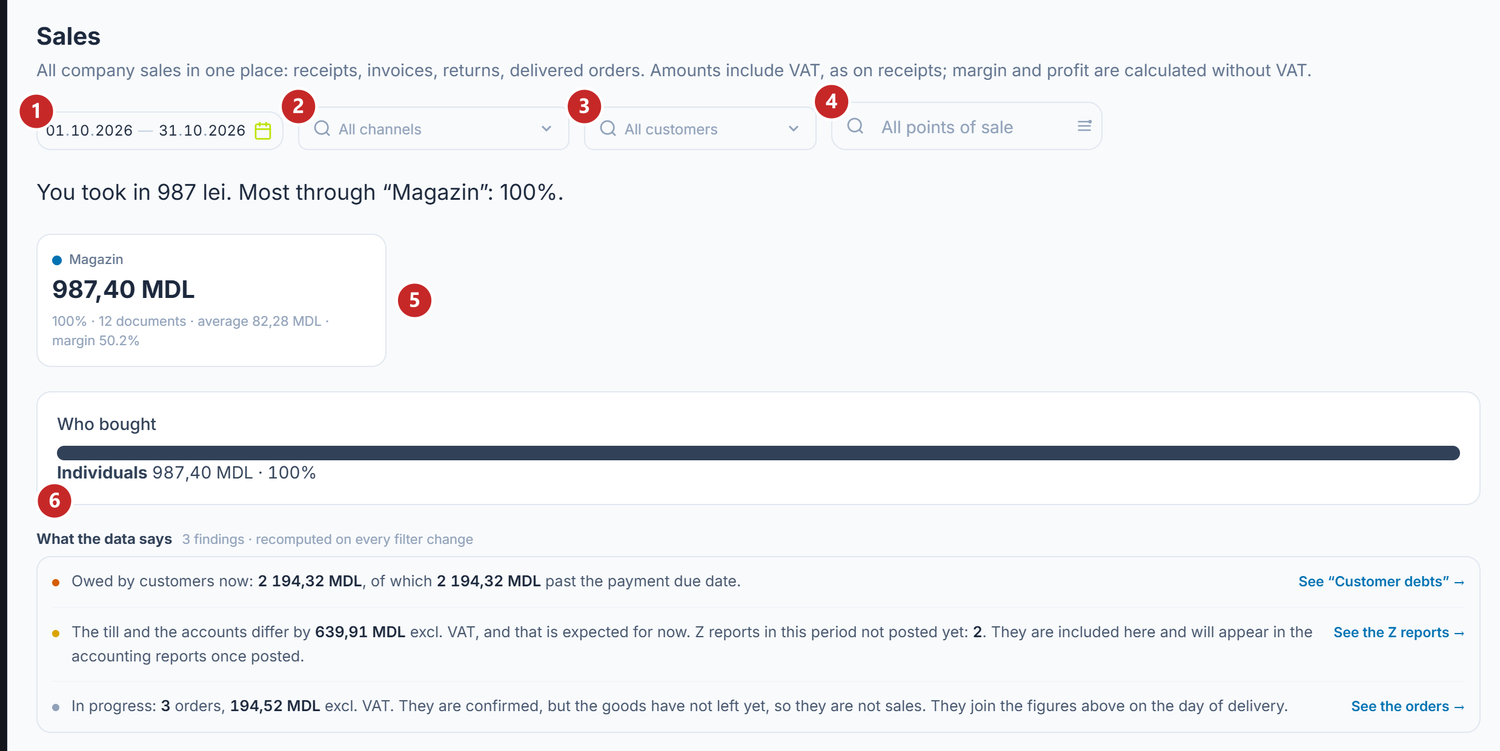
1 the period · 2 the channel · 3 individuals or companies · 4 the point of sale · 5 a channel card · 6 the findings
How to read the figures
The big amounts are including VAT, as on receipts: what the customer paid. Under the summary, the panel tells you how much of it is VAT and how much is revenue excluding VAT; margin and profit are calculated on the revenue excluding VAT. For a company not registered for VAT, that line does not appear.
The first sentence tells you how much you collected in the period, how much more or less than in the previous period, and on which channel you sold the most. The comparison is missing while the previous period is not fully in the ledger.
Each channel has its card: the amount, the share of the total, how many documents, the average per document and the margin. When the margin says "not known yet", the cost of part of the goods sold is missing.
The Who bought bar splits sales between Individuals and Companies.
To narrow the screen, choose the period, a channel, the kind of customer or a point of sale. Everything recalculates at each choice.
What the data says
Under the cards, What the data says gathers what you need to know next to the sales figure. Each line appears only when it has something to say, and the link on the right takes you where you fix it:
- Owed by customers now — how much customers owe you and how much is past due. The link opens Customer debts.
- The till and the accounts differ by …, and that is expected for now — the Z reports in the period that are not posted yet. They are included here; in accounting they appear after posting. See the Z reports lists them, with a link to each.
- Register Z reports show … above the receipts that reached the platform — usually receipts not synced yet. The amount is included as sales from Z without detailed receipts.
- Documents with incomplete cost — goods were sold that were not in stock. Their margin recalculates by itself when the goods arrive.
- In progress — confirmed orders whose goods have not left yet. They are not sales; they enter the figures on the day of delivery.
- Sales history is filling in — the ledger is still gathering older months, so their figures grow gradually.
The lines are ordered by urgency: what needs action at the top, what is just good to know at the bottom. The coloured dot on the left says the same.
Broken down by channel, customer, product
Under the Sales by day and channel chart, the table breaks the same figures down in five ways: By channel, By customer, By product, By employee and By point of sale.
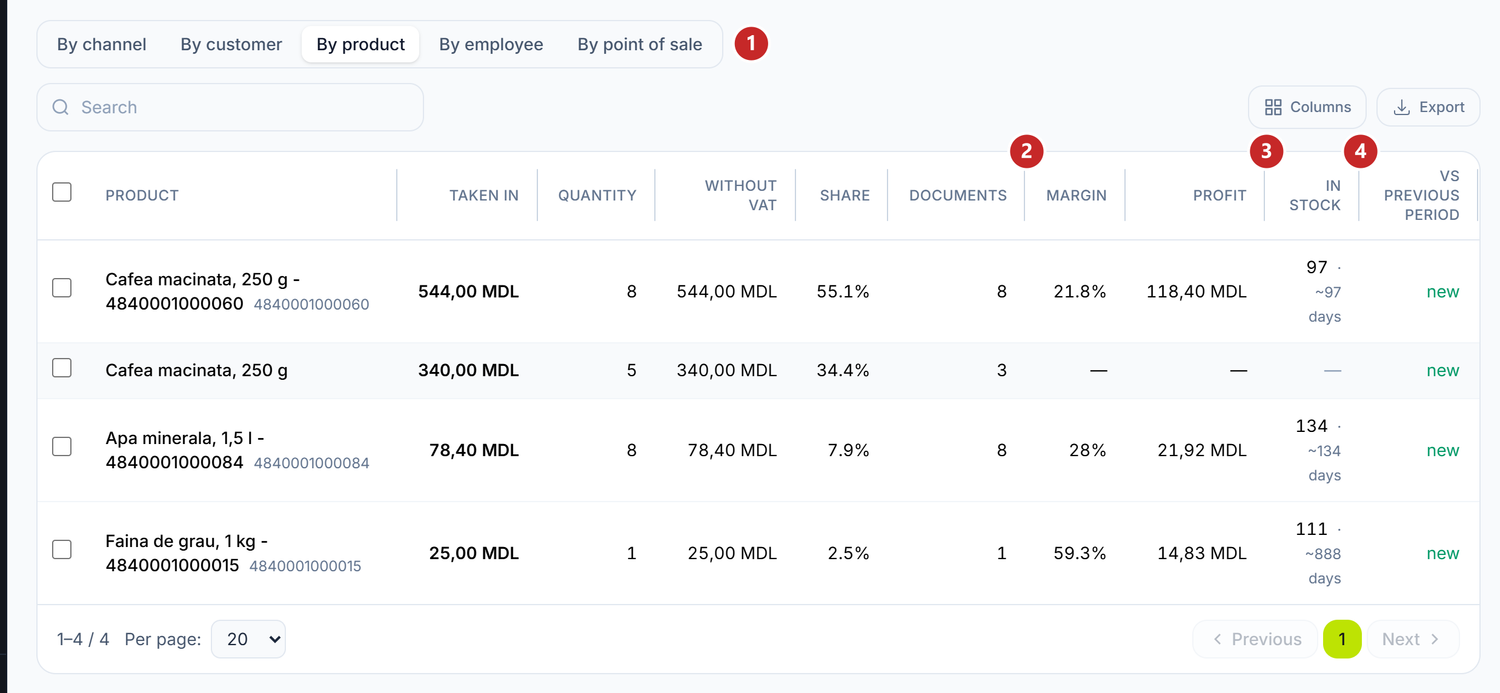
1 the breakdown · 2 the margin · 3 the stock now · 4 vs the previous period
By product, three more columns appear:
- Profit — revenue excluding VAT minus cost.
- In stock — how much you have and roughly how many days it lasts at the sales pace of the period. Under a week, the days figure turns amber; a finished product says Out of stock, in red. A dash means the screen has no stock to show for the row: an item without stock (a service, a dish) or one it cannot find in the nomenclature.
- Vs previous period — growth or decline, in percent. "new" means the product did not sell in the previous period.
What to order for the products running out is on What to order.
To see the documents behind a figure
- Choose the breakdown — for example By channel.
- Click the row you are interested in.
- The list of its documents opens under the table.
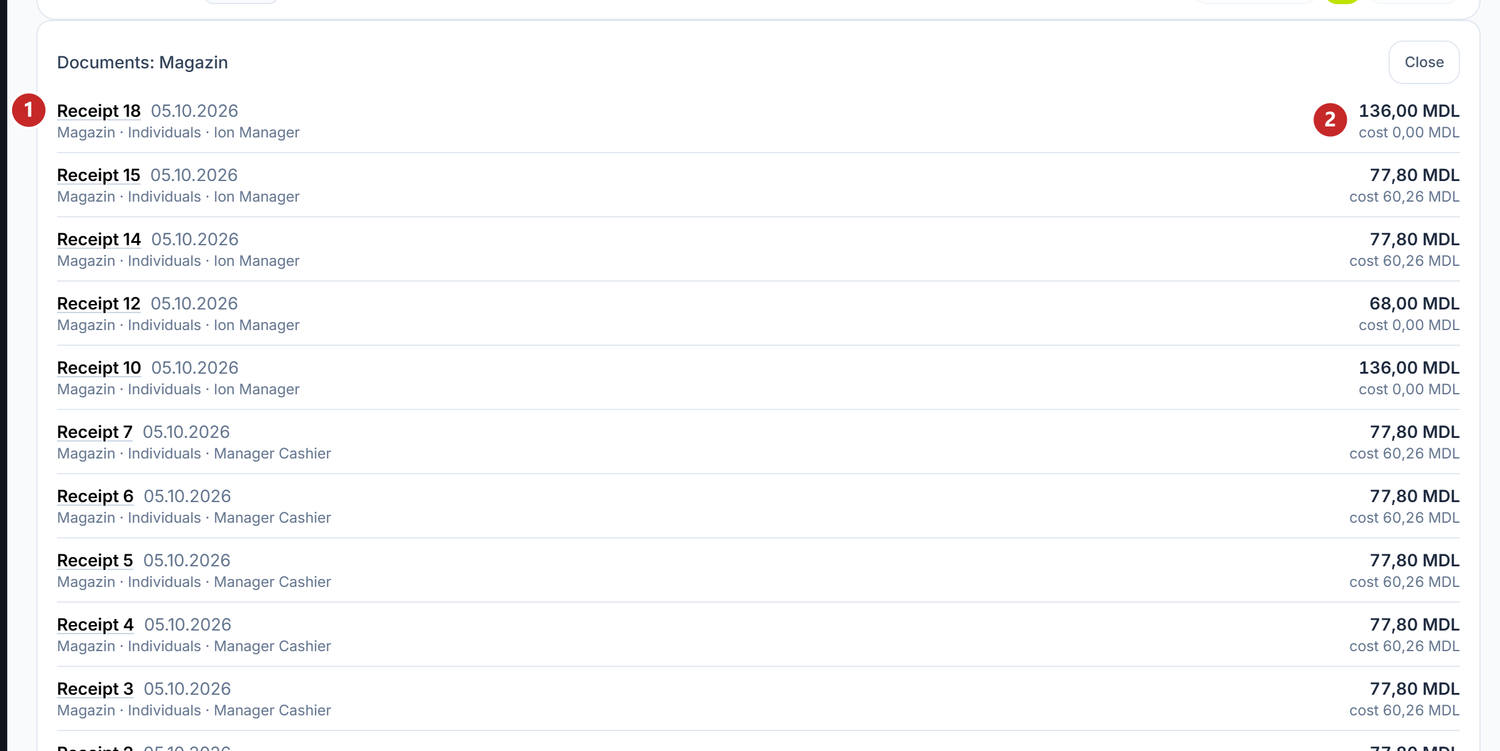
1 the document, with a link · 2 the amount excluding VAT and the cost
The invoice, the return and the retail report open in their form. The receipt and the Z report open in the till viewer, exactly as they came out at the counter. Close folds the list.
Related pages
- Sales channels — where the channel on each document comes from
- Customer and supplier debts — the money to collect from the sales here
- Discounts and promotions at the till — the rules that change what the customer pays at the till