Production reports
The production report is the only accounting document of production. It says: "I consumed these materials, I obtained these products and this is what the batch cost me".
At posting, in a single entry, the report does three things at once: it takes the consumed materials out of stock, it adds to the batch the overhead you put in the direct cost grid, and it brings the obtained product into stock, at the actual cost that results.
Where to find it: Sidebar → Production → the Production Reports tab
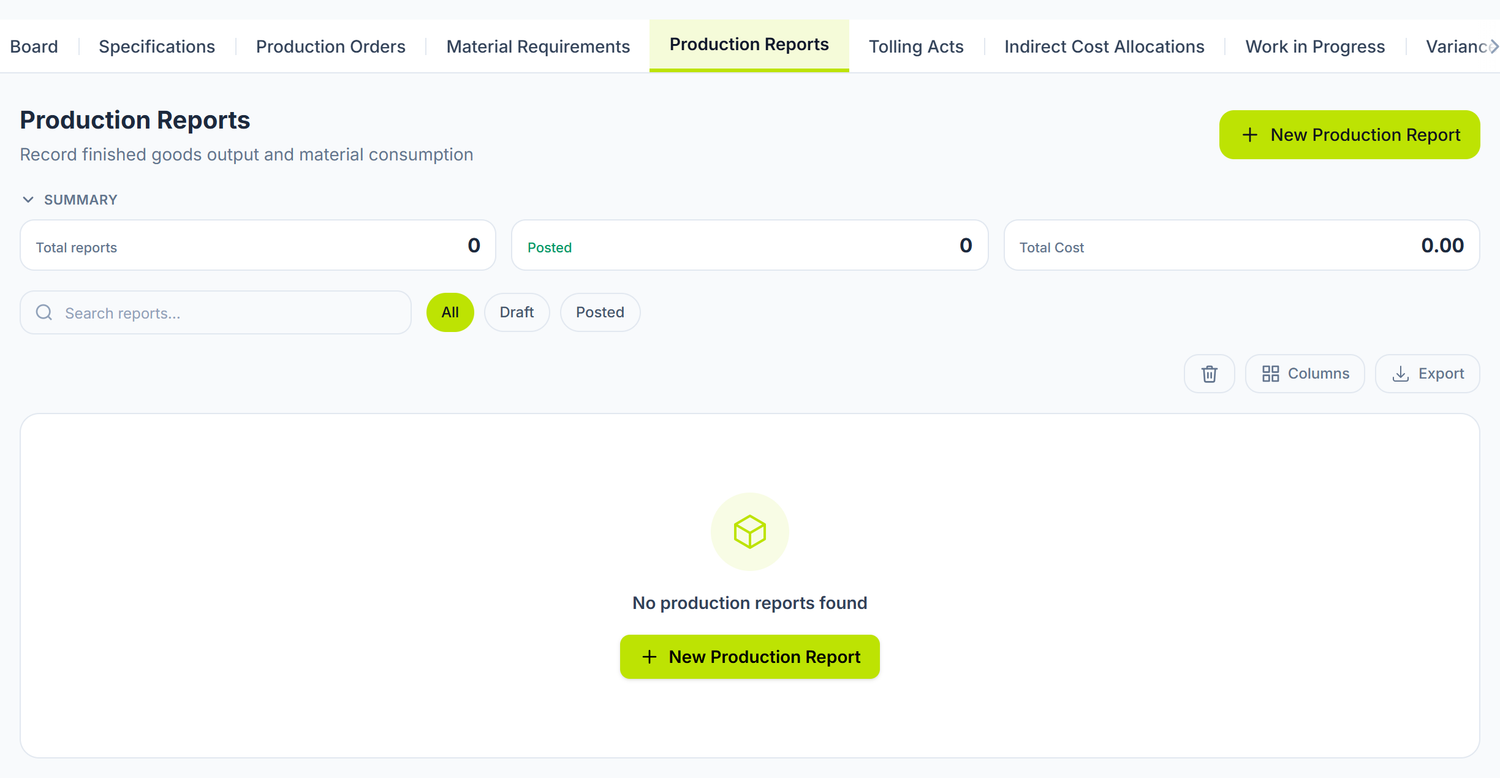
The production order is a planning document: it moves no stock and emits no entries. The link to the order is optional on the report. A trial batch or the remake of a reject is reported directly, without an order.
What you fill in the header
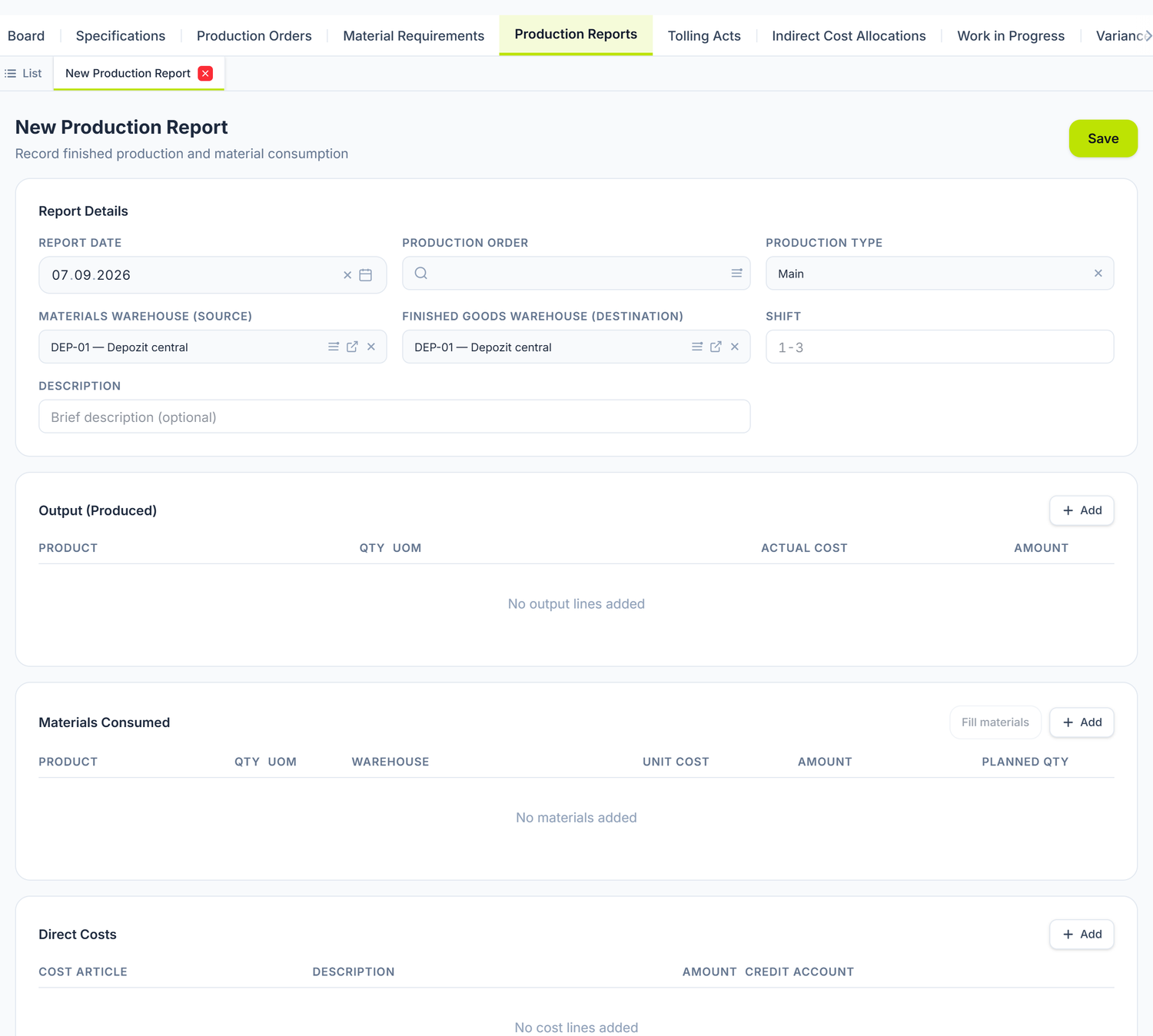
The form has a short header and, below it, three grids — that is where the whole document is built. The two warehouses already come filled in with the company's default warehouse; change them if this batch leaves from somewhere else or enters a different warehouse.
Report Date is the date on which the production is recognised. Production Order is optional, but it does work: when you pick it, if the output grid is still empty, the panel creates the first line itself, with the order's product and with the quantity left to produce (planned minus actual). If you already have a product line, it does not touch it.
Materials Warehouse (source) and Finished goods warehouse (destination) are mandatory if the document moves stock. The source warehouse counts twice: besides being the default value for new lines, it is the one against which the stock shortfall is judged when the materials are filled in.
The journal entry is built from the three grids below, not from the header. The only account the document takes from you is Credit Account, on the direct cost line.
At the bottom of the form appears Manager — the user who created the document, read-only.
The three line tables
The document has three grids, and the journal entry is built exclusively out of them.
Output (Produced)
What you obtained. On the line you pick the product from the nomenclature, you write the quantity and the unit, and Amount is calculated on its own from quantity × Actual Cost. You can report several products from a single batch — you add one line for each.
The cost you type here is only an estimate. At posting, the product enters stock at the actual production cost: the materials consumed plus the direct costs declared. The amount is spread over the output lines in proportion to the quantity. On a batch reported in full, the accumulated cost is released entirely, so no remainder is left on the output line.
Materials Consumed
What you consumed. On the line you pick the product, the quantity, the unit, the Warehouse it leaves from and the Unit Cost; Amount is calculated on its own.
The last column, Planned Qty, is the reference from the bill of materials: you compare it by eye with the quantity actually consumed, so you see on the spot whether the batch came out of tolerance.
To fill the grid from the recipe
- First add the obtained product and the quantity to Output (Produced).
- Fill materials.
The order is not negotiable — this is where everybody trips the first time. The button stays dead while you have no output line, and if you press it without a quantity you get the warning "Add the output product and quantity first, then fill materials."
The button explodes the bill of materials of the products in the output grid and fills the materials. If lines already exist, the panel asks for confirmation before replacing them. Unit Cost stays at zero — see the box below.
Fill materials brings the quantities from the bill of materials, but leaves Unit Cost at zero. The figure you type goes to two places at once: into the journal entry and into the value taken out of the warehouse.
You read the real value on the Account card, on the line's warehouse. An approximate figure leaves value without quantity in stock and distorts the product's cost.
Substitutes on a stock shortfall
When the required quantity exceeds the available stock, a yellow warning appears under the line with Short on stock and the missing quantity. If the bill of materials declares substitutes, they are listed there. Each comes with its equivalent quantity, calculated through the conversion coefficient, and with its own stock.
Replace does not change the line, it cuts it in two. The initial line keeps as much as the stock covers, and for the shortfall a new line is inserted on the substitute, with the substitute's own warehouse. So you see one row more — that is not an error. Only when the main material has no stock at all is the old line replaced outright.
Nothing changes automatically: the consumption and the cost have to show what was actually used, so the decision stays yours. After applying it, the line keeps the trace in the form ↳ Substituted for: <the initial raw material>.
When no substitute has enough stock, the message is "No substitute with sufficient stock".
The shortfall is judged only against the source warehouse in the header. It is the one sent in the fill request, so a material that exists in another warehouse appears here as missing.
When the stock is unknown, the warning does not appear at all. If the warehouse does not answer, the panel treats the shortfall as zero instead of inventing one. That explains why sometimes you don't see "Short on stock" although the material really is missing.
The consumption warehouse is chosen per line, not per document. The same raw material can sit in several warehouses, and the choice is not a formality: the average cost differs from warehouse to warehouse, and so does the responsible storekeeper. When the material also exists elsewhere, the note "Also in …" appears under the Warehouse field, with the alternative warehouses.
Direct Costs
The grid brings onto the batch the overhead already recorded elsewhere. It does not record new costs.
On the line you pick a Cost Article from the classifier, you write a free description and the amount, then you pick Credit Account — the account you bring the cost from. Left empty, the panel credits the production indirect cost account on its own.
Neither labour nor utility invoices are typed here. Salaries and contributions come in from the salary calculation; a cost line on the payroll liabilities account would double both the cost and the debt to the employee. The gas or electricity invoice is recorded as a supplier invoice — the production report emits no VAT line and has no partner field, so you would lose the deduction and be left with a liability without a supplier.
Bring the overhead onto the batch in the same month in which you incurred it. The month-end close works on the net turnover of the collector account, so it allocates by itself only what you left unbrought. A cost line put on a report from the following month passes through production a second time, and that month's close flags a residual balance.
Example. In August, the gas invoice puts 3.000 lei on the overhead account. You bring 1.200 lei onto the batch, through a cost line on an August report. The August close finds the remaining 1.800 lei and allocates them. Total that reached production: 3.000 lei, once.
Cost summary
Below the grids, three indicators recalculate in real time.
| Indicator | What it shows |
|---|---|
| Total Output Cost | The sum of the Amount column in the output grid, that is, your estimates. It does not reach the entry |
| Total Materials Cost | The materials plus the direct costs. It is the total cost of the batch, the one that is capitalised |
| Unit Cost | The total cost of the batch divided by the total output quantity — the value at which the product enters stock |
The name "Total Materials Cost" is misleading: the indicator includes the Direct Costs grid too. If you compare it with the total of the materials grid, the figures do not match.
Where the entry takes its accounts from
Stock accounts come from the nomenclature, not from a constant. The account each item enters or leaves on is read from its nomenclature card. If the item has no stock account defined, posting stops — better a clear refusal than an entry that credits the wrong account.
There is nothing for you to choose in the form for this. The only account the document asks you for is Credit Account on the direct cost line, and left empty it fills itself with the production indirect cost account. The subconto — the product group, the cost article and the linked order — are filled automatically.
How the cost is spread over the output lines
Total cost of the batch = the sum of the material lines + the sum of the cost lines. It is divided over the output lines in proportion to the quantity, rounded to two bani. The rounding remainder falls on the line with the largest quantity, so that the batch is released exactly.
Example. A batch of 500 loaves gathers 2.668,00 lei of materials and 750,00 lei of overhead brought in through cost lines — 3.418,00 lei in total. The unit cost comes out at 3.418,00 ÷ 500 = 6,836 lei/pcs, and the panel displays it rounded, 6,84. What goes into the entry and the stock ledger, however, is the total value, 3.418,00 lei — not 500 × 6,84, which would give 3.420,00 lei.
Spreading by quantity assumes comparable output lines. On joint products with very different values — wine and marc, meat and by-products — dividing by quantity overvalues the by-product and undervalues the main product. In the panel you cannot yet mark a line as a by-product. Until then, report the two products on separate documents, each with the costs that belong to it.
What is checked at posting
Posting stops, with an explicit message, in these situations:
| Check | Message |
|---|---|
| A document that moves stock, with no warehouse at all | "Completează depozitul înainte de contabilizare — altfel nota s-ar emite, dar stocul nu s-ar mișca." (Fill in the warehouse before posting — otherwise the entry would be emitted but the stock would not move.) |
| Material lines with no source warehouse | "Completează depozitul sursă al materialelor înainte de contabilizare." (Fill in the source warehouse of the materials before posting.) |
| A report with no cost at all (materials or overhead) | "Raportul nu are costuri …, deci produsul finit ar intra în stoc cu valoare zero." (The report has no costs …, so the finished product would enter stock at zero value.) |
| The accounting period is closed | Posting is refused by the period gate |
At save time, negative quantities or amounts are also rejected, as is a report with no line at all.
The lifecycle
Draft → Posted → Deleted
| Status | What happens | What you can do |
|---|---|---|
| Draft | The document exists, it affects neither the stock nor the accounts | You edit freely; Post; Delete |
| Posted | The entry is emitted, the stock has moved | The document is read-only; Unpost or Delete |
| Deleted | The document leaves the lists | Restore (from the report list, with the bin toggle) |
The Post button performs the internal approval step itself — there is no separate "Approve" action.
Delete appears in the report list on any row, including a posted one. You do not have to unpost first: the server does both in a single operation — it deletes the entry and deletes the document, or it does neither.
Unposting deletes the journal entry and brings the document back into work, in a single transaction: either both succeed, or neither.
There is no "Reversal" on the production report. The "Reverse" button and the "Reversed" state no longer exist anywhere in the panel. A wrong report is corrected like this: Unpost → correct the lines → Post again. Documents with negative values are not an alternative here: the report rejects negative quantities and amounts, because the stock lines it emits do not carry the sign through.
Work in progress
Where to find it: Sidebar → Production → the Work in Progress tab
The document declares the balance of production in progress at month end: what the books say against what you established physically, by order and by item. It is a statement, not a record — it creates neither revenue nor expense and emits no journal entry.
To declare the balance:
- Production → the Work in Progress tab → the new document.
- Fill in Date, Year and Month for which you are declaring.
- On every line you pick the product and the production order, then you write Book qty, Actual Qty and Unit Cost.
- Save.
Difference is calculated per line, coloured red when negative and green when positive. Below the grid, the summary gives Book Value, Physical value and Difference for the whole document — the figures derive from the lines, so the header cannot declare anything other than what the detail shows.
The document freezes the balance, but does not move it into the balance sheet. The reclassification onto the work-in-progress account is not yet emitted by the period close. Until that step is delivered, you enter it as a manual entry in the journal register, at the balance sheet date, and reverse it at the opening of the next month. Without it, work in progress does not appear under "Inventories".
Indirect cost allocation
Where to find it: Sidebar → Production → the Indirect Cost Allocations tab
The document calculates how the collected overhead is divided between the production orders. It emits no journal entry — carrying the overhead into the production cost is done exclusively by the month-end close step, on the real balances. If the document did it too, the same overhead would pass through twice.
To see a month's allocation:
- Production → the Indirect Cost Allocations tab → the new document.
- Fill in Year and Month.
- Pick the Allocation Method — Units produced or Material cost. Those are the only two; there are no hour-based bases.
- Write the Amount to allocate and check the Currency.
- Save.
The lines appear only after saving. The server calculates them itself, from the period's completed orders, and shows them read-only: the order, the allocation base, the percentage and the amount. Below them, Total Allocated.
Analysing the results
Variance Analysis shows the price and consumption variances on materials and the cost variances on outputs. Costing & Analytics shows planned against actual per product, yield and rejects, cost structure.
Neither of the two displays anything until you press Load. You first pick Year and Month from the top bar, then you press the button; until then the screen stays empty.
"Costing & Analytics" has three sub-tabs you switch between without reloading: Material Consumption, Production Output and Cost Calculation.
Board
Where to find it: Sidebar → Production → the Board tab
This is the screen you land on daily. At the top, six indicators: batches in work, quantity in work, committed cost, late, to post and completed. The committed cost is provisional — it fills in at month-end close, when the allocated overhead arrives.
Needs attention is the yellow-framed panel below the indicators. It gathers the late orders and the unposted reports, each with an Open link that takes you straight into the document.
Below it, the batches sit in five columns, by stage: Planned, Released, In progress, To post, Completed. Each card shows the order number, the product, actual/planned, the percentage and a progress bar. The card can also show:
- the red Late N days badge, when the deadline has passed;
- the purple Stock not moved yet badge, when the batch still has unposted reports;
- the committed cost of the batch and, if it can be calculated, the unit cost.
The Table button in the header switches to the list view; from there you come back with Board. Refresh reloads the data.
Tolling acts
Where to find it: Sidebar → Production → the Tolling Acts tab
A tolling act certifies that you processed someone else's raw material — or that someone processed yours. It emits no journal entry: the revenue from the service and the VAT are created by the tax invoice issued or received for the service.
To draw up an act:
- Production → the Tolling Acts tab → the new document.
- Fill in the Date and pick the Direction — Provided (you process) or Received (yours is processed).
- Pick the Partner and, where relevant, the Due Date.
- In Processing service you write the Service cost, pick the VAT Rate — the VAT Amount is calculated on its own — and check the Currency.
- Add the lines: product, quantity, unit and Line kind — Customer raw material or Product returned to customer.
- Save.
The summary at the bottom gives the service amount, the VAT and the total.
Two things that do not reach the product cost on their own
Labour does not enter the cost. The panel looks for the department's expense account, but the department form has no such field, so salaries all go to the period's expense. To carry productive labour into the batch cost, enter a manual entry in the journal register, after the salary has been posted.
Overhead allocated at month-end close does not enter the cost retroactively. The closing step works after the month's reports have already been posted, and no document carries that cost further, into the product. To avoid this, you add the overhead share as a cost line on the report, before posting, in the same month. The close then allocates only the rest.
Approvals
If the organization has an approval route active on the production report, the direct posting button disappears from the header. The document is posted through the final signature of the workflow, and direct posting is explicitly refused while the workflow is running.
- Routes are configured in: Sidebar → Settings → the Approval routes tab
- The documents waiting for you are in: Sidebar → Production → the My approvals tab
The link with other documents
| Document | The relationship |
|---|---|
| Production orders | The planning of the batch and the bills of materials |
| Products | The nomenclature; the stock accounts used in the entry come from here |
| Warehouses | The consumption and entry locations |
| Sales documents | The sale of the finished products |
| Supplier invoices | The procurement of raw materials |
| VAT in Moldova | How purchase and sales invoices are broken down |
| Chart of accounts | The stock and production accounts used in the entry |
| Journal register | Checking the generated entry and the manual reclassification entries |
| Accounting periods | The gate that refuses posting into a closed month |
| Trial balance | The balance left on production — the batch not yet finished |
| Account card | Analysing the movements on the production accounts |
Frequently asked questions
Do I have to have a production order in order to report production?
No. The Production Order field is optional. You fill it in when you want the batch to appear in the order's planned/actual tracking and in the variance analysis.
Why did the product enter stock at a different value from the one I typed?
Because the valuation is at actual cost: materials plus direct costs, spread over the output quantity. The Actual Cost column in the output grid is only your estimate and does not reach the entry.
Can I report several products from a single batch?
Yes. You add several lines in the Output (Produced) grid. The total cost of the batch is divided between them in proportion to the quantity. When the products have very different values, report them on separate documents — see the allocation section.
Can I create several reports for the same order?
Yes, for batch production. Each report carries its own material and cost lines, so the unit cost can legitimately differ from batch to batch.
How do I correct an already posted report?
Unpost from the ⋯ menu, correct the lines, then Post again. The initial entry is deleted, and the stock movements are reverted in the same transaction.
Can I unpost if the finished product has already been sold?
Technically yes, but you shouldn't. Unposting deletes the entry and asks the warehouse to withdraw the movements written at posting, including the entry of the finished product. If you have sold it in the meantime, the warehouse balance stays distorted. Cancel the sales document first, then the production report.
Why doesn't the "Post" button appear?
Three possible causes: the document is not in Draft; you do not have write permission on the Production module; or the organization has an approval workflow active on this document type. In the last case, posting is done through the final signature in the approval panel.
Unpost and Delete require something else: the Delete level on the Production module, not Write. With write permission you can post, but you cannot undo.
What do I do if a material has insufficient stock?
Under the line the Short on stock warning appears, with the missing quantity. You have three ways out: you apply a substitute proposed from the bill of materials, you pick another warehouse for the line, or you procure it first through a supplier invoice or a stock movement.
Where do I declare the batch's rejects?
The panel has no reject field and does not separate losses.
Normal technological losses you let absorb themselves: you report only the good quantity, and the unit cost rises accordingly. You have nothing extra to do.
Losses above the norms — definitive rejects, damage, waste — you take out of the batch cost with a manual entry in the journal register, for the value of the loss.
What happens to the cost if production is not finished at month end?
It stays accumulated on the main production account. You see it in the Trial balance and you declare it in the Work in Progress tab. The reclassification onto the balance sheet account you enter manually in the journal register, at the balance sheet date: the period close does not do it yet.
At what value does the batch enter the warehouse?
At the actual cost allocated to the output line — the same amount that appears on the debit side of the entry. The quantity and the value are written together into the stock ledger of the destination warehouse. The batch takes part in the warehouse value exactly like a receipt from a supplier.
Can I produce a product that is not in the nomenclature?
No. Both the obtained product and the materials must exist in the nomenclature, with a unit of measure and a stock account filled in. Otherwise the entry has no account to use and posting stops.
What is the daily flow for a bakery?
- In the morning — you create (or you already have) the production order with the bill of materials and the planned quantity, then you press Start
- After baking — right-click the order in the list → Create production report; the report opens with the product and the remaining quantity
- You press Fill materials, you fill in the unit costs and the actual quantities, then Post
- At sale time — the bread is in stock at actual cost and is sold like any other product
- Monthly — you check the main production account on the Account card for the closed batches; what is left there is either work in progress, or overhead allocated after the reports were posted