Licensing and Activation
License Types
| License Type | Description | Validity |
|---|---|---|
| Standard License | For a single terminal | According to the signed contract |
Obtaining the Activation Key
- Contact the provider for purchase (M373 SRL +373 60 100 698)
- Provide company details or create an account at posfix.md
- Receive the activation key via email
Key format: An 8-character alphanumeric code (e.g., ETHP-9WV5)
Note
You will receive the activation key by email. Save this code for the next step.
Activation Process
When launching the application for the first time, ensure you have an active internet connection. Activation cannot be performed Offline. The image below illustrates the screen you will see during application activation. Here is what each field represents:
- Hardware ID (Unique Identifier): A system-generated code that is unique to your computer. Do not modify anything here. This code is the "fingerprint" that you will provide to the provider only if performing activation over the phone.
- Serial Number (Activation Key): The field where you must enter the received code.
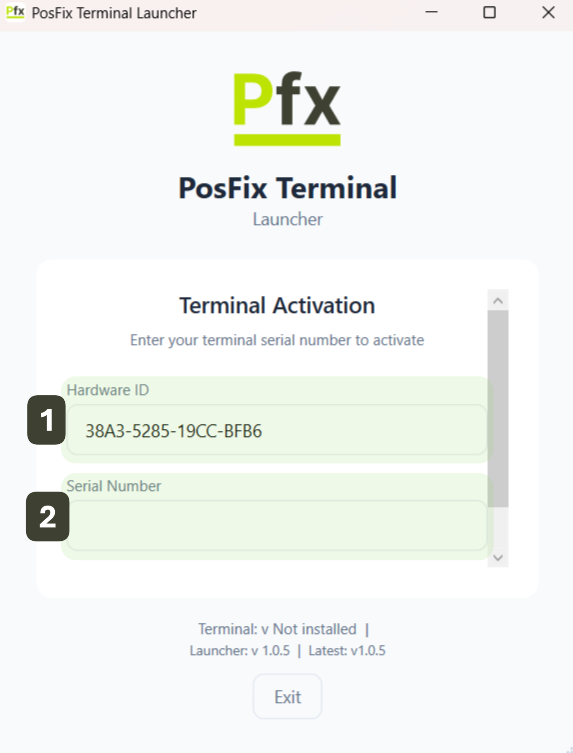
Activation steps:
- Verify the hardware code automatically displayed in Hardware ID
- Enter the Activation Key in the dedicated field
- Press the Activate Terminal button
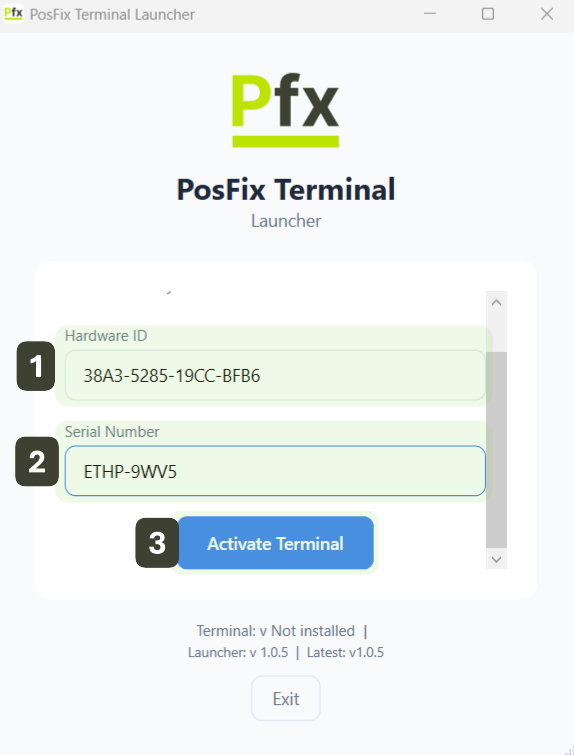
Activation Information
After activation, the system displays:
| Information | Description |
|---|---|
| Terminal ID | Unique identifier (e.g., T-001234) |
| Merchant Name | Name of the licensed company |
| Activation Date | The date the activation was performed |
| Status | Active / Expired / Suspended |
License Restrictions
- One license = One physical terminal
- The license is tied to specific hardware
- License transfer requires contacting the provider
- Changing major components may require reactivation
Important
In case of operating system reinstallation or hardware component changes, contact the Technical Support department. License reactivation requires operator assistance.
Common Issues
| Issue | Cause | Solution |
|---|---|---|
| "Invalid key" | Key entered incorrectly | Verify and re-enter |
| "Key already in use" | License activated on another device | Contact the provider |
| "Connection error" | No internet access | Check your connection |
| "Unauthorized terminal" | Hardware has been modified | Request reactivation |